Affise Attribution
A platform for data-loving marketers that want to grow their revenue by up to 250%
com.affise.attribution 
Install via UPM
Add to Unity Package Manager using this URL
https://www.pkglnk.dev/attribution.git README Markdown
Copy this to your project's README.md

## Installation
Add **Affise Attribution** to your Unity project via Package Manager:
1. Open **Window > Package Manager**
2. Click **+** > **Add package from git URL**
3. Enter:
```
https://www.pkglnk.dev/attribution.git
```
[](https://www.pkglnk.dev/pkg/attribution)README
Affise Unity package
| Artifact | Version |
|---|---|
attribution |
- Affise Unity package
- Description
- Features
- ProviderType identifiers collection
- Event send control
- Events tracking
- Predefined event parameters
- Events buffering
- Advertising Identifier (google) tracking
- Open Advertising Identifier (huawei) tracking
- Push token tracking
- Links
- Offline mode
- Disable tracking
- Disable background tracking
- Get random user Id
- Get Affice device Id
- Get providers
- Is first run
- Get referrer
- Get referrer value
- Referrer keys
- Get module status
- Platform specific
- SDK to SDK integrations
- Debug
- Troubleshoots
Description
Affise SDK is a software you can use to collect app usage statistics, device identifiers, deeplink usage, track install referrer.
Quick start
SDK compatibility
Xcode14.2+iOS12+Android24+
Integration
Integrate unity package
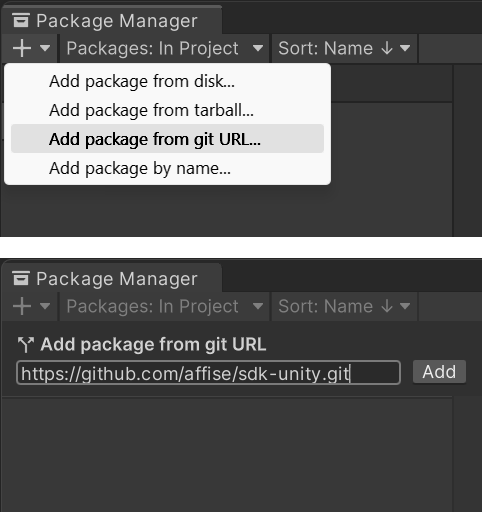
Open Package Manager(Window / Package Manager)
Add package from git url https://github.com/affise/affise-mmp-sdk-unity.git
Integrate unitypackage file
Download latest Affise SDK attribution-1.7.1.unitypackage
from releases page and drop this file to unity editor
Initialize
Unity asset
After package is added to unity project, initialize affise settings.
Open Project Settings(Edit / Project Settings)
On Affise tab click Create button.
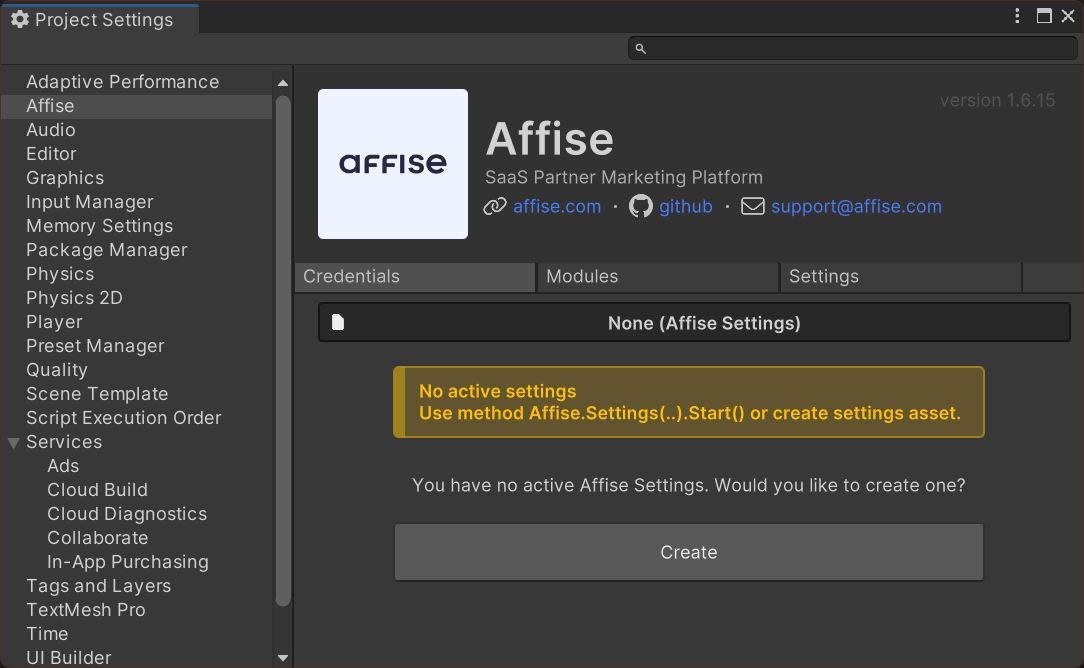
This will create Affise Settings.asset in Assets / Affise / Resources directory.
[!NOTE]
🟦🟦🟦🟦🟦🟦🟦🟦🟦🟦🟦🟦🟦🟦🟦
Settings set in
Edit / Project Settings / Affiseare marked asActive SettingsAffise is using settings marked as
Active Settingslocated in root of folder
Resourceswhich can be located in any folderExample
<Any folder> / Resources / <Your affise settings>.asset🟦🟦🟦🟦🟦🟦🟦🟦🟦🟦🟦🟦🟦🟦🟦
[!CAUTION]
🟧🟧🟧🟧🟧🟧🟧🟧🟧🟧🟧🟧🟧🟧🟧
Settings located in
Editorfolder are invalid.Example:
Editor / Resources / <Your affise settings>.asset🟧🟧🟧🟧🟧🟧🟧🟧🟧🟧🟧🟧🟧🟧🟧
Fill all required fields
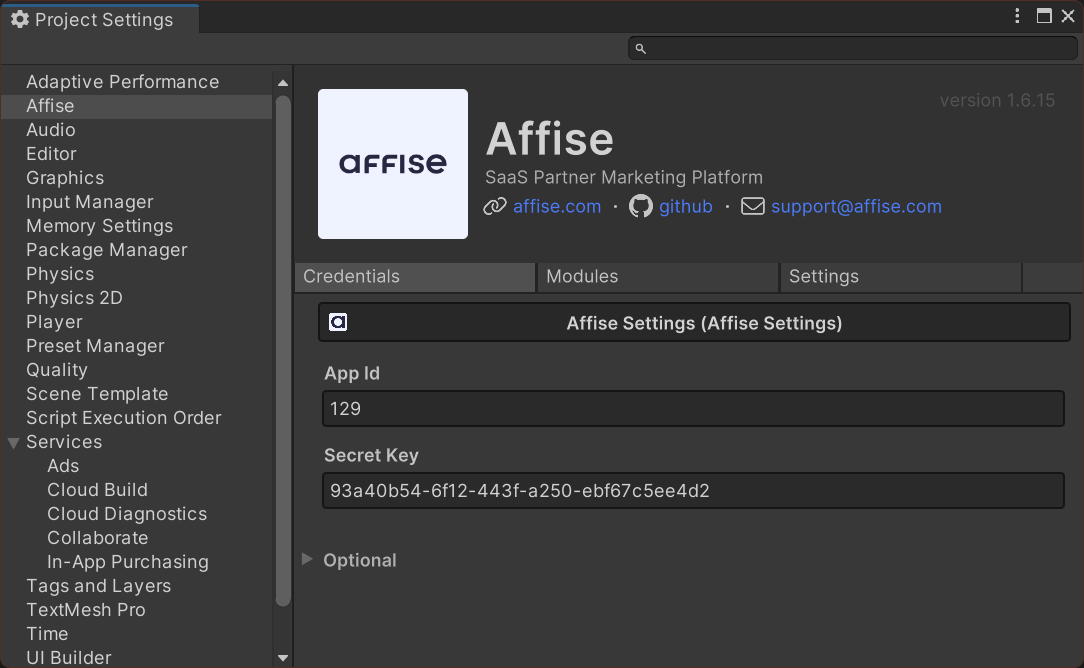
Domain
Set SDK server domain:
- Open
Edit / Project Settings / Affise - Unfold
Optionalsection at the bottom - Fill
Domainfield
Manual
Demo app AffiseDemo.cs
Affise
    .Settings(
        affiseAppId: "Your appId", //Change to your app id
        secretKey: "Your SDK secretKey" //Change to your SDK secretKey
    )
    .Start(); // Start Affise SDK
Initialization callbacks
Check Affise library initialization
Affise
    .Settings(
        affiseAppId: "Your appId",
        secretKey: "Your SDK secretKey"
    )
    .SetOnInitSuccess(() => {
        Debug.Log("Affise: init success");
    })
    .SetOnInitError((error) => {
        Debug.Log($"Affise: init error {error}");
    })
    .Start(); // Start Affise SDK
Domain
Set SDK server domain:
Affise
    .Settings(
        affiseAppId: "Your appId",
        secretKey: "Your SDK secretKey"
    )
    .setDomain("https://YoureCustomDomain/") // Set custom domain
    .Start(); // Start Affise SDK
Before application is published
[!CAUTION]
🟥🟥🟥🟥🟥🟥🟥🟥🟥🟥🟥🟥🟥🟥🟥
Please make sure your credentials are valid
Visit section validation credentials
🟥🟥🟥🟥🟥🟥🟥🟥🟥🟥🟥🟥🟥🟥🟥
Requirements
iOS
Affise Advertising module uses AppTrackingTransparency framework to get advertisingIdentifier
For working functionality your app needs to declare NSUserTrackingUsageDescription permission:
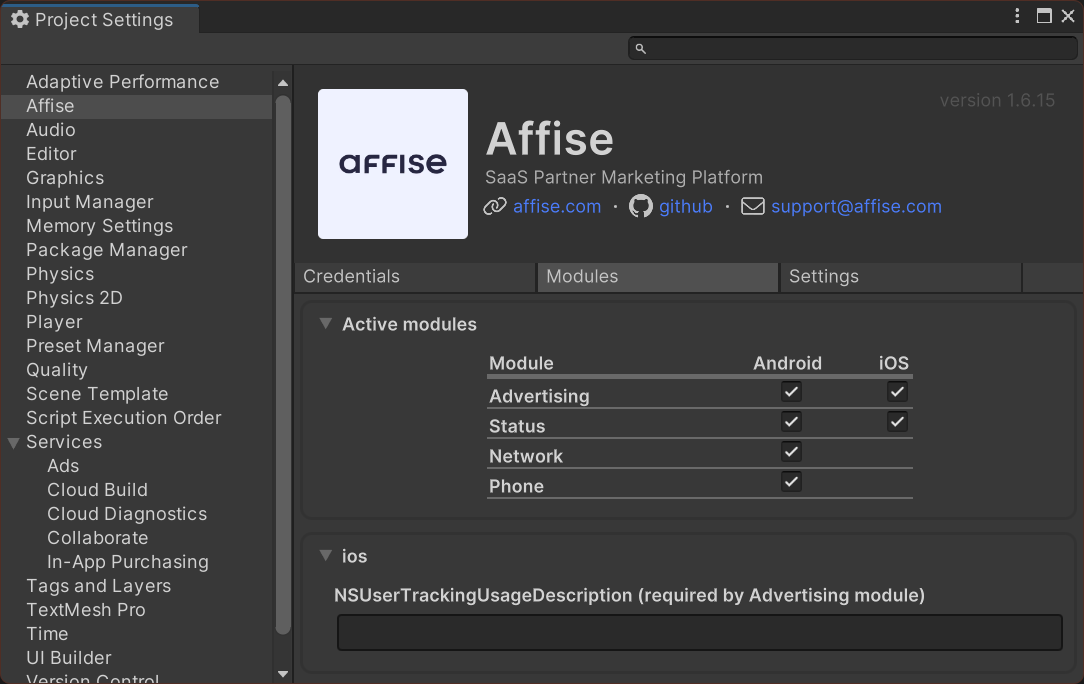
Key NSUserTrackingUsageDescription value is set in Edit / Project Settings / Affise / Modules
Key added automatically then module Advertising is selected
Default value is empty string ""
Modules
Open Edit / Project Settings / Affise
On Modules tab select all required
Android
All affise modules is updated automatically on build
[!CAUTION]
No manual editing is required
| Module | Version |
|---|---|
Advertising |
 |
AndroidId |
 |
AppsFlyer |
 |
Link |
 |
Network |
 |
Phone |
 |
Status |
 |
Subscription |
 |
RuStore |
 |
Huawei |
 |
Meta |
 |
TikTok |
 |
Dependencies located in Android project gradle file build.gradle
final affise_version = '1.7.1'

dependencies {
    // ...
    // Affise modules
    implementation "com.affise:module-advertising:$affise_version"
    implementation "com.affise:module-androidid:$affise_version"
    implementation "com.affise:module-link:$affise_version"
    implementation "com.affise:module-network:$affise_version"
    implementation "com.affise:module-phone:$affise_version"
    implementation "com.affise:module-status:$affise_version"
    implementation "com.affise:module-subscription:$affise_version"
    implementation "com.affise:module-meta:$affise_version"
    implementation "com.affise:module-rustore:$affise_version"
    implementation "com.affise:module-huawei:$affise_version"
    implementation "com.affise:module-appsflyer:$affise_version"
    implementation "com.affise:module-tiktok:$affise_version"
}
iOS
All affise modules is updated automatically on build
[!CAUTION]
No manual editing is required
| Module | Version |
|---|---|
AdService |
|
Advertising |
|
AppsFlyer |
|
Link |
|
Persistent |
|
Status |
|
Subscription |
|
TikTok |
Dependencies located in XCode project folder Podfile
platform :ios, '12.0'

target 'UnityFramework' do
  pod 'AffiseInternal', '1.7.1'

  # Affise Modules
  pod 'AffiseModule/AdService', '1.7.1'
  pod 'AffiseModule/Advertising', '1.7.1'
  pod 'AffiseModule/AppsFlyer', '1.7.1'
  pod 'AffiseModule/Link', '1.7.1'
  pod 'AffiseModule/Persistent', '1.7.1'
  pod 'AffiseModule/Status', '1.7.1'
  pod 'AffiseModule/Subscription', '1.7.1'
  pod 'AffiseModule/TikTok', '1.7.1'
end

target 'Unity-iPhone' do
end

use_frameworks! :linkage => :static
Installed active modules
Get list of installed modules:
Affise.Module.GetModulesInstalled()
Manual exclude modules
To manually stop modules from starting use Affise.Settings.SetDisableModules:
Affise
    .Settings(
        affiseAppId: "Your appId", //Change to your app id
        secretKey: "Your SDK secretKey", //Change to your SDK secretKey
    )
    .SetDisableModules(new List<AffiseModules> {
        // Exclude modules from start
        AffiseModules.Advertising,
        AffiseModules.Persistent,
        AffiseModules.Subscription,
    })
    .Start(); // Start Affise SDK
Module AdService
iOS 14.3+
Sends attributionToken from AdServices framework AAAttribution.attributionToken() to Affise server
Module Advertising
iOS
[!CAUTION]
🟥🟥🟥🟥🟥🟥🟥🟥🟥🟥🟥🟥🟥🟥🟥
iOSonlyAdvertising Module starting Manually
🟥🟥🟥🟥🟥🟥🟥🟥🟥🟥🟥🟥🟥🟥🟥
Affise.Module.Advertising.StartModule();
This module required to Use IDFA (Identifier for advertisers)
[!CAUTION]
🟥🟥🟥🟥🟥🟥🟥🟥🟥🟥🟥🟥🟥🟥🟥
Module Advertising requires
NSUserTrackingUsageDescriptionkey ininfo.plistApplication will crash if key not present
Key
NSUserTrackingUsageDescriptionvalue is set inEdit / Project Settings / Affise / ModulesKey added automatically then module
Advertisingis selectedDefault value is empty string ""
🟥🟥🟥🟥🟥🟥🟥🟥🟥🟥🟥🟥🟥🟥🟥
Or Manual open info.plist and add key NSUserTrackingUsageDescription with string value. For more information read requirements
Module Huawei
[!NOTE]
🟥🟥🟥🟥🟥🟥🟥🟥🟥🟥🟥🟥🟥🟥🟥
Use
AndroidHuawei Module to get OAID (Open Advertising Identifier)🟥🟥🟥🟥🟥🟥🟥🟥🟥🟥🟥🟥🟥🟥🟥
var providers = Affise.GetProviders();
var key = ProviderType.OAID;
if (providers.ContainsKey(key)) {
    var oaid = providers[key];
}
Module AppsFlyer
Send AppsFlyer event data to Affise
//AppsFlyer event data
const string eventName = "af_add_to_wishlist";
Dictionary<string, string> eventValues = new()
{
    {AFInAppEvents.PRICE, "1234.56"},
    {AFInAppEvents.CONTENT_ID, "1234567"}
};

// Send AppsFlyer event
AppsFlyer.sendEvent(eventName, eventValues);

// Send AppsFlyer data to Affise
Affise.Module.AppsFlyer.LogEvent(eventName, eventValues);
Is Module present:
Affise.Module.AppsFlyer.HasModule();
Module Link
Return last url in chan of redirection
🟥Support MAX 10 redirections🟥
Affise.Module.Link.Resolve("SITE_WITH_REDIRECTION", (redirectUrl) => {
    // handle redirect url
});
Is Module present:
Affise.Module.Link.HasModule();
Module Meta
- Add
queriesto yourAndroidManifest.xml
<?xml version="1.0" encoding="utf-8"?>
<manifest xmlns:android="http://schemas.android.com/apk/res/android">
    <queries>
        <package android:name="com.facebook.katana" />
        <package android:name="com.instagram.android" />
        <package android:name="com.facebook.lite" />
    </queries>

    <application>
      ...
    </application>
</manifest>
- Add your
Facebook App Idas config valueAffiseConfig.FB_APP_IDinAffise.settings
Affise
    .Settings(
        affiseAppId: "Your appId", //Change to your app id
        secretKey: "Your SDK secretKey", //Change to your SDK secretKey
    )
    .setConfigValue(AffiseConfig.FB_APP_ID, "Your Facebook App Id")
    .Start(); // Start Affise SDK
Module Persistent
iOS Only
[!NOTE]
Module requires user phone to be authenticated by Apple ID
It uses Apple
Securityframework to store protected information in user account
Persist device id value for Get random device Id on application reinstall
Module Status
[!CAUTION]
🟥🟥🟥🟥🟥🟥🟥🟥🟥🟥🟥🟥🟥🟥🟥
If
getStatusreturn an error or working more than 2 minutesPlease see section validation credentials
🟥🟥🟥🟥🟥🟥🟥🟥🟥🟥🟥🟥🟥🟥🟥
Affise.Module.GetStatus(AffiseModules.Status, response => {
    // handle response
});
Module Subscription
Get products by ids:
var ids = new List<AffiseProduct> {
    "exampple.product.id_1",
    "exampple.product.id_2",
};

Affise.Module.Subscription.FetchProducts(ids, (result) =>
{
    if (result.IsSuccess)
    {
        var value = result.AsSuccess;
        var products = value.Products;
        var invalidIds = value.InvalidIds;
    }
    else
    {
        var error = result.AsFailure;
    }
});
Purchase product:
// Specify product type for correct affise event
Affise.Module.Subscription.Purchase(product, AffiseProductType.CONSUMABLE, (result) =>
{
    if (result.IsSuccess)
    {
        AffisePurchasedInfo purchasedInfo = result.AsSuccess;
    }
    else
    {
        var error = result.AsFailure;
    }
});
Is Module present:
Affise.Module.Subscription.HasModule();
Module TikTok
[!CAUTION]
🟥🟥🟥🟥🟥🟥🟥🟥🟥🟥🟥🟥🟥🟥🟥
Module TikTok requires TikTok Business Unity SDK
🟥🟥🟥🟥🟥🟥🟥🟥🟥🟥🟥🟥🟥🟥🟥
Send TikTok event data to Affise TikTok Docs
var tiktokEvent = new TikTokAddToCartEvent("eventID");
tiktokEvent.SetDescription("Description of the product");
tiktokEvent.SetCurrency(TTCurrency.TTCurrencyUSD);
tiktokEvent.SetValue(4.99);
tiktokEvent.SetContentType("Type of the product");
tiktokEvent.SetContentId("ABC");

var eventContent = new TikTokContentParams();
eventContent.price = 4.99;
eventContent.quantity = 1;
eventContent.brand = "Brand of the product";
eventContent.contentName = "Name of the product";
TikTokContentParams[] contents = {eventContent};

tiktokEvent.SetContents(contents);

// Send TikTok event
TikTokBusinessSDK.TrackTTEvent(cartEvent);

// Prepare TikTok event data to Affise
var eventName = tiktokEvent.EventParams["eventName"];
var eventId = tiktokEvent.EventParams["eventId"];
var jsonString = tiktokEvent.EventParams["properties"];
var properties = Utils.JsonToDictionary(jsonString);
// Send TikTok event data to Affise
Affise.Module.TikTok.SendEvent(eventName, properties, eventId);
Is Module present:
Affise.Module.TikTok.HasModule();
Persistent data
Some methods require to return same data on application reinstall
It is achieved by using Affise Persistent Module for iOS and Affise AndroidId Module for Android
Such SDK methods are:
To simulate multiple device install for testing purpose you can use one of two options:
- Disable module dependencies:
- for
iOSAffise Persistent Module - for
AndroidAffise AndroidId Module
- Disable module programmatically:
Affise
    .Settings(
        affiseAppId: "Your appId",
        secretKey: "Your SDK secretKey",
    )
    .SetDisableModules(new List<AffiseModules> {
        AffiseModules.Persistent, // Disable module programmatically for iOS
        AffiseModules.AndroidId, // Disable module programmatically for Android
    })
    .Start();
Reinstall tracking
[!NOTE]
Read more about Persistent data
There are two working mode for Affice device Id:
- Return persistent value on each reinstall
- Return new value on each reinstall
First mode require:
- Enabling Affise Persistent Module for
iOS - Enabling Affise AndroidId Module for
Android
Even after deleting application Affice device Id will be preserved and will restore on next installation
Second mode is convenient for testing. By disabling module in UI, disabling module programmatically or removing dependency, a new Affice device Id will be generated for each new installation.
Build
iOS
SDK is using Cocoapods
- In
Build settingselect iOS platform and pressBuild - Select build folder (unity will exported iOS project to build folder)
- Build folder should contain
Podfile - In Terminal open build folder and run commend
pod install - Open generated
*.worksapceto build your unity project
[!CAUTION]
🟧🟧🟧🟧🟧🟧🟧🟧🟧🟧🟧🟧🟧🟧🟧
If command
pod installreturns errorCocoaPods could not find compatible versions for pod "AffiseInternal"Run
pod repo updateand then runpod installagain🟧🟧🟧🟧🟧🟧🟧🟧🟧🟧🟧🟧🟧🟧🟧
If Podfile hasn't generated you can create it manually using this Podfile as template
Podfile:
platform :ios, '11.0'

target 'UnityFramework' do
  pod 'AffiseInternal', '1.7.1'

  # Affise Modules
  # pod 'AffiseModule', `1.7.1`
end

target 'Unity-iPhone' do
end

use_frameworks! :linkage => :static
Features
ProviderType identifiers collection
To match users with events and data library is sending, these ProviderType identifiers are collected:
Attribution
AFFISE_APP_IDAFFISE_PKG_APP_NAMEAFF_APP_NAME_DASHBOARDAPP_VERSIONAPP_VERSION_RAWSTORETRACKER_TOKENTRACKER_NAMEFIRST_TRACKER_TOKENFIRST_TRACKER_NAMELAST_TRACKER_TOKENLAST_TRACKER_NAMEOUTDATED_TRACKER_TOKENINSTALLED_TIMEFIRST_OPEN_TIMEINSTALLED_HOURFIRST_OPEN_HOURINSTALL_FIRST_EVENTINSTALL_BEGIN_TIMEINSTALL_FINISH_TIMEREFERRER_INSTALL_VERSIONREFERRAL_TIMEREFERRER_CLICK_TIMEREFERRER_CLICK_TIME_SERVERREFERRER_GOOGLE_PLAY_INSTANTCREATED_TIMECREATED_TIME_MILLICREATED_TIME_HOURUNINSTALL_TIMEREINSTALL_TIMELAST_SESSION_TIMECPU_TYPEHARDWARE_NAMEDEVICE_MANUFACTURERDEEPLINK_CLICKDEVICE_ATLAS_IDAFFISE_DEVICE_IDAFFISE_ALT_DEVICE_IDREFTOKENREFTOKENSREFERRERREFERRER_UPDATEDUSER_AGENTMCCODEMNCODEREGIONCOUNTRYLANGUAGEDEVICE_NAMEDEVICE_TYPEOS_NAMEPLATFORMSDK_PLATFORMAPI_LEVEL_OSAFFISE_SDK_VERSIONOS_VERSIONRANDOM_USER_IDAFFISE_SDK_POSTIMEZONE_DEVAFFISE_EVENT_NAMEAFFISE_EVENT_TOKENLAST_TIME_SESSIONTIME_SESSIONAFFISE_SESSION_COUNTLIFETIME_SESSION_COUNTAFFISE_DEEPLINKAFFISE_PART_PARAM_NAMEAFFISE_PART_PARAM_NAME_TOKENAFFISE_APP_TOKENLABELAFFISE_SDK_SECRET_IDUUIDAFFISE_APP_OPENEDPUSHTOKENPUSHTOKEN_SERVICEAFFISE_EVENTS_COUNTAFFISE_SDK_EVENTS_COUNTAFFISE_METRICS_EVENTS_COUNTAFFISE_INTERNAL_EVENTS_COUNTIS_ROOTEDIS_EMULATOR
AdService
AD_SERVICE_ATTRIBUTION
Advertising
GAID_ADIDGAID_ADID_MD5ADIDALTSTR_ADIDFIREOS_ADIDCOLOROS_ADID
AndroidId
ANDROID_IDANDROID_ID_MD5
Huawei
OAIDOAID_MD5
Meta
META
Network
MAC_SHA1MAC_MD5CONNECTION_TYPEPROXY_IP_ADDRESS
Phone
NETWORK_TYPEISP
Event send control
There are two ways to send events
- Cache event to later scheduled send in batch
AddToCartEvent()
    .Send();
- Send event right now
AddToCartEvent()
    .SendNow(() =>
        {
            // handle event send success
        }, (errorResponse) =>
        {
            // handle event send failed
            // 🟥Warning:🟥 event is NOT cached for later send
        }
    );
Events tracking
For example, we want to track achievements. To send event first create it with following code
class Presenter {
    void OnUnlockAchievement()
    {
        var achievement =  new JSONObject
        {
            ["achievement"] = "new level",
        };

        new UnlockAchievementEvent("best damage")
            .AddPredefinedParameter(PredefinedLong.USER_SCORE, 12552L)
            .AddPredefinedParameter(PredefinedString.ACHIEVEMENT_ID, "1334-1225-ASDZ")
            .AddPredefinedParameter(PredefinedObject.CONTENT, achievement)
            .Send();
    }
}
With above example you can implement other events:
AchieveLevelAddPaymentInfoAddToCartAddToWishlistAdRevenueClickAdvCompleteRegistrationCompleteStreamCompleteTrialCompleteTutorialContactContentItemsViewCustomizeProductDeepLinkedDonateFindLocationInitiateCheckoutInitiatePurchaseInitiateStreamInviteLastAttributedTouchLeadListViewLoginOpenedFromPushNotificationOrderOrderItemAddedOrderItemRemoveOrderCancelOrderReturnRequestOrderReturnRequestCancelPurchaseRateReEngageReserveSalesScheduleSearchShareSpendCreditsStartRegistrationStartTrialStartTutorialSubmitApplicationSubscribeTravelBookingUnlockAchievementUnsubscribeUpdateViewAdvViewCartViewContentViewItemViewItemsInitialSubscriptionInitialTrialInitialOfferConvertedTrialConvertedOfferTrialInRetryOfferInRetrySubscriptionInRetryRenewedSubscriptionFailedSubscriptionFromRetryFailedOfferFromRetryFailedTrialFromRetryFailedSubscriptionFailedOfferiseFailedTrialReactivatedSubscriptionRenewedSubscriptionFromRetryConvertedOfferFromRetryConvertedTrialFromRetryUnsubscription
Custom events tracking
Use any of custom events if default doesn't fit your scenario:
CustomId01EventCustomId02EventCustomId03EventCustomId04EventCustomId05EventCustomId06EventCustomId07EventCustomId08EventCustomId09EventCustomId10Event
If above event functionality still limits your usecase, you can use UserCustomEvent
new UserCustomEvent(eventName: "MyCustomEvent")
    .Send();
Predefined event parameters
To enrich your event with another dimension, you can use predefined parameters for most common cases. Add it to any event:
class Presenter {
    void OnUnlockAchievement()
    {
        var achievement = new JSONObject
        {
            ["achievement"] = "new level",
        };

        new UnlockAchievementEvent(
            userData: "best damage"
        )
            .AddPredefinedParameter(PredefinedString.DESCRIPTION, "best damage")
            .AddPredefinedParameter(PredefinedObject.CONTENT, achievement)
            .Send();
    }
}
In examples above PredefinedParameters.DESCRIPTION and PredefinedObject.CONTENT is used, but many others is available:
| PredefinedParameter | Type |
|---|---|
| PredefinedString | string |
| PredefinedLong | long |
| PredefinedFloat | float |
| PredefinedObject | JSONObject |
| PredefinedListObject | List<JSONObject> |
| PredefinedListString | List<string> |
PredefinedString
ACHIEVEMENT_IDADREV_AD_TYPEBRANDBRICKCAMPAIGN_IDCATALOGUE_IDCHANNEL_TYPECITYCLASSCLICK_IDCONTENT_IDCONTENT_NAMECONTENT_TYPECONVERSION_IDCOUNTRYCOUPON_CODECURRENCYCUSTOMER_SEGMENTCUSTOMER_TYPECUSTOMER_USER_IDDEEP_LINKDESCRIPTIONDESTINATION_ADESTINATION_BDESTINATION_LISTEVENT_NAMENEW_VERSIONOLD_VERSIONORDER_IDPARAM_01PARAM_02PARAM_03PARAM_04PARAM_05PARAM_06PARAM_07PARAM_08PARAM_09PARAM_10PAYMENT_INFO_AVAILABLEPIDPREFERRED_NEIGHBORHOODSPRODUCT_IDPRODUCT_NAMEPURCHASE_CURRENCYRECEIPT_IDREGIONREGISTRATION_METHODREVIEW_TEXTSEARCH_STRINGSEGMENTSTATUSSUBSCRIPTION_IDSUCCESSSUGGESTED_DESTINATIONSSUGGESTED_HOTELSTUTORIAL_IDUTM_CAMPAIGNUTM_MEDIUMUTM_SOURCEVALIDATEDVERTICALVIRTUAL_CURRENCY_NAMEVOUCHER_CODE
PredefinedLong
AMOUNTDATE_ADATE_BDEPARTING_ARRIVAL_DATEDEPARTING_DEPARTURE_DATEHOTEL_SCORELEVELMAX_RATING_VALUENUM_ADULTSNUM_CHILDRENNUM_INFANTSPREFERRED_NUM_STOPSPREFERRED_STAR_RATINGSQUANTITYRATING_VALUERETURNING_ARRIVAL_DATERETURNING_DEPARTURE_DATESCORETRAVEL_STARTTRAVEL_ENDUSER_SCOREEVENT_STARTEVENT_END
PredefinedFloat
PREFERRED_PRICE_RANGEPRICEREVENUELATLONG
PredefinedObject
CONTENT
PredefinedListObject
CONTENT_LIST
PredefinedListString
CONTENT_IDS
Events buffering
Affise library will send any pending events with first opportunity, but if there is no network connection or device is disabled, events are kept locally for 7 days before deletion.
Advertising Identifier (google) tracking
[!NOTE]
AndroidonlyRequires Affise Advertising Module
Advertising Identifier (google) tracking is supported automatically, no actions needed
Open Advertising Identifier (huawei) tracking
[!NOTE]
AndroidonlyRequires Affise Huawei Module
Open Advertising Identifier is supported automatically, no actions needed
Push token tracking
To let affise track push token you need to receive it from your push service provider, and pass to Affise library.
Affise.AddPushToken(token, PushTokenService.FIREBASE);
Supported service providers:
APPLE- iOS onlyFIREBASE
Firebase Plugin
Add Firebase to your Unity project
Firebase.Auth.FirebaseUser user = Firebase.Auth.FirebaseAuth.DefaultInstance.CurrentUser;

user.TokenAsync(true).ContinueWith(task => {
    if (task.IsCanceled) {
        Debug.LogError("TokenAsync was canceled.");
        return;
    }

    if (task.IsFaulted) {
        Debug.LogError("TokenAsync encountered an error: " + task.Exception);
        return;
    }

    string idToken = task.Result;

    Affise.AddPushToken(idToken, PushTokenService.FIREBASE);
});
Links
- Register deeplink callback right after
Affise.Settings(affiseAppId,secretKey).Start()
Affise.RegisterDeeplinkCallback((value) =>
{
    // full uri "scheme://host/path?parameters"
    var deeplink = value.Deeplink;

    // separated for convenience
    var scheme = value.Scheme;
    var host = value.Host;
    var path = value.Path;
    var queryParametersMap = value.Parameters;

    if(queryParametersMap["<your_uri_key>"]?.Contains("<your_uri_key_value>") == true) {
      // handle value
    }
});
Test Android DeepLink via terminal command:
adb shell am start -a android.intent.action.VIEW -d "YOUR_SCHEME://YOUR_DOMAIN/somepath?param=1\&list=some\&list=other\&list="
Test iOS DeepLink via terminal command:
xcrun simctl openurl booted "YOUR_SCHEME://YOUR_DOMAIN/somepath?param=1&list=some&list=other&list=1"
Config
Open Edit / Project Settings / Affise
On Settings tab add links
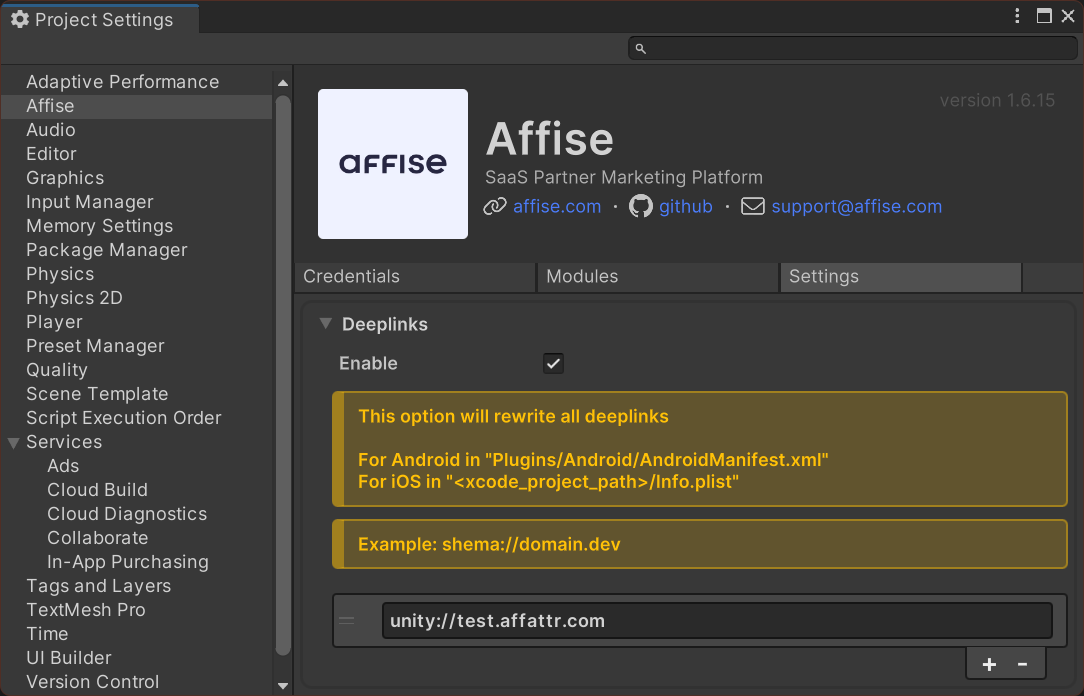
[!CAUTION]
🟧🟧🟧🟧🟧🟧🟧🟧🟧🟧🟧🟧🟧🟧🟧
For Android deeplink remove is manual
Open Android project and remove deeplink
intent-filterfromAndroidManifest.xml🟧🟧🟧🟧🟧🟧🟧🟧🟧🟧🟧🟧🟧🟧🟧
Deeplinks manual
[!CAUTION]
🟥🟥🟥🟥🟥🟥🟥🟥🟥🟥🟥🟥🟥🟥🟥
Deeplinks support only CUSTOM scheme NOT
httporhttpsFor
httporhttpsread how to setup AppLinks🟥🟥🟥🟥🟥🟥🟥🟥🟥🟥🟥🟥🟥🟥🟥
Android
To integrate deeplink support in android you need:
Add intent filter to
AndroidManifest.xml. For more info read Unity docsAdd custom scheme (NOT
httporhttps) and host to filter
Example: YOUR_SCHEME://YOUR_DOMAIN
Example: myapp://mydomain.com
<intent-filter android:autoVerify="true">
    <action android:name="android.intent.action.VIEW" />

    <category android:name="android.intent.category.DEFAULT" />
    <category android:name="android.intent.category.BROWSABLE" />

    <data
        android:host="YOUR_DOMAIN"
        android:scheme="YOUR_SCHEME" />
</intent-filter>
iOS
To integrate deeplink support in iOS you need:
Add key CFBundleURLTypes to Info.plist file in Xcode project folder
Example: YOUR_SCHEME://YOUR_DOMAIN
Example: myapp://mydomain.com
<key>CFBundleURLTypes</key>
<array>
    <dict>
        <key>CFBundleTypeRole</key>
        <string>Editor</string>
        <key>CFBundleURLName</key>
        <string>YOUR_DOMAIN</string>
        <key>CFBundleURLSchemes</key>
        <array>
            <string>YOUR_SCHEME</string>
        </array>
    </dict>
</array>
Applinks manual
[!CAUTION]
🟥🟥🟥🟥🟥🟥🟥🟥🟥🟥🟥🟥🟥🟥🟥
You must owne website domain.
And has ability to add file
https://yoursite/.well-known/apple-app-site-associationfor iOS supportAnd has ability to add file
https://yoursite/.well-known/assetlinks.jsonfor Android support🟥🟥🟥🟥🟥🟥🟥🟥🟥🟥🟥🟥🟥🟥🟥
Android
To integrate applink support in android you need:
Add intent filter to
AndroidManifest.xml. For more info read Unity docsAdd
httpsorhttpscheme and host to filter
Example: https://YOUR_DOMAIN
Example: https://mydomain.com
<intent-filter android:autoVerify="true">
    <action android:name="android.intent.action.VIEW" />

    <category android:name="android.intent.category.DEFAULT" />
    <category android:name="android.intent.category.BROWSABLE" />

    <data
        android:host="YOUR_DOMAIN"
        android:scheme="https" />
</intent-filter>
Associate your app with your website. Read Google instructions
How To Associate your app with your website
After setting up URL support for your app, the App Links Assistant generates a Digital Assets Links file you can use to associate your website with your app.
As an alternative to using the Digital Asset Links file, you can associate your site and app in Search Console.
If you're using Play App Signing for your app, then the certificate fingerprint produced by the App Links Assistant usually doesn't match the one on users' devices. In this case, you can find the correct Digital Asset Links JSON snippet for your app in your Play Console developer account under Release > Setup > App signing.
To associate your app and your website using the App Links Assistant, click Open Digital Asset Links File Generator from the App Links Assistant and follow these steps:
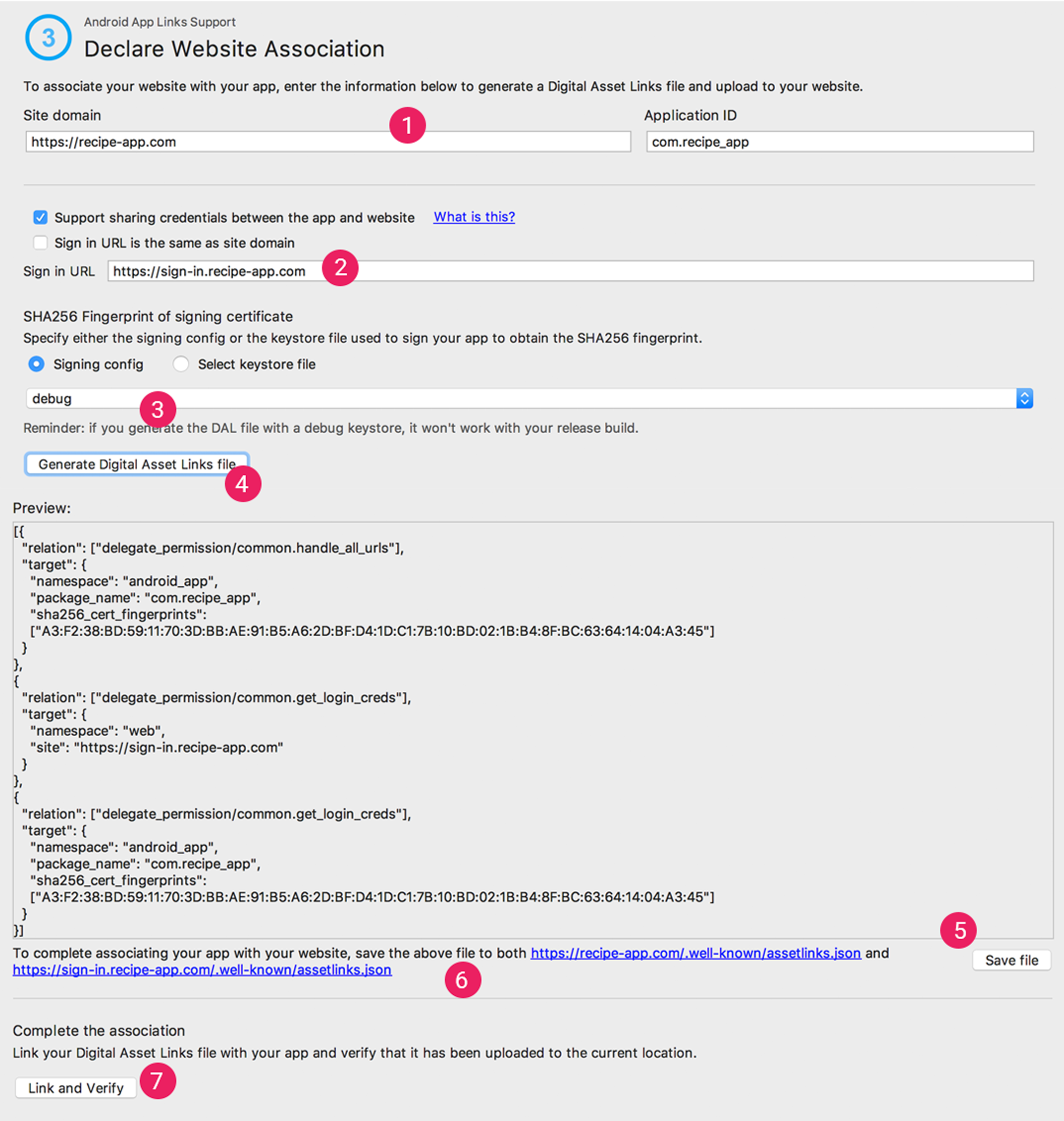 Figure 2. Enter details about your site and app to generate a Digital Asset Links file.
Enter your Site domain and your Application ID.
To include support in your Digital Asset Links file for One Tap sign-in, select Support sharing credentials between the app and the website and enter your site's sign-in URL.This adds the following string to your Digital Asset Links file declaring that your app and website share sign-in credentials:
delegate_permission/common.get_login_creds.Specify the signing config or select a keystore file.
Make sure you select the right release config or keystore file for the release build or the debug config or keystore file for the debug build of your app. If you want to set up your production build, use the release config. If you want to test your build, use the debug config.
- Click Generate Digital Asset Links file.
- Once Android Studio generates the file, click Save file to download it.
- Upload the
assetlinks.jsonfile to your site, with read access for everyone, athttps://yoursite/.well-known/assetlinks.json.
[!IMPORTANT]
The system verifies the Digital Asset Links file via the encrypted HTTPS protocol. Make sure that the assetlinks.json file is accessible over an HTTPS connection, regardless of whether your app's intent filter includes https.
- Click Link and Verify to confirm that you've uploaded the correct Digital Asset Links file to the correct location.
Learn more about associating your website with your app through the Digital Asset Links file in Declare website associations.
iOS
To integrate applink support in iOS you need:
Follow how to set up applink in the official documentation.
Associate your app with your website. Supporting associated domains
Add key
com.apple.developer.associated-domainstoInfo.plist
Example: https://YOUR_DOMAIN
Example: https://mydomain.com
<key>com.apple.developer.associated-domains</key>
<array>
    <string>applinks:YOUR_DOMAIN</string>
</array>
Get deferred deeplink
[!NOTE]
Requires
Affise Status Module
Use the next public method of SDK to get deferred deeplink from server
Affise.GetDeferredDeeplink(deferredDeeplink => {
    // handle deferred deeplink
});
Get deferred deeplink value
[!NOTE]
Requires
Affise Status Module
Use the next public method of SDK to get deferred deeplink value from server
Affise.GetReferrerOnServerValue(ReferrerKey.CLICK_ID, deferredDeeplinkValue => {
    // handle deferred deeplink value
});
Offline mode
In some scenarios you would want to limit Affise network usage, to pause that activity call anywhere in your application following code after Affise start:
Affise.SetOfflineModeEnabled(true) // to enable offline mode
Affise.SetOfflineModeEnabled(false) // to disable offline mode
While offline mode is enabled, your metrics and other events are kept locally, and will be delivered once offline mode is disabled. Offline mode is persistent as Application lifecycle, and will be disabled with process termination automatically. To check current offline mode status call:
Affise.IsOfflineModeEnabled() // returns true or false describing current tracking state
Disable tracking
To disable any tracking activity, storing events and gathering device identifiers and metrics call anywhere in your application following code after Affise start:
Affise.SetTrackingEnabled(true) // to enable tracking
Affise.SetTrackingEnabled(false) // to disable tracking
By default tracking is enabled.
While tracking mode is disabled, metrics and other identifiers is not generated locally. Keep in mind that this flag is persistent until app reinstall, and don't forget to reactivate tracking when needed. To check current status of tracking call:
Affise.IsTrackingEnabled() // returns true or false describing current tracking state
Disable background tracking
To disable any background tracking activity, storing events and gathering device identifiers and metrics call anywhere in your application following code after Affise start:
Affise.SetBackgroundTrackingEnabled(true) // to enable background tracking
Affise.SetBackgroundTrackingEnabled(false) // to disable background tracking
By default background tracking is enabled.
While background tracking mode is disabled, metrics and other identifiers is not generated locally. Background tracking mode is persistent as Application lifecycle, and will be re-enabled with process termination automatically. To check current status of background tracking call:
Affise.IsBackgroundTrackingEnabled() // returns true or false describing current background tracking state
Get random user Id
Affise.GetRandomUserId();
[!CAUTION]
🟥🟥🟥🟥🟥🟥🟥🟥🟥🟥🟥🟥🟥🟥🟥
Return
11111111-1111-1111-1111-111111111111if Affise SDK not initializedReturn
22222222-2222-2222-2222-222222222222if no valid methods to retrieve id for current device
AffiseError.UUID_NOT_INITIALIZED==11111111-1111-1111-1111-111111111111
AffiseError.UUID_NO_VALID_METHOD==22222222-2222-2222-2222-222222222222🟥🟥🟥🟥🟥🟥🟥🟥🟥🟥🟥🟥🟥🟥🟥
Get Affice device Id
[!NOTE]
To make
device idmore persistent on application reinstalluse Affise
PersistentModule foriOSuse Affise
AndroidIdModule forAndroid
[!NOTE]
Read more about Persistent data and Reinstall tracking
Affise.GetRandomDeviceId();
[!CAUTION]
🟥🟥🟥🟥🟥🟥🟥🟥🟥🟥🟥🟥🟥🟥🟥
Return
11111111-1111-1111-1111-111111111111if Affise SDK not initializedReturn
22222222-2222-2222-2222-222222222222if no valid methods to retrieve id for current device
AffiseError.UUID_NOT_INITIALIZED==11111111-1111-1111-1111-111111111111
AffiseError.UUID_NO_VALID_METHOD==22222222-2222-2222-2222-222222222222🟥🟥🟥🟥🟥🟥🟥🟥🟥🟥🟥🟥🟥🟥🟥
Get providers
Returns providers map with ProviderType as key
var providers = Affise.GetProviders();
var key = ProviderType.AFFISE_APP_TOKEN;
if (providers.ContainsKey(key)) {
    var value = providers[key];
}
[!CAUTION]
🟥🟥🟥🟥🟥🟥🟥🟥🟥🟥🟥🟥🟥🟥🟥
Return Empty Map if Affise SDK not initialized
🟥🟥🟥🟥🟥🟥🟥🟥🟥🟥🟥🟥🟥🟥🟥
Is first run
Affise.IsFirstRun();
Get referrer
[!CAUTION]
🟧🟧🟧🟧🟧🟧🟧🟧🟧🟧🟧🟧🟧🟧🟧
Don't call this method directly in
Awake()it may causeNullReferenceException🟧🟧🟧🟧🟧🟧🟧🟧🟧🟧🟧🟧🟧🟧🟧
Use the next public method of SDK to get referrer
To get Install referrer by installing from
AndroidRuStoreinclude moduleRuStore
To get Install referrer by installing from
AndroidAppGalleryinclude moduleHuawei
Affise.GetReferrerUrl(referrer => {
    // handle referrer
});
Get referrer value
Use the next public method of SDK to get referrer value by
To get Install referrer by installing from
AndroidRuStoreinclude moduleRuStore
To get Install referrer by installing from
AndroidAppGalleryinclude moduleHuawei
Affise.GetReferrerUrlValue(ReferrerKey.CLICK_ID, referrer => {
    // handle referrer value
});
Referrer keys
In examples above ReferrerKey.CLICK_ID is used, but many others is available:
AD_IDCAMPAIGN_IDCLICK_IDAFFISE_ADAFFISE_AD_IDAFFISE_AD_TYPEAFFISE_ADSETAFFISE_ADSET_IDAFFISE_AFFC_IDAFFISE_CHANNELAFFISE_CLICK_LOOK_BACKAFFISE_COST_CURRENCYAFFISE_COST_MODELAFFISE_COST_VALUEAFFISE_DEEPLINKAFFISE_KEYWORDSAFFISE_MEDIA_TYPEAFFISE_MODELAFFISE_OSAFFISE_PARTNERAFFISE_REFAFFISE_SITE_IDAFFISE_SUB_SITE_IDAFFISE_SUB_1AFFISE_SUB_2AFFISE_SUB_3AFFISE_SUB_4AFFISE_SUB_5AFFCPIDSUB_1SUB_2SUB_3SUB_4SUB_5
Get module status
[!CAUTION]
🟥🟥🟥🟥🟥🟥🟥🟥🟥🟥🟥🟥🟥🟥🟥
Required Module Status
If
getStatusreturn an error or working more than 2 minutesPlease see section validation credentials
🟥🟥🟥🟥🟥🟥🟥🟥🟥🟥🟥🟥🟥🟥🟥
Affise.Module.GetStatus(AffiseModules.Status, response => {
    // handle response
});
Platform specific
StoreKit Ad Network
iOS Only
For ios prior 16.1 first call
Affise.IOS.RegisterAppForAdNetworkAttribution(error =>
{
    // Handle error
});
Updates the fine and coarse conversion values, and calls a completion handler if the update fails. Second argument coarseValue is available in iOS 16.1+
Affise.IOS.UpdatePostbackConversionValue(1, SKAdNetwork.CoarseConversionValue.Medium, error =>
{
    // Handle error
});
Configure your app to send postback copies to Affise:
Add key NSAdvertisingAttributionReportEndpoint to project Info.plist
Set key value to https://affise-skadnetwork.com/
<key>CFBundleURLTypes</key>
<array>
    <dict>
      <key>NSAdvertisingAttributionReportEndpoint</key>
      <string>https://affise-skadnetwork.com/</string>
    </dict>
</array>
SDK to SDK integrations
// Send AdRevenue info
new AffiseAdRevenue(AffiseAdSource.ADMOB)
        .SetRevenue(2.5f, "ImpressionData_Currency")
        .SetNetwork("ImpressionData_Network")
        .SetUnit("ImpressionData_Unit")
        .SetPlacement("ImpressionData_Placement")
        .Send();
Debug
Validate credentials
[!CAUTION]
🟥🟥🟥🟥🟥🟥🟥🟥🟥🟥🟥🟥🟥🟥🟥
Debug methods WON'T work on Production
🟥🟥🟥🟥🟥🟥🟥🟥🟥🟥🟥🟥🟥🟥🟥
Validate your credentials by receiving ValidationStatus values:
VALID- your credentials are validINVALID_APP_ID- your app id is not validINVALID_SECRET_KEY- your SDK secretKey is not validPACKAGE_NAME_NOT_FOUND- your application package name not foundNOT_WORKING_ON_PRODUCTION- you using debug method on productionNETWORK_ERROR- network or server not available (for exampleAiroplane modeis active)
Affise
    .Settings(
        affiseAppId: "Your appId",
        secretKey: "Your SDK secretKey"
    )
    .SetProduction(false) //To enable debug methods set Production to false
    .Start(); // Start Affise SDK

Affise.Debug.Validate(status =>
{
    // Handle validation status
});
Version
Get Affise library version
Affise.Debug.Version()
Version native
Get Affise native Android/iOS library version
Affise.Debug.VersionNative();
Troubleshoots
[!CAUTION]
🟥🟥🟥🟥🟥🟥🟥🟥🟥🟥🟥🟥🟥🟥🟥
If Affise settings doesn't change or api is working incorrectly
First: completely stop mobile application on device
Second: try reset cache for project
🟥🟥🟥🟥🟥🟥🟥🟥🟥🟥🟥🟥🟥🟥🟥
iOS
[!CAUTION]
🟥🟥🟥🟥🟥🟥🟥🟥🟥🟥🟥🟥🟥🟥🟥
This app has crashed because Affise Advertising Module is attempted to access privacy-sensitive data without a usage description.
The app's
Info.plistmust contain anNSUserTrackingUsageDescriptionkey with a string value explainingto the user how the app uses this data.
🟥🟥🟥🟥🟥🟥🟥🟥🟥🟥🟥🟥🟥🟥🟥
Open info.plist and add key NSUserTrackingUsageDescription with string value. For more information read requirements
Android
[!CAUTION]
🟥🟥🟥🟥🟥🟥🟥🟥🟥🟥🟥🟥🟥🟥🟥
Application has crashed on Android 14 (API level 34) with error
java.lang.SecurityException: One of RECEIVER_EXPORTED or RECEIVER_NOT_EXPORTED should be specified when a receiver isn't being registered exclusively for system broadcastsCause: Google enforced new security policy for Android 14 (API level 34).
🟥🟥🟥🟥🟥🟥🟥🟥🟥🟥🟥🟥🟥🟥🟥
Update Unity minimum version for 2023.3.0a4, 2022.3.14f1, 2021.3.33f1
Related Unity issue
Earlier versions are not supported
Unity In-App Purchasing
iOS only
Then using package Unity In-App Purchasing.
If build failed with unknown protocol SKPaymentTransactionObserver in UnityFramework-Swift.h,
add #import <StoreKit/StoreKit.h> before UnityFramework-Swift.h
#import <StoreKit/StoreKit.h>
#include "UnityFramework/UnityFramework-Swift.h"
[!NOTE]
UnityFramework-Swift.his an auto-generated Xcode header that exposes Swift code to Objective-C
SKPaymentTransactionObserverappearing only when unity packageUnity In-App Purchasingis added
No comments yet. Be the first!