Better NavMesh Bake
Adds a little convenience for baking NavMesh Surfaces.
com.github.lajawi.betternavmeshbake 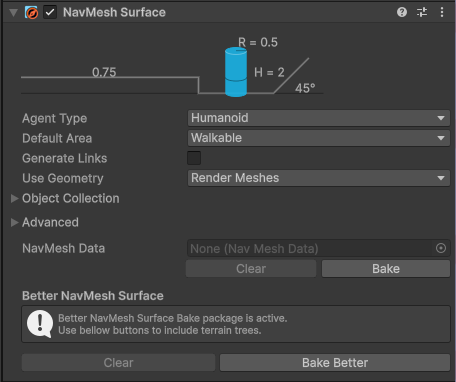
Install via UPM
Add to Unity Package Manager using this URL
https://www.pkglnk.dev/betternavmeshbake.git README Markdown
Copy this to your project's README.md

## Installation
Add **Better NavMesh Bake** to your Unity project via Package Manager:
1. Open **Window > Package Manager**
2. Click **+** > **Add package from git URL**
3. Enter:
```
https://www.pkglnk.dev/betternavmeshbake.git
```
[](https://www.pkglnk.dev/pkg/betternavmeshbake)Dependencies (1)
README
Unity Better NavMesh Bake
A Unity package that enhances the NavMesh Surface baking process. Currently it only adds support for Terrain Trees.
Usage
[!IMPORTANT] You need Unity's AI Navigation package. When you install this package, it should depend on it and install it automatically for you.
Install the package according to the installation instructions. Once installed, you can use the extra buttons from the NavMesh Surface to use this package to bake.
What this package currently does
- Make real instances of terrain trees for baking (they get removed after baking). These trees support the following components:
- LOD Groups, only used when Use Geometry is set to Render Meshes, takes precedence to just a Mesh Renderer and Mesh Filter on the root object of a tree
- Mesh Renderer and Mesh Filter, only used when Use Geometry is set to Render Meshes, #Problems that may not be obvious
- Colliders of any type, can be multiple, mix and matched, only used when Use Geometry is set to Physics Colliders
- NavMesh Modifier
- NavMesh Modifier Volume
[!IMPORTANT] All components above need to be enabled to be used by the NavMesh Surface.
Problems that may not be obvious
Mesh Renderer & Mesh Filter
[!IMPORTANT] Both a Mesh Renderer and Mesh Filter need to be on the tree, otherwise the Surface will not recognise it.
Installation
Option 1: Package Manager (recommended)
Open the Package Manager window, click on Add Package from Git URL ..., then enter the following:
https://github.com/lajawi/unity-navmesh-better-bake.git
[!TIP] Head to the Unity documentation for help if need be. https://docs.unity3d.com/Manual/upm-ui-giturl.html
Option 2: Manually Editing package.json
Add the following line to your project's Packages/manifest.json:
"com.github.lajawi.betternavmeshbake": "https://github.com/lajawi/unity-navmesh-better-bake.git"
No comments yet. Be the first!