Unity Autopilot
Unity Autopilot is an AI-powered tool integrated into the Unity Editor, allowing developers and creators to control the editor using natural language commandsâ\x80\x94speeding up workflows by automating tasks described in plain English.
com.openai.unity 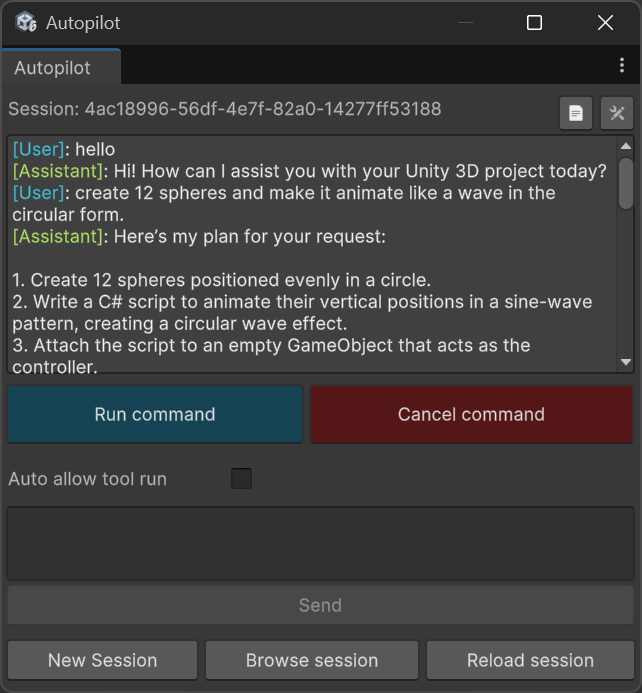
Install via UPM
Add to Unity Package Manager using this URL
https://www.pkglnk.dev/bhadrik-unity.git?path=Package/Dependency/com.openai.unity README Markdown
Copy this to your project's README.md

## Installation
Add **Unity Autopilot** to your Unity project via Package Manager:
1. Open **Window > Package Manager**
2. Click **+** > **Add package from git URL**
3. Enter:
```
https://www.pkglnk.dev/bhadrik-unity.git?path=Package%2FDependency%2Fcom.openai.unity
```
[](https://www.pkglnk.dev/pkg/bhadrik-unity)Dependencies (3)
README
Unity Autopilot
Unity Autopilot is an AI-powered tool integrated into the Unity Editor, allowing developers and creators to control the editor using natural language commands—speeding up workflows by automating tasks described in plain English.
✨ Features
- 🧠 Natural Language Command Execution – Translate plain English into Unity editor actions.
- 🛠️ Editor Automation – Create GameObjects, modify components, manage scenes, and more through text.
- 🔌 Customizable & Extensible – Easily define your own command handlers and integrate with different LLM providers.
- 🤖 Any LLM Support – Possible to use any LLM api through a generalized API backend.
📊 Project Tracking
| Task | Status |
|---|---|
| Generalize LLM Communication API | ✅ Done |
| Manage Script & Shader Compilation Timing | ✅ Requires Testing |
| Develop Comprehensive Tool Testing Suite | ⚠️ Partially Complete |
| Implement UI Builder-Based GUI | ⏳ To Do |
| Implement Support for Additional LLM APIs | ⏳ To Do |
| Integrate Markdown Text Viewer | ⏳ To Do |
| Implement Multi-Agent Flow Architecture | ⏳ To Do |
| └─ Task Manager Agent | ⏳ To Do |
| └─ Log Reader Agent | ⏳ To Do |
🚀 Getting Started
Requirements
- Unity 2022.3 LTS or later
- Internet connection (for online LLMs)
- API key for your preferred language model provider (e.g., OpenAI, Azure, local)
📦 Installation
Step 1 – Install Unity Autopilot
- Install the Unity Autopilot package via Git URL
https://github.com/bhadrik/unity-autopilot.git?path=/Package#main
Step 2 - Run Autopilot
- Window location:
Window/Autopilot/Chat
Dependency
Newtonsoft.Json.Schema
This project includes a pre-configured dependency on the Newtonsoft.Json.Schema library, version 3.0.16.
About Newtonsoft.Json.Schema
Newtonsoft.Json.Schema is a .NET library used for validating JSON data against JSON Schema specifications. It provides a powerful and flexible way to ensure JSON data conforms to expected structures.
Useful Links
- Official website: https://www.newtonsoft.com/jsonschema
- GitHub Releases: https://github.com/JamesNK/Newtonsoft.Json.Schema/releases
com.openai.unity
This is an unofficial OpenAI package to interact with the OpenAI API. This project contain modified version of this package.
About com.openai.unity
This package is a modified version of the original repository available at RageAgainstThePixel/com.openai.unity.
Useful Links
- Original Repository: https://github.com/RageAgainstThePixel/com.openai.unity
Source File Origins and Adaptations
This project utilizes several source files originally taken from the unity-mcp repository by Justin P. Barnett as a foundational base.
All these files have since been modified and adapted to meet the specific requirements of this current project.
Comments
No comments yet. Be the first!
Sign in to join the conversation
Sign In