Built-in UI Resources Browser!
Browser built-in icons, StyleSheets and VisualTreeAssets in Unity Editor.
com.greenbamboogames.builtinuiresbrowser 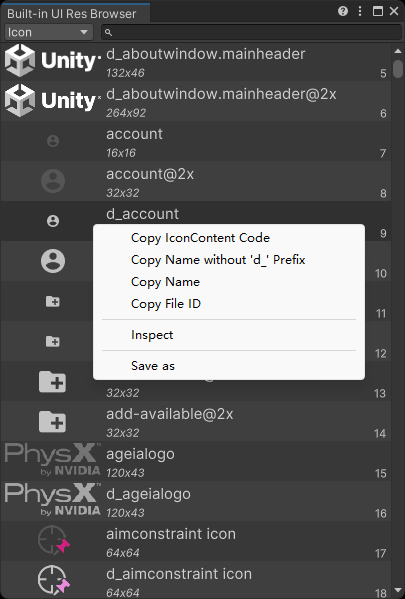
Install via UPM
Add to Unity Package Manager using this URL
https://www.pkglnk.dev/builtinuiresbrowser.git README Markdown
Copy this to your project's README.md

## Installation
Add **Built-in UI Resources Browser!** to your Unity project via Package Manager:
1. Open **Window > Package Manager**
2. Click **+** > **Add package from git URL**
3. Enter:
```
https://www.pkglnk.dev/builtinuiresbrowser.git
```
[](https://www.pkglnk.dev/pkg/builtinuiresbrowser)README
Unity Editor内置UI资源浏览器
Unity Editor Built-in UI Resources Browser
浏览Unity Editor内置的UI资源。
Browse the Unity Editor built-in UI resources.
支持的Unity版本
Supported Unity Version
Unity 2019.4及更新版本。
Unity 2019.4 and later.
安装方法
Installation

从 OpenUPM 安装此插件,或者直接克隆此仓库到项目中。 Install this package via OpenUPM, or clone this repository directly into the Packages folder of your project.
如何使用
How to use
从工具栏菜单 Tools/Bamboo/Editor Icons Overview 打开工具窗口。
Open the Editor Icons Overview window from the menu Tools/Bamboo/Editor Icons Overview.
左键双击条目,可以在Inspector中检视该条目。
Double-click on an entry to inspect it in the Inspector.
右键点击图标条目,可以复制图标名字或代码(Unity会自动根据主题为图标追加 d_ 前缀)。
Right-click on an icon entry to copy the icon name or code (Unity will automatically append d_ prefix based on the theme).
右键点击StyleSheet和VisualTreeAsset条目,可以复制资产名字、代码或将其导出。
Right-click on a StyleSheet or VisualTreeAsset entry to copy the asset name, code or export it.
Thanks to halak/unity-editor-icons .
No comments yet. Be the first!