Com.Utilities.Encoder.Ogg

Ogg Vorbis encoder utility library for Unity (UPM)
Unity Project
Download the source from GitHub
README
com.utilities.encoder.ogg


Simple library for Ogg encoding support in the Unity Game Engine.
This package uses the open source .net ogg vorbis encoder found on NuGet
Installing
Requires Unity 2021.3 LTS or higher.
The recommended installation method is though the unity package manager and OpenUPM.
Via Unity Package Manager and OpenUPM
Terminal
openupm add com.utilities.encoder.ogg
Manual
- Open your Unity project settings
- Select the
Package Manager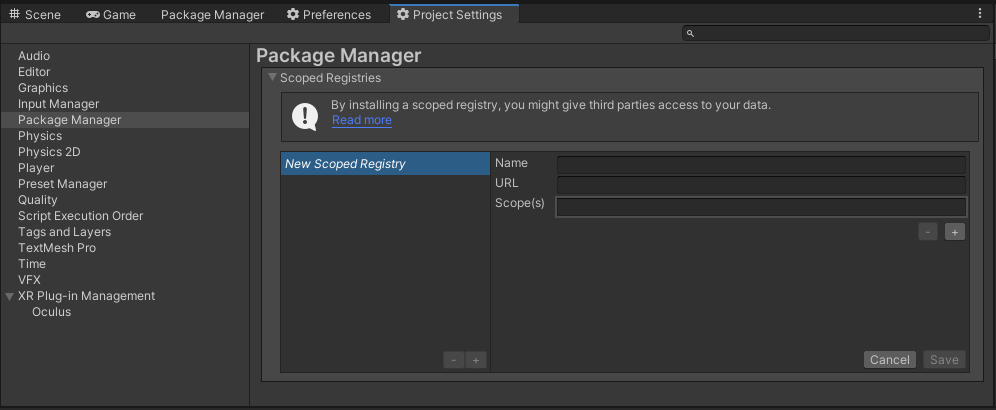
- Add the OpenUPM package registry:
- Name:
OpenUPM - URL:
https://package.openupm.com - Scope(s):
com.utilities
- Name:
- Open the Unity Package Manager window
- Change the Registry from Unity to
My Registries - Add the
Utilities.Encoder.Oggpackage
Via Unity Package Manager and Git url
[!WARNING] This repo has dependencies on other repositories! You are responsible for adding these on your own.
- Open your Unity Package Manager
- Add package from git url:
https://github.com/RageAgainstThePixel/com.utilities.encoder.ogg.git#upm
Documentation
Table of Contents
Recording Behaviour
Simply add the OggRecorderBehaviour to any GameObject to enable recording.
This will stream the recording directly to disk as it is recorded.
Audio Clip Extensions
Provides extensions to encode AudioClips to OGG encoded bytes.
Supports 8, 16, 24, and 32 bit sample sizes.
Encode OGG
var bytes = audioClip.EncodeToOggVorbis();
var bytes = await audioClip.EncodeToOggVorbisAsync();
Related Packages
Comments
No comments yet. Be the first!
Sign in to join the conversation
Sign In