Cu1uSFX
A package for easily adding sound effects to a project through a window, and playing them from anywhere in your code.
com.cu1us.cu1usfx 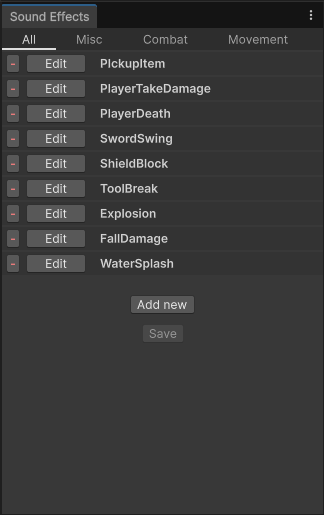
Install via UPM
Add to Unity Package Manager using this URL
https://www.pkglnk.dev/cu1usfx.git README Markdown
Copy this to your project's README.md

## Installation
Add **Cu1uSFX** to your Unity project via Package Manager:
1. Open **Window > Package Manager**
2. Click **+** > **Add package from git URL**
3. Enter:
```
https://www.pkglnk.dev/cu1usfx.git
```
[](https://www.pkglnk.dev/pkg/cu1usfx)README
Cu1uSFX
Easy-to-use Unity package that streamlines playing and creating sound effects.
📯 Features
- Convenient editor window where you can define any number of named sound effects, and group them by categories.
- Define sound effects with randomized volume, pitch, and any number of audio clips.
- Preview sound effects in the editor while creating them!
- Play these sound effects anywhere in your game with a single line of code.
Extras
- Play AudioClips from anywhere with the .Play() extension method.
- Sounds can be played globally, at a specific position, following a specific transform, and have their pitch/volume/position changed mid-playback.
- Define sound effects locally on objects in the inspector, or select from the global list using a dropdown.
⚙️ Installation
- In the Unity Editor, open the Package Manager (Window -> Package Manager)
- Click the large plus sign at the top
- "Install package from git URL..."
- Type in
https://github.com/Cu1us/Cu1uSFX.git - Done!
🔨 Usage
When the package is installed, open the SFX List through the Window/SFX List tab, and start creating sound effects! These can then be played from anywhere like this:
using Cu1uSFX;
public class Example : MonoBehaviour
{
    public void PlaySounds()
    {
        SFX.YourSound.Play();
        // OR
        SFXPlayer.Play(SFX.YourSound);
    }
}
You can also select sound effects through the inspector like this:
using Cu1uSFX;
public class SimpleSfxPlayer : MonoBehaviour
{
    [SerializeField] PredefinedSFX predefinedSfx; // Choose one of your defined sound effects from a dropdown in the inspector

    [SerializeField] SFXDefinition locallyDefinedSfx; // Define a new sound effect in the inspector for this object only, with its own audio clips, pitch, etc.

    public void PlaySounds()
    {
        predefinedSfx.Play();
        locallyDefinedSfx.Play();
    }
}
This will result in the inspector view below: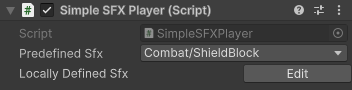
Need more info? Check out the quickstart guide: 📑 Quickstart
Overview, and how the package works internally: 📑 Overview
List of more advanced features: 📑 Tips and Tricks
📷 Screenshots
The SFX List window: (opened through Window -> SFX List, or by clicking the button on the SFX List asset)
SFX editing window: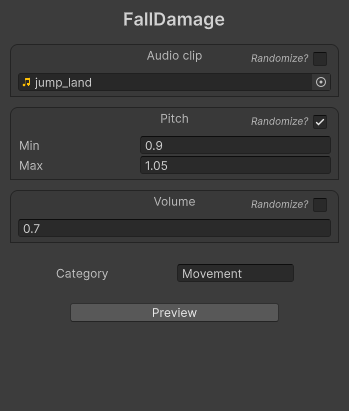
📜 License
This project is licenced under the GNU General Public License v3. See the LICENSE file for details.
Copyright © 2025 Måns Fritiofsson
No comments yet. Be the first!