

Datra is a comprehensive data management system for game development.
Unity Project
Download the source from GitHub
Download 0
README
Rendered from GitHubDatra
한국어 | English



Datra is a game data management system that uses C# Source Generators to automatically generate serialization code for CSV, JSON, and YAML data. Works seamlessly in both Unity and .NET environments.
Features
- Multiple Formats: CSV, JSON, YAML with auto-detection
- Zero Boilerplate: Source Generators eliminate manual serialization code
- Type Safety: Compile-time validation with strong typing
- Data References: Type-safe
DataRef<T>for cross-table references - Unity Integration: Built-in Editor window with Table/Form views
- Localization: Multi-language support with
LocaleRef - Advanced Types: Nested structs, polymorphic JSON, arrays, enums
Quick Start
1. Define Your Data Model
using Datra.Attributes;
using Datra.Interfaces;

[TableData("Characters.csv")]
public partial class CharacterData : ITableData<string>
{
    public string Id { get; set; }
    public string Name { get; set; }
    public int Level { get; set; }
    public int Health { get; set; }
}

[SingleData("GameConfig.json")]
public partial class GameConfigData
{
    public string GameName { get; set; }
    public int MaxLevel { get; set; }
}
2. Configure the Data Context
[assembly: DatraConfiguration("GameData",
    Namespace = "MyGame.Generated"  // Required
)]
3. Load and Use Data
var provider = new FileRawDataProvider("path/to/data");
var context = new GameDataContext(provider, new DataLoaderFactory());

await context.LoadAllAsync();

var hero = context.Character.GetById("hero_001");
var config = context.GameConfig.Get();
Installation
Unity
Add to Packages/manifest.json:
{
  "dependencies": {
    "com.penspanic.datra": "https://github.com/penspanic/Datra.git?path=Datra",
    "com.penspanic.datra.editor": "https://github.com/penspanic/Datra.git?path=Datra.Editor",
    "com.penspanic.datra.unity": "https://github.com/penspanic/Datra.git?path=Datra.Unity"
  }
}
.NET
Add project references:
<ProjectReference Include="path/to/Datra/Datra.csproj" />
<ProjectReference Include="path/to/Datra.Generators/Datra.Generators.csproj"
                  OutputItemType="Analyzer"
                  ReferenceOutputAssembly="false" />
Unity Editor
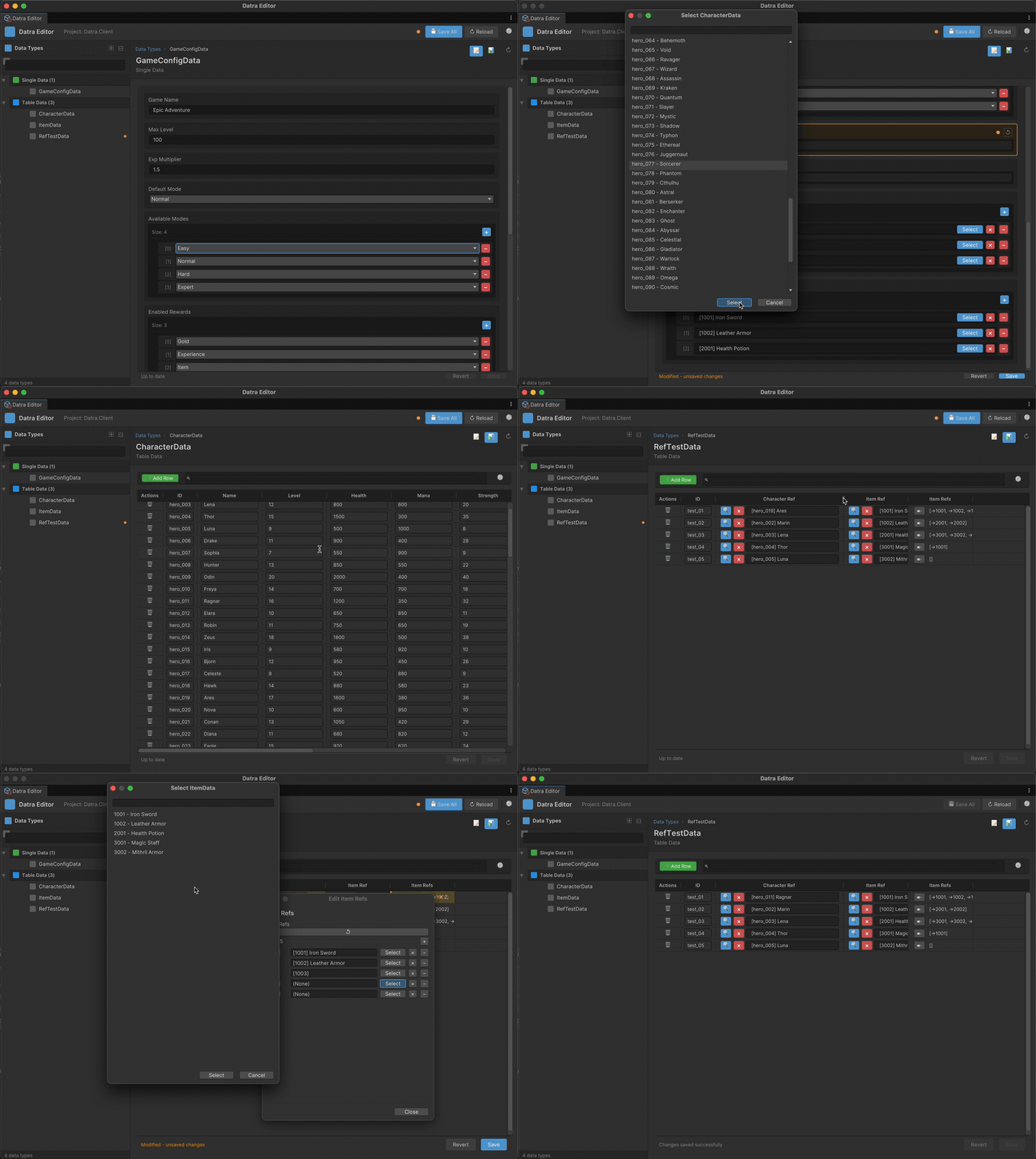
The Unity Editor window provides:
- Table View / Form View for data editing
- Real-time change tracking with save/revert
- Collection editors for List, Dictionary, arrays
- DataRef selectors with dropdown pickers
- Localization panel for multi-language editing
Open via: Window > Datra > Data Editor
Project Structure
Datra/
├── Datra/                  # Core runtime library
├── Datra.Generators/       # Source Generator (compile-time)
├── Datra.Analyzers/        # Roslyn Analyzers
├── Datra.Editor/           # Shared editor utilities
├── Datra.Unity/            # Unity packages (Runtime, Editor, Addressables)
├── Datra.Tests/            # Unit tests
└── Datra.SampleData/       # Sample data models
Documentation
- Features Guide - Detailed feature documentation
- Unity Guide - Unity integration guide
- Developer Guide - Internal development guide
License
MIT License - see LICENSE
Links
Versions 0
No versions tracked yet.
Dependencies 0
No dependencies.
Changelog 0 releases
No changelog entries yet. Run the admin Changelog & Version Scanner to pull from the repository's CHANGELOG.md.
Comments
No comments yet. Be the first!
Sign in to join the conversation
Sign In