Detailed Logs
Enhance Unity's debug logs with color formatting and caller information, making it easier to trace and debug issues. Automatically overrides default logging at runtime with zero configuration, while offering optional custom filters for selective log output and a lightweight configuration system—no external dependencies required.
com.jonathonoh.detailed-logs 
Install via UPM
Add to Unity Package Manager using this URL
https://www.pkglnk.dev/detailed-logs.git README Markdown
Copy this to your project's README.md

## Installation
Add **Detailed Logs** to your Unity project via Package Manager:
1. Open **Window > Package Manager**
2. Click **+** > **Add package from git URL**
3. Enter:
```
https://www.pkglnk.dev/detailed-logs.git
```
[](https://www.pkglnk.dev/pkg/detailed-logs)README
Overview
Default Unity log

Prettier Unity log
Why This Package?
I don't like dependencies on third party packages - or depdencies at all for that matter.
The only reason you will ever need to reference this package in your code is if you want to make a custom log filter and even those are pretty light weight.
Quick Start
Install (UPM)
In Unity, open the Package Manager
Window > Package Management > Package ManagerInstall Package from git URL
Package Manager > + (in top left) > Install Package from git URLPaste
https://github.com/JohnnyHowe/unity-detailed-logs.gitand press Install
(Recommended) If you want a specific version, use https://github.com/JohnnyHowe/unity-detailed-logs.git#<version>
Usage
The logger will automatically override the default at runtime. No configuration needed.
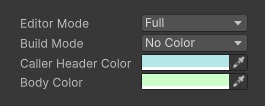
Custom Configuration
Assets > Create > Detailed Log Configuration
Ensure this file is in a Resources folder and that there is only one.
- Ensure file is automatically put into Assets/Resources
- Give warning/error when user tries to create a second
This file lets you adjust how and when the detailed logger takes over.
Log Filtering
The detailed logger can handle filtering out logs based on.
- Caller
- Log content
- Log type
To create a filter, have a class inherit from JonathonOH.Unity.DetailedLogs.DetailedLogFilter and call RegisterFilter onstartup.
- Make registering easier
- Make filter an interface, not an abstract class
Example:
public class ExampleLogFilter : DetailedLogFilter
{
	/// <summary>
	/// Registers the filter in the logger
	/// </summary>
	[RuntimeInitializeOnLoadMethod(RuntimeInitializeLoadType.BeforeSceneLoad)]
	private static void CreateFilterObject()
	{
		RegisterFilter(new ExampleLogFilter());
	}

	/// <summary>
	/// Hide Debug.Log statements from MyNamespace.MyClassThatIWantToHideLogsFor
	/// </summary>
	public override bool ShouldHideLog(Type caller, LogType logType, string format)
	{
		// Don't filter if we don't know caller
		if (caller == null)
		{
			return false;
		}

		// Only filter Debug.Logs
		if (logType != LogType.Log)
		{
			return false;
		}

		// Hide logs for a given class
		return caller.FullName.StartsWith("MyNamespace.MyClassThatIWantToHideLogsFor");
	}
}
No comments yet. Be the first!