EasyTangibleTable
EasyTangibleTable is a lightweight Unity asset for building interactive tangible table applications using TUIO. Easily detect, track, and manage fiducial markers (tags) to create interactive surfaces, installations, and multi-object experiences. Note: Requires a TUIO source (such as reacTIVision, Displax, or other tracking systems) to send tag data over OSC.
com.ireshsampath.unity-assets.easy-tangible-table 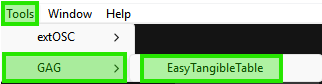
Install via UPM
Add to Unity Package Manager using this URL
https://www.pkglnk.dev/easy-tangible-table.git README Markdown
Copy this to your project's README.md

## Installation
Add **EasyTangibleTable** to your Unity project via Package Manager:
1. Open **Window > Package Manager**
2. Click **+** > **Add package from git URL**
3. Enter:
```
https://www.pkglnk.dev/easy-tangible-table.git
```
[](https://www.pkglnk.dev/pkg/easy-tangible-table)Dependencies (1)
README
🧩 EasyTangibleTable for Unity




🚀 Overview
EasyTangibleTable is a lightweight Unity package for building tangible table applications using the TUIO protocol.
It allows Unity apps to detect, track, and interact with fiducial markers (tags) on interactive surfaces such as touch tables and projection systems.
The package provides:
- a clean event-driven API
- a component-based tag controller system
- an extensible architecture for interactive installations and R&D projects
⚙️ Features
- ✅ Detect tangible tags using TUIO protocol
- ✅ Track tag position, rotation, and movement
- ✅ Event-driven architecture
- ✅ Create custom tag behaviors
- ✅ Support for multiple tags simultaneously
- ✅ Built-in target alignment detection
- ✅ Clean EasyTT API
- ✅ Designed for interactive installations and R&D prototypes
Perfect for:
🧩 Tangible user interfaces 🎮 Interactive installations 🧪 R&D prototypes 🏛️ Museum installations 🎥 Multi-object interactive demos
📦 Installation
EasyTangibleTable requires extOSC to receive TUIO messages.
Follow the installation steps in order.
1️⃣ Install extOSC (Required) via Unity Package Manager (Git URL)
- Open Unity → Window → Package Manager
- Click + → Add package from Git URL
- Paste the following: https://github.com/IreshSampath/extOSC.git#upm
- Click Install
2️⃣ Install EasyTangibleTable via Unity Package Manager (Git URL)
- Open Unity → Window → Package Manager
- Click + → Add package from Git URL
- Paste the following: https://github.com/IreshSampath/unity-assets-easy-tangible-table.git
- Click Install
🧰 Import the Samples
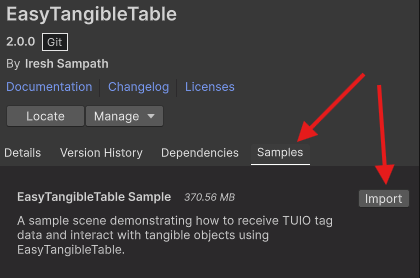
After installing the package:
- 1️⃣ Open Package Manager
- 2️⃣ Select EasyTangibleTable
- 3️⃣ Go to the Samples tab
- 4️⃣ Click Import
🎮 Available Sample Prefabs

Inside the imported sample, you will find two prefabs.
EasyTangibleTable
- Receiving TUIO tag and touch data
- Displaying tag details
- Debug logging
⚠️ EasyUIConsole is required for debug output.
EasyTangibleTable Demo
This prefab demonstrates example tag behaviours and abobe bsic functaionalties.
Example tag controllers included:
TagAController
TagBController
TagCController
TagDController
These show how to create custom tag interactions, such as:
- rotation-based UI states
- button interactions
- color selection
- alignment triggers
⚠️ EasyUIConsole is required for debug output.
3️⃣ Import EasyUIConsole
⚠️ This sample requires EasyUIConsole to display the logs.
Without EasyUIConsole the system still works, but debug messages will not appear.
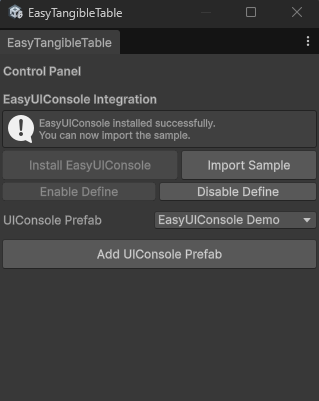
🧠 Basic Usage
EasyTangibleTable provides a simple API via EasyTT.
Example
using GAG.EasyTangibleTable;

void OnEnable()
{
    EasyTT.TagAligned += OnTagAligned;
    EasyTT.TagRemoved += OnTagRemoved;
}

void OnDisable()
{
    EasyTT.TagAligned -= OnTagAligned;
    EasyTT.TagRemoved -= OnTagRemoved;
}

void OnTagAligned(int tagID)
{
    Debug.Log($"Tag aligned: {tagID}");
}

void OnTagRemoved(int tagID)
{
    Debug.Log($"Tag removed: {tagID}");
}
🎮 Create Custom Tag Behaviours
Each tangible tag can have its own controller script.
EasyTangibleTagControllerBase
Example
using GAG.EasyTangibleTable;
using UnityEngine;

public class MyCustomTagController : EasyTangibleTagControllerBase
{
    protected override void OnTargetReached()
    {
        Debug.Log("Tag reached target!");
    }

    protected override void OnTargetDeparted()
    {
        Debug.Log("Tag left target!");
    }
}
Attach this script to your tag prefab.
📡 Available Events
EasyTangibleTable exposes multiple events:
EasyTT.TagPlaced
EasyTT.TagUpdated
EasyTT.TagMoved
EasyTT.TagRotated
EasyTT.ActiveTagsUpdated
EasyTT.TagAligned
EasyTT.TagAlignmentLost
EasyTT.TagRemoved
These events allow you to build complex interactions such as:
- UI triggers
- object manipulation
- multi-tag interactions
- experience control
🎨 Example Use Cases
EasyTangibleTable can be used for:
- tangible games
- interactive tables
- educational installations
- museum exhibits
- research experiments
📜 License
IT License — Free for commercial and personal use.
🙏 Thank You
Thanks for using EasyTangibleTable!
- Feel free to contribute
⭐ Star the repo 🐞 Report issues 🚀 Suggest improvements
👤 Author
Iresh Sampath
No comments yet. Be the first!