EnumDict

Dictionary type with an entry for each value of an enum
dev.comradevanti.enum-dict Install via UPM
Add to Unity Package Manager using this URL
https://www.pkglnk.dev/enum-dict.git 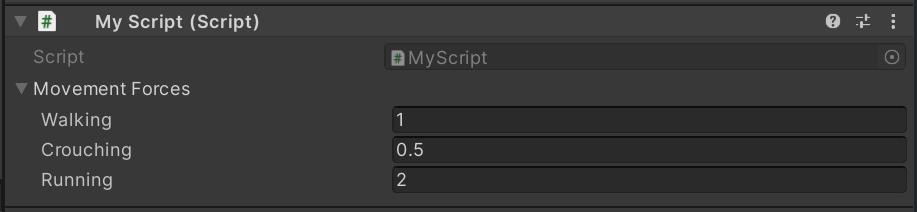
README Markdown
Copy this to your project's README.md

## Installation
Add **EnumDict** to your Unity project via Package Manager:
1. Open **Window > Package Manager**
2. Click **+** > **Add package from git URL**
3. Enter:
```
https://www.pkglnk.dev/enum-dict.git
```
[](https://www.pkglnk.dev/pkg/enum-dict)README
EnumDict

A Unity package for associating a value with each case of an enum. Allows setting values in the inspector and serialization.
Installation
The quickest way is to install via OpenUPM
using openupm add dev.comradevanti.enum-dict.
Or install manually
as git dependency
from https://github.com/ComradeVanti/UnityEnumDict.git or download as zip
and import locally.
Works for Unity 2020.x and upwards.
Usage
Say, you want to associate a movement-force for a rigidbody with each possible movement state. You could do this by first defining an enum for it like this.
public enum MovementState
{

    Walking,
    Crouching,
    Running

}
Next create a variable for the EnumDict in your script. All serializable types
are valid, such as strings, serializable classes and structs or in this case,
floats.
public class MyScript : MonoBehaviour
{

    public EnumDict<MovementState, float> movementForces;

}
You can then edit it from the inspector.
To access the value for a specific enum-case, use the indexer syntax.
// 0.5
var force = movementForces[MovementState.Crouching];
Comments
No comments yet. Be the first!
Sign in to join the conversation
Sign In