Figma Importer
Figma Importer is a Unity package that allows you to import Figma designs into Unity.
com.vadimagamov.figmaimporter 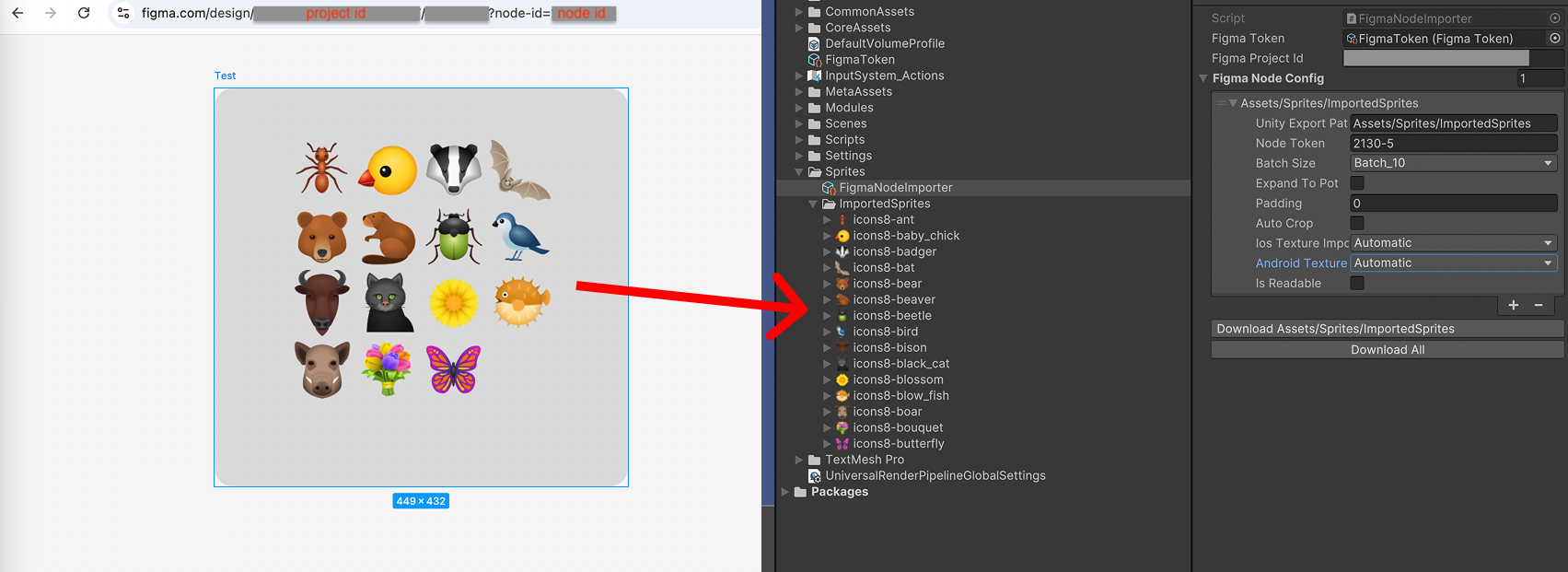
Install via UPM
Add to Unity Package Manager using this URL
https://www.pkglnk.dev/figmaimporter.git README Markdown
Copy this to your project's README.md
Style
Preview 
## Installation
Add **Figma Importer** to your Unity project via Package Manager:
1. Open **Window > Package Manager**
2. Click **+** > **Add package from git URL**
3. Enter:
```
https://www.pkglnk.dev/figmaimporter.git
```
[](https://www.pkglnk.dev/pkg/figmaimporter)Dependencies (2)
README
Figma to Unity importer
Simple tool for importing images from Figma to Unity. Download images from given Figma file and save them to the specified folder.
Install
Add git package https://github.com/vadim-agamov/figma-importer.git to Package Manager
Configuration
Figma API token
Add personal access token: Create -> FigmaImporter -> Token.
Do not forget to exclude token from public repository
Import settings
Create config with import settings. Create -> FigmaImporter -> Node Importer
- Figma Project Id - id of the Figma project
- Figma Token - reference to figma token config
- Unity Export Path - path to the folder where images will be saved in Unity project starting from Assets folder: Assets/..
- Node Token - token of the node that holds images you want to import
- Batch size - number of images to download in one request. Figma API could return error in case you request of too many images at once
- Ios Texture Importer,Android Texture Importer - texture import format
Post Processing
- Expand to Pot - increase image size to nearest power of two
- Padding - amount of pixels to add around the image
- Auto crop - crop image to the non-transparent content area
- ResizeTo - set image size to the specified value and copy image to the center
Usage
Locate config in inspector and press "Download" / "Download All" button
No comments yet. Be the first!