Install via UPM
Add to Unity Package Manager using this URL
https://www.pkglnk.dev/finder.git README Markdown
Copy this to your project's README.md
Style
Preview 
## Installation
Add **Finder** to your Unity project via Package Manager:
1. Open **Window > Package Manager**
2. Click **+** > **Add package from git URL**
3. Enter:
```
https://www.pkglnk.dev/finder.git
```
[](https://www.pkglnk.dev/pkg/finder)README
Finder




Find Asset in Unity.
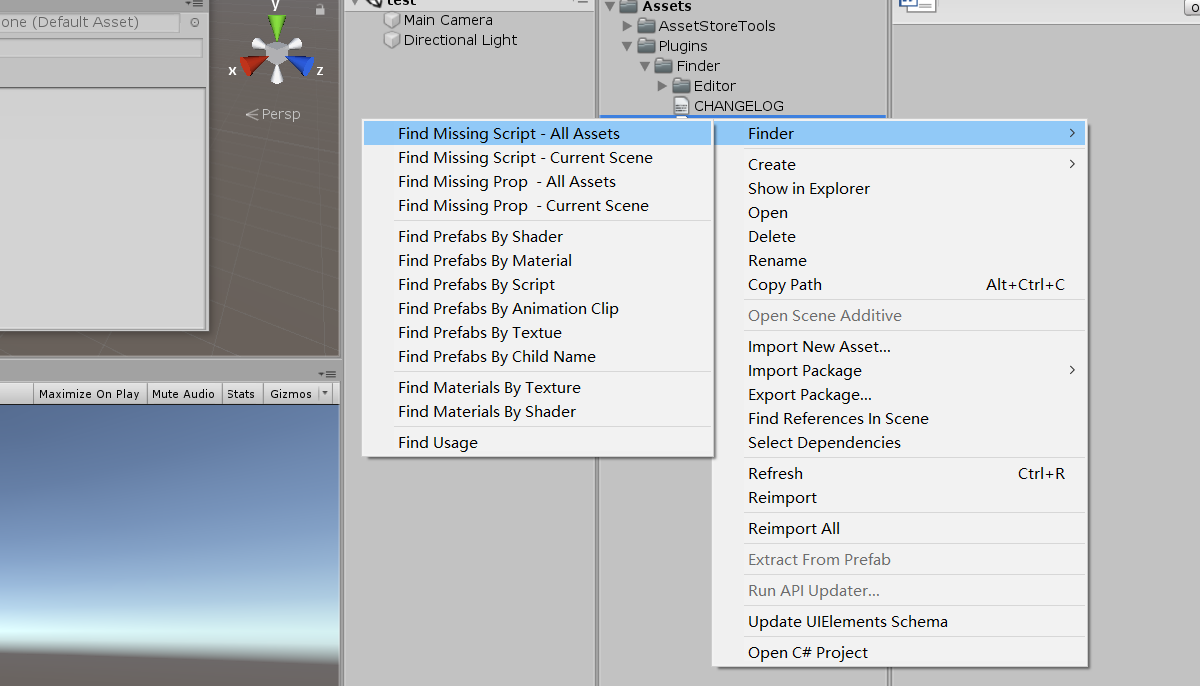
Shotscreen
Requirement
- Unity 2018.4+
Install
- By NPM (Ease upgrade in Package Manager UI)Recommend
Find the manifest.json file in the Packages folder of your project and edit it to look like this:
{
  "scopedRegistries": [
    {
      "name": "My Registry",
      "url": "https://registry.npmjs.org",
      "scopes": [
        "com.litefeel"
      ]
    }
  ],
  "dependencies": {
    "com.litefeel.finder": "1.1.0",
    ...
  }
}
- By git url
Find the manifest.json file in the Packages folder of your project and edit it to look like this:
{
  "dependencies": {
    "com.litefeel.finder": "https://github.com/litefeel/Unity-Finder.git#1.1.0",
    ...
  }
}
Support
- Create issues by issues page (https://github.com/litefeel/Unity-Finder/issues)
- Send email to me: litefeel@gmail.com
No comments yet. Be the first!