AIDrivenFramework
A modular framework for safely integrating local LLMs into Unity projects.
com.hatomaru.ai.framework 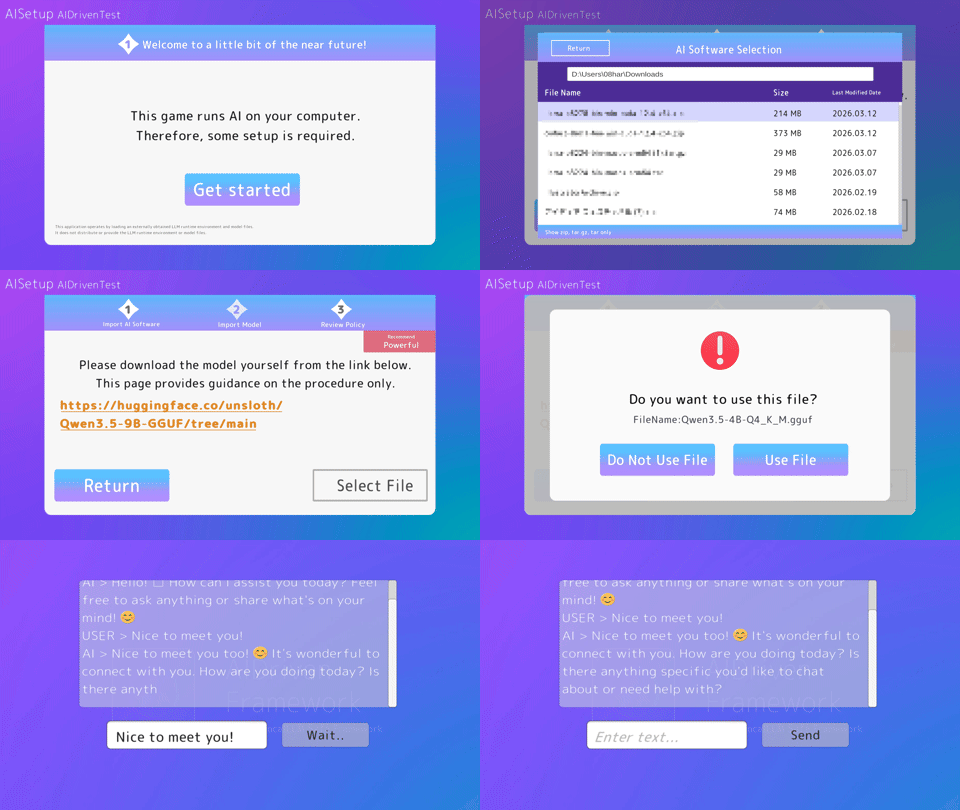
Install via UPM
Add to Unity Package Manager using this URL
https://www.pkglnk.dev/framework.git?path=src/AIDrivenFramework README Markdown
Copy this to your project's README.md

## Installation
Add **AIDrivenFramework** to your Unity project via Package Manager:
1. Open **Window > Package Manager**
2. Click **+** > **Add package from git URL**
3. Enter:
```
https://www.pkglnk.dev/framework.git?path=src%2FAIDrivenFramework
```
[](https://www.pkglnk.dev/pkg/framework)README
AIDrivenFramework 🚀
Unity × Local LLM Safe Framework
A setup & execution framework for safely integrating local LLMs into Unity.


🎥 Introduction Video
🇯🇵 日本語READMEはこちら
🎞 Demo
Model Setup Demo
🛠 System Architecture
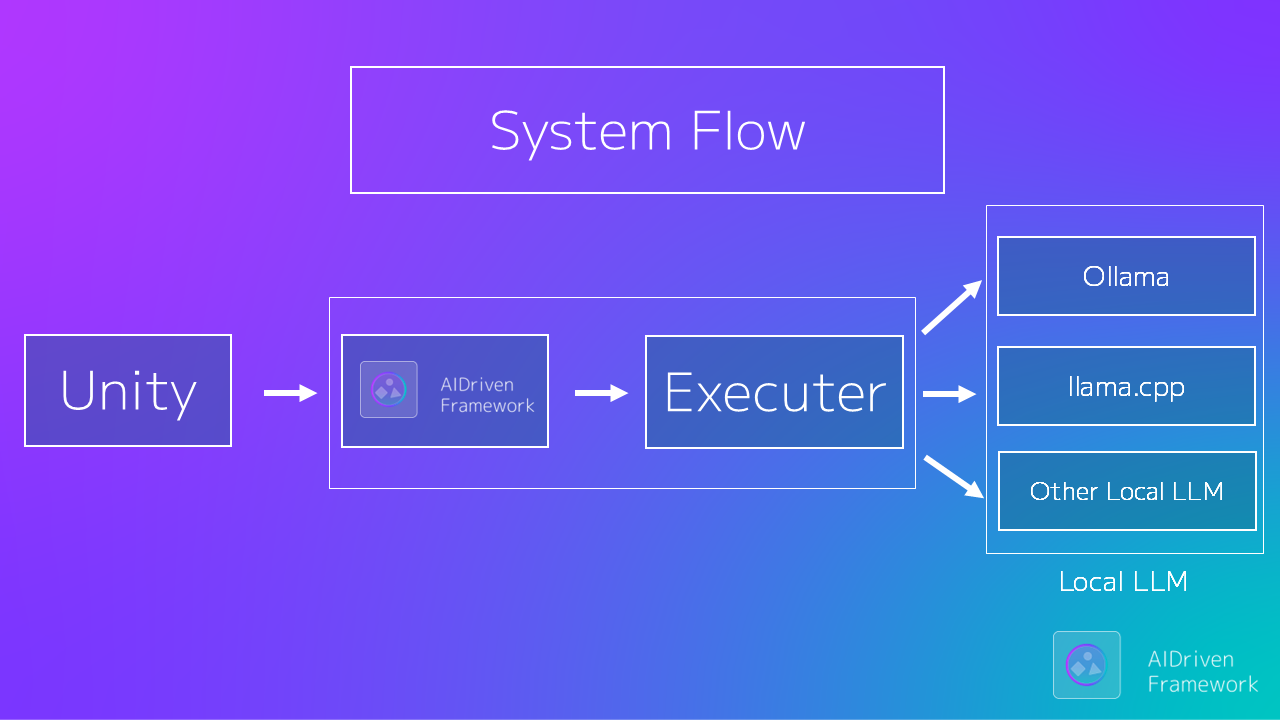
AIDrivenFramework connects Unity games with Local LLM environments through a flexible Executor architecture.
✨ Main Features
- 🎯 Built for Unity: Optimized for Play Mode, runtime builds, and real game workflows.
- 💬 Streaming output support: Receive and display generated text sequentially. Can be used for chat and interactive effects.
- 🛠 Integrated Setup Wizard: No Ollama required - Easy installation via GUI.
- 🔒 Safe-by-Design: Prevents invalid states and guarantees model readiness before generation.
- ⚡ Automatic Initialization: Prepares the LLM environment automatically on Play.
- 🧩 Modular Executors: Seamlessly switch between CLI, HTTP, or custom backends.
- 🧼 Clean & Managed Execution: Handles process lifecycle and returns pure assistant output.
Unity interacts only with a minimal, clean API.
⚡ Quick Start
1️⃣ Install
Add via Unity Package Manager:
https://github.com/hatomaru/AIDrivenFramework.git?path=src/AIDrivenFramework
2️⃣ Prepare Local LLM (If not using Ollama)
Download separately:
llama.cpp.ggufmodel file
(Not included in this repository)
[!TIP] Use pre-built llama.cpp binaries from https://github.com/ggerganov/llama.cpp/releases
Recommended starting model: https://huggingface.co/bartowski/Llama-3.1-8B-Instruct-GGUF (Q4_K_M)
3️⃣ Initialize
using AIDrivenFW.API;

await AIDrivenInitializer.Initialize();
If the environment is not prepared:
- The setup scene opens automatically
- Requires optional AISetup component
[!TIP]
IsPrepared()accepts an optionalGenAIinstance.Passing an existing instance prevents the LLM process from being terminated after the health check, avoiding double model loading and improving startup performance.
4️⃣ Generate
using AIDrivenFW.API;

var genAI = new GenAI();
var result = await genAI.Generate("Hello AI");
Debug.Log(result);
You're ready. 🎉
Supported LLM runtimes
✔ Ollama ✔ llama.cpp CLI ✔ llama.cpp server
🧙 Setup Wizard (AISetup Component)
The optional AISetup package provides a setup wizard for beginners.
- Automatic detection of unconfigured states
- llama.cpp executable selection GUI
- .gguf model file selection GUI
[!TIP] One-click installation of the sample scene (optional)
Manual launch from the menu:
Tools > AIDrivenFW > Optional Packages
It can be installed from the setup window (optional dependency).
This greatly simplifies the initial setup, especially recommended for beginners.
🎮 Sample Games (Coming Soon)
Currently under development.
They will be included in the Example package soon.
| Sample | Name | Overview | AI Features You Can Experience |
|---|---|---|---|
| 1 | AI NPC Roleplay Chat | A roleplay chat where you can freely talk with AI NPCs | NPC personality and conversation history management |
| 2 | Guess the Topic | A game where you guess the topic the AI is thinking of by asking questions | Reasoning and question answering |
| 3 | Dialogue Battle | A game where you overcome NPCs through conversation | State management and dialogue gameplay |
| 4 | AI Story Generator | A game where you generate stories together with AI | Text generation and context management |
🎯 Minimal Public API (V1)
GenAI.Generate(string input, GenAIConfig config = null);
AIDrivenInitializer.Initialize();
GenAIConfig;
Everything else is internal.
🧠 Why AIDrivenFramework?
Unlike simple wrappers, this framework:
- Prevents generation before model load
- Prevents missing process startup
- Guarantees execution safety at API level
- Supports Executor replacement
Designed for long-term Unity × AI architecture, not just quick calls.
🔁 Executor Replacement (Advanced)
You can replace the execution layer:
GenAI.SetExecutor(customExecutor);
Default implementation:
LlamaProcessExecutor
This allows HTTP executors or custom process handlers.
📦 Installation Options
✅ OpenUPM (Recommended)
openupm add com.hatomaru.ai.framework
🔧 Required Dependencies
The following packages are required:
🖥 System Requirements
Minimum
- Unity 2022.3 LTS or later
- Windows 10 / 11 (64-bit) or macOS
- RAM: 8 GB or more
Recommended
- RAM: 16 GB or more
- GPU VRAM: 8 GB or more (depending on the AI model used)
💬 Community
Questions? Experiments? Unity × Local LLM discussion?
👉 Join CommunityGuild
https://discord.gg/dfzwqCHSW2
⚖ License
- Framework core: MIT License
- Models & runtimes: Not included
- Follow each official distribution license
🎮 Target Users
- Unity developers exploring local LLM
- Developers concerned about execution safety
- Experimental AI × Game creators
- OSS contributors
✍ From the Author
AIDrivenFramework was created to provide
a safe entry point for local LLM integration in Unity.
Issues, PRs, and feedback are welcome.# AIDrivenFramework 🚀
Unity × Local LLM Safe Framework
No comments yet. Be the first!