
Fast and memory efficient implementation of C#'s ISet for enums, storing data as bit masks.
Add to Unity Package Manager
Paste this URL into Unity's Window › Package Manager › + › Add package from git URL,
or click Install.
https://www.pkglnk.dev/gilzoide-enum-bitset.git README
Rendered from GitHubEnumBitSet

Fast and memory efficient implementation of C#'s ISet for enums, storing data as bit masks:
EnumBitSet32<T>: usesEnumBitMask32<T>as data, supporting enums with up to 32 values.EnumBitSet64<T>: usesEnumBitMask64<T>as data, supporting enums with up to 64 values.
Bit masks are readonly structs implementing IReadOnlySet for enums:
EnumBitMask32<T>: usesintas data, supporting enums with up to 32 values.EnumBitMask64<T>: useslongas data, supporting enums with up to 64 values.
All implementations support enums both with and without [Flags] attributes.
Conversions between enum values and integer types are non-boxing where possible by using unsafe utilities from Unity 2018+, .NET 5+ or .NET Core 3.0+
Installing the package
This package is available on the openupm registry and can be installed using the openupm-cli:
openupm add com.gilzoide.enum-bitset
Otherwise, you can install directly using the Unity Package Manager with the following URL:
https://github.com/gilzoide/unity-enum-bitset.git#1.1.0
Unity 2020+ Serialization and Property Drawer
In Unity 2020+, EnumBitSets are serializable directly as generic classes.
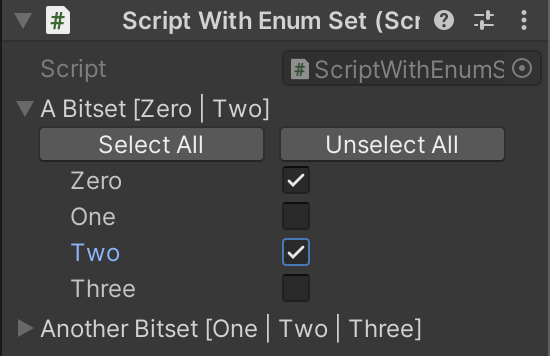
There's also a custom property drawer for selecting the containing enums:
using System;
using UnityEngine;
using Gilzoide.EnumBitSet;

public enum TestEnum
{
    Zero, One, Two, Three
}

[Flags]
public enum TestEnumFlags
{
    Zero = 1 << 0, One = 1 << 1, Two = 1 << 2, Three = 1 << 3
}

public class ScriptWithBitSet : MonoBehaviour
{
    public EnumBitSet32<TestEnum> aBitset;
    public EnumBitSet64<TestEnumFlags> anotherBitset;
}
Unity 2019- Serialization and Property Drawer
In Unity 2019 and earlier, create non-generic classes that inherit from the generic ones:
using System;
using UnityEngine;
using Gilzoide.EnumBitSet;

public enum TestEnum
{
    Zero, One, Two, Three
}

[Flags]
public enum TestEnumFlags
{
    Zero = 1 << 0, One = 1 << 1, Two = 1 << 2, Three = 1 << 3
}

[Serializable]
public class TestEnumBitSet32 : EnumBitSet32<TestEnum> {}

[Serializable]
public class TestEnumFlagsBitSet64 : EnumBitSet64<TestEnumFlags> {}

public class ScriptWithBitSet : MonoBehaviour
{
    public EnumBitSet32<TestEnum> aBitset;
    public EnumBitSet64<TestEnumFlags> anotherBitset;
}
For the custom Property Drawer, the same applies.
Create a class that inherits from EnumBitSetPropertyDrawer:
using UnityEditor;
using Gilzoide.EnumBitSet.Editor;

[CustomPropertyDrawer(typeof(TestEnumBitSet32))]
public class TestEnumBitSet32PropertyDrawer : EnumBitSetPropertyDrawer {}
Versions 1
- v1.1.0 current
Dependencies 0
No dependencies.
Changelog 0 releases
No changelog entries yet. Run the admin Changelog & Version Scanner to pull from the repository's CHANGELOG.md.
README Markdown
Copy this to your project's README.md

## Installation
Add **Enum BitSet** to your Unity project via Package Manager:
1. Open **Window > Package Manager**
2. Click **+** > **Add package from git URL**
3. Enter:
```
https://www.pkglnk.dev/gilzoide-enum-bitset.git
```
[](https://www.pkglnk.dev/pkg/gilzoide-enum-bitset)Embed badge README snippet
[](https://www.pkglnk.dev/pkg/gilzoide-enum-bitset)<a href="https://www.pkglnk.dev/pkg/gilzoide-enum-bitset"><img src="https://www.pkglnk.dev/badge/gilzoide-enum-bitset.svg" alt="pkglnk installs"></a>https://www.pkglnk.dev/badge/gilzoide-enum-bitset.svgComments
No comments yet. Be the first!
Sign in to join the conversation
Sign In