Gsplat
Render 3D Gaussian Splatting assets in Unity with seamless integration into your existing rendering pipeline. Gsplat supports Built-in, URP, and HDRP renderers, correctly blending Gaussians with transparent meshes based on depth. Features include PLY file support with SH degrees 0-3, orthographic projection, MSAA compatibility, and XR support across multiple render modes.
wu.yize.gsplat 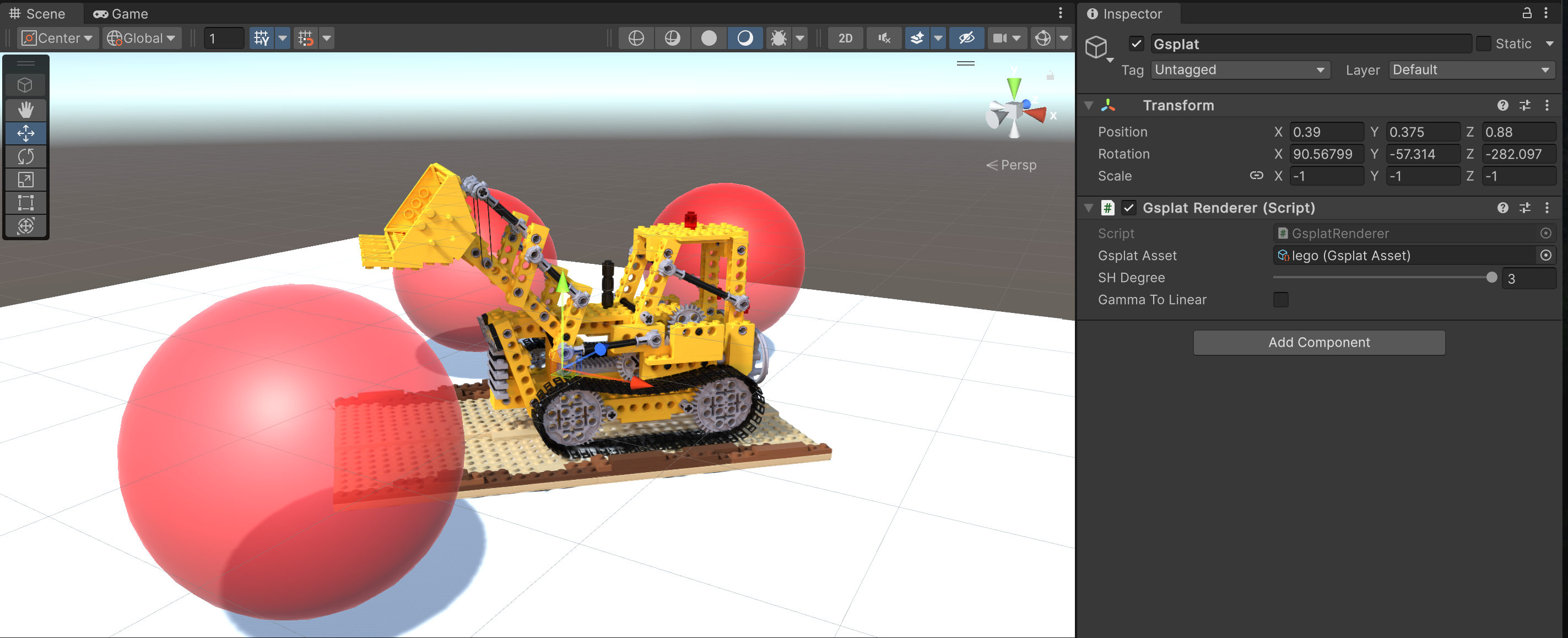
Install via UPM
Add to Unity Package Manager using this URL
https://www.pkglnk.dev/gsplat.git README Markdown
Copy this to your project's README.md

## Installation
Add **Gsplat** to your Unity project via Package Manager:
1. Open **Window > Package Manager**
2. Click **+** > **Add package from git URL**
3. Enter:
```
https://www.pkglnk.dev/gsplat.git
```
[](https://www.pkglnk.dev/pkg/gsplat)Dependencies (1)
README
Gsplat


A Unity package for rendering 3D Gaussian Splatting (3DGS). Supports Unity 2021 and later.
The 3DGS rendering pipeline design of this package is inspired by PlayCanvas, which treats 3DGS objects similarly to transparent meshes that use a custom shader. With this approach, only an additional sorting pass needs to be inserted into each camera's command buffer. This design makes it easier to integrate 3DGS rendering into an existing pipeline, allows the draw calls for 3DGS objects to be correctly inserted into the existing rendering queue for transparent meshes (based on their bounding boxes), rather than rendering all 3DGS objects to a separate render texture as is done in aras-p/UnityGaussianSplatting.
That sounds great, but at what cost?
Most 3DGS assets are trained in Gamma space, following the official implementation. This means that the alpha blending for the Gaussians is also performed in Gamma space. Since there is no longer an additional render texture that would allow us to convert the color space after the alpha blending of 3DGS, you must ensure your project's color space (Edit > Project Settings > Player > Other Settings > Rendering > Color Space) is set to "Gamma" for the 3DGS assets to be rendered correctly (be aware that HDRP doesn't support Gamma mode). For projects using a linear color space, you must retrain the 3DGS asset with linear-space images. While this plugin offers a Gamma To Linear option as a workaround, converting the color space before alpha blending leads to incorrect results and will lower the 3DGS rendering quality.
Highlights
Supports Built-in Render Pipeline (BiRP), URP and HDRP
Gaussians can be correctly blended with transparent meshes based on their bounding boxes
Supports reading & rendering PLY files with SH degrees 0-3
Supports orthographic projection
Compatible with MSAA
Compatible with XR
XR Render Mode BiRP URP HDRP Multi-pass ✓ ✓ ✗ Single Pass Instanced ✗ ✓ ✗
Platform Compatibility
The sorting pass, built upon b0nes164/GPUSorting, requires wave / subgroups operations which are only available in D3D12, Metal or Vulkan graphics APIs. WebGPU supports the subgroup operations but Unity has not implemented it. Anything using other graphics APIs will not work. I have only tested on Windows, Mac and Android, but the compatibility of this package should be similar to aras-p/UnityGaussianSplatting.
Usage
Install
After cloning or downloading this repository, open your Unity project (or create a new one). Navigate to Window > Package Manager, click the + button, select Install package from disk..., and then choose the package.json file from this repository.
Setup
First, ensure your project is using a supported Graphics API. For Windows: in Edit > Project Settings > Player > Other Settings, uncheck Auto Graphics API for Windows. Then, in the Graphics APIs for Windows list, add Vulkan or Direct3D12 and remove any other options. Unity will require a restart to switch the Graphics API. You may need to perform similar steps for other platforms.
Note that for Android, you also need to uncheck Apply display rotation during rendering in Player > Settings for Android > Other Settings > Vulkan Settings, as this package currently does not support rendering in the native display orientation.
The next steps depend on the Render Pipeline you are using:
- BiRP: Does not need any extra setup.
- URP: Add
Gsplat URP Featureto the URP renderer settings.- Find the
Universal Renderer Datayour project is using, click theAdd Renderer Featurebutton, and chooseGsplat URP Feature. - If you are using Unity 6 or later, the Render Graph "Compatibility Mode" in URP settings must be turned off!
- Find the
- HDRP: Add
Custom Passvolume object in your scene and aGsplat HDRP Passentry to it. The injection Point should be set toBefore Transparent.
Import Assets
Copy or drag & drop the PLY file anywhere into your project's Assets folder. The package will then automatically read the file and import it as a derived class of Gsplat Asset. The package supports two compression modes for the asset: Uncompressed and Spark (packed). The default mode is Spark, which is inspired by spark.js. You can change the compression mode in the inspector of the imported Gsplat Asset.
Add Gsplat Renderer
Create or choose a game object in your scene, and add the Gsplat Renderer component on it. Point the Gsplat Asset field to one of your imported Gsplat Assets. Then it should appear in the viewport.
The SH Degree option sets the order of SH coefficients used for rendering. The final value is capped by the Gsplat Asset's SH Bands.
The Gamma To Linear option is offered as a workaround to render Gamma Space Gsplat Assets in a project using the Linear Space. This will degrade the rendering quality, so changing the color space of the project or retraining the 3DGS asset is the recommended approach. If your project uses a linear color space and you do not wish to retrain your 3DGS assets, it is recommended to use aras-p/UnityGaussianSplatting.
The Brightness option allows post-hoc scaling of the Gsplat Asset's brightness. This is functional regardless of color space choices, but will degrade quality if the project and assets are in Gamma Space. This can be most smoothly controlled via the Log Brightness slider.
The Async Upload option enables streaming data from RAM to VRAM, which can help reduce lags when loading the GsplatRenderer or setting its enable property to true. When enabled, the renderer can optionally draw before upload completes (Render Before Upload Complete), which will render the asset with whatever data has been uploaded so far.
Additional Documentation
Project Using Gsplat
- HiFi-Human/DynGsplat-unity - A Unity package for rendering and playing dynamic gaussian splatting sequences
License
This project is released under the MIT license. It is built upon several other open-source projects:
- playcanvas/engine, MIT License (c) 2011-2024 PlayCanvas Ltd
- aras-p/UnityGaussianSplatting, MIT License (c) 2023 Aras Pranckevičius
- b0nes164/GPUSorting, MIT License (c) 2024 Thomas Smith
- sparkjsdev/spark, MIT License (c) 2025 WORLD LABS TECHNOLOGIES, INC.
No comments yet. Be the first!