Hidden Object Finder!
Find hidden Objects in the Unity Editor.
com.greenbamboogames.hiddenobjectfinder 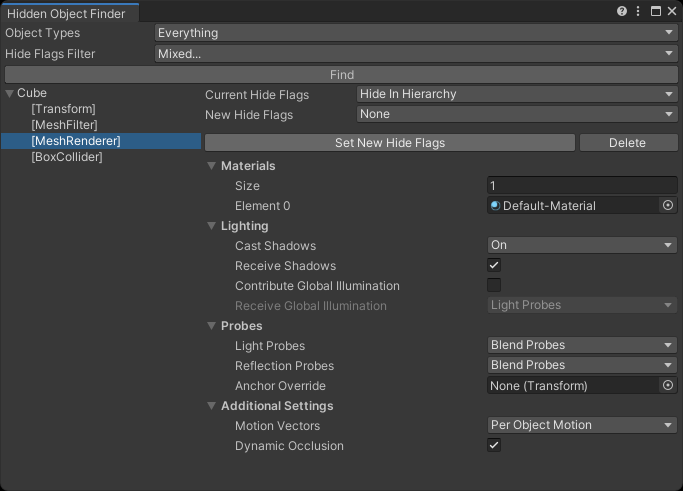
Install via UPM
Add to Unity Package Manager using this URL
https://www.pkglnk.dev/hiddenobjectfinder.git README Markdown
Copy this to your project's README.md

## Installation
Add **Hidden Object Finder!** to your Unity project via Package Manager:
1. Open **Window > Package Manager**
2. Click **+** > **Add package from git URL**
3. Enter:
```
https://www.pkglnk.dev/hiddenobjectfinder.git
```
[](https://www.pkglnk.dev/pkg/hiddenobjectfinder)README
Unity Hidden Object Finder
Find hidden Obejcts in the Unity Editor.
Supported Unity Version
Unity 2019.4 and later.
Installation

Install this package via OpenUPM, or clone this repository directly into the Packages folder of your project.
How to use
Open the Hidden Object Finder tool window from the menu Tools/Bamboo/Hidden Object Finder.
Use the Object Types option to set the types of objects you want to find, and use the Hide Flags Filter option to set which types of hidden flags to search for. Then click the Find button to display the search results on the left side of the window. After selecting a search result, you can preview and edit the object in the right panel of the window.
Note: The window does not automatically refresh the list of search results. If you modify the object's hidden flags or delete an object, you need to perform the search again to refresh the list.
API
You can call the static methods of the GBG.HiddenObjectFinder.Editor.HiddenObjectFinder class to find hidden objects through a script.
No comments yet. Be the first!