Net Core Networking Sockets
A lightweight Unity client for NetCoreServer that enables TCP, UDP, and SSL networking with minimal garbage collection overhead. Supports async send/receive operations without blocking the main thread and works across Editor, Android, iOS, and Windows platforms.
com.deml.netcore-networking 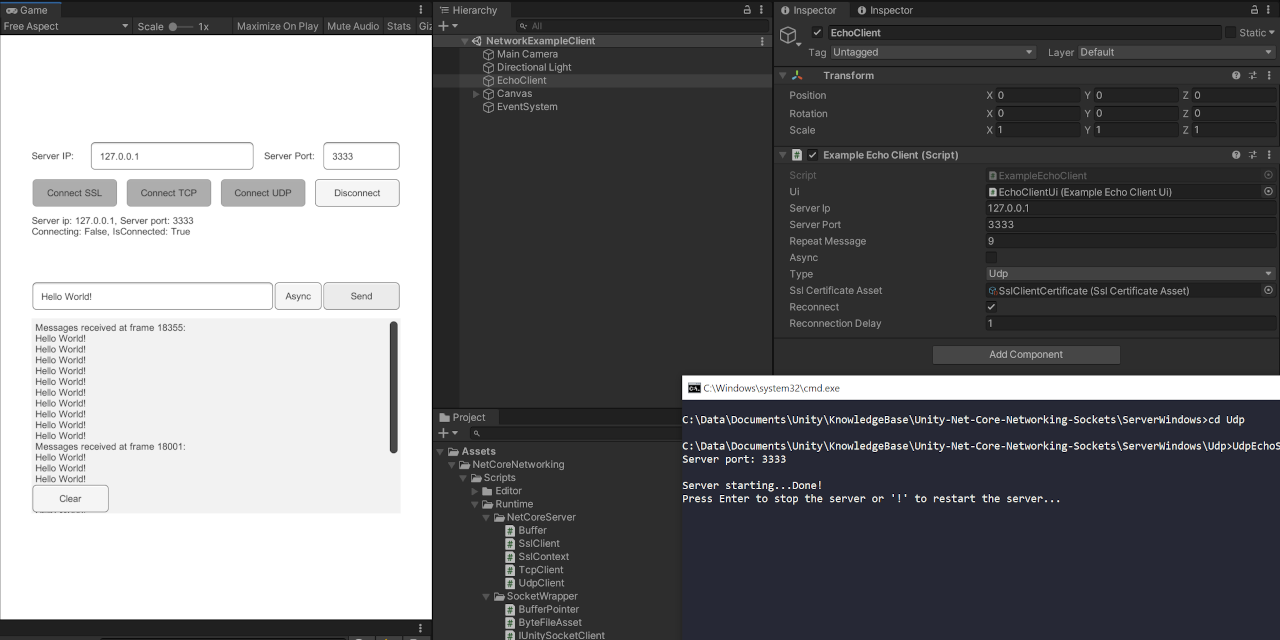
Install via UPM
Add to Unity Package Manager using this URL
https://www.pkglnk.dev/netcore-networking.git?path=Assets/NetCoreNetworking README Markdown
Copy this to your project's README.md
Style
Preview 
## Installation
Add **Net Core Networking Sockets** to your Unity project via Package Manager:
1. Open **Window > Package Manager**
2. Click **+** > **Add package from git URL**
3. Enter:
```
https://www.pkglnk.dev/netcore-networking.git?path=Assets%2FNetCoreNetworking
```
[](https://www.pkglnk.dev/pkg/netcore-networking)README
Unity .Net Core Networking Client
Lightweight Unity client for NetCoreServer


This is an example for a unity client that works with a NetCoreServer server application. The latest version is built with Unity 2020.3.1f1 and NetCoreServer 5.0.15.
Features
- Supports SSL, TCP & UDP
- Client code from NetCoreServer with wrappers for unity usage
- Precompiled server executables for windows for easy testing
- Small GC overhead - Usage of MemoryStream
- Async send and receive - Does not block the Main Thread
- Low level - just plain UPD/TCP/SSL
- Tested with local, network and remote server
| Platform | SSL | TCP | UDP |
|---|---|---|---|
| Editor | ✔️ | ✔️ | ✔️ |
| Android | ✔️ | ✔️ | ✔️ |
| iOS | ✔️ | ✔️ | ✔️ |
| Windows | ✔️ | ✔️ | ✔️ |
Installation
You can either install the package through the package manager with OpenUPM (Recommended) or download the scripts as a unity package
OpenUPM
# Install openupm-cli
$ npm install -g openupm-cli

# Enter your unity project folder
$ cd YOUR_UNITY_PROJECT_FOLDER

# Add package to your project
$ openupm openupm add com.deml.netcore-networking
Download
Setup
- Unity 2020.3.1f1 (Works with older versions as well)
- Precompiled servers an in ServerWindows, run the bat you want to test
- Open
Samples/EchoClient/Scenes/NetworkExampleClient.unityand hit play. - Default port is
3333when running the bat files.
Troubleshooting
- I can't find the samples
- The samples are stored in
Assets/NetCoreNetworking/Samples~. A symlink atAssets/Samplespoints to the folder. That symlink might break when pulling for the first time on Windows. There are two solutions for it:- Just run
Assets/.RelinkSamples.batto regenerate the symlink. - Configure your git to support symlinks
- Just run
- The samples are stored in
- The precompiled server scripts don't work
- Install Dotnet from https://dotnet.microsoft.com/download
TODO
- Split messages back into the sent chunks
- Fix bug: Repeated asnyc sending results in some packages not being sent for UDP
- Support Websockets
Libraries
License
- MIT - see LICENSE
No comments yet. Be the first!