E-Overlays
This is an overlays package that provides create editor tools & utilities
com.erdem.overlays Install via UPM
Add to Unity Package Manager using this URL
https://www.pkglnk.dev/overlays.git README Markdown
Copy this to your project's README.md

## Installation
Add **E-Overlays** to your Unity project via Package Manager:
1. Open **Window > Package Manager**
2. Click **+** > **Add package from git URL**
3. Enter:
```
https://www.pkglnk.dev/overlays.git
```
[](https://www.pkglnk.dev/pkg/overlays)README
EOverlays
EOverlays is a editor tool for Unity 3D game engine to write custom editor tools & utilities. EOverlay uses Overlays at Unity (you can discover overlays from this link).
Support
EOverlays is an open-source project that I am developing in my free time. If you like it you can support me by donating.

Installation
Asset Store
You can install from this link.
Git
For git installation you need to know git link (https://github.com/erdemkly/EOverlays.git)
Paste this link to
Window -> Package Manager -> + -> Add package from git url -> [Paste link here] -> Add
(The location of this feature may vary depending on the Unity version. I am using version 2021.3.21f1 of the Unity game engine.)
Install via OpenUPM


The package is available on the openupm registry. It's recommended to install it via openupm-cli.
openupm add com.erdem.overlays
Usage
Your scripts must be children of the Editor folder.
You can discover some usages from Samples in the package.
Attribute
You must add this attribute to method to serialize.
[EOverlayElement(name:"Tab Name",order:0,enableCondition:"condition_variable_name")]
Enable Condition
If you want to control your methods visibility with bool variable you can use enable condition parameter.
public static bool EnableCondition {get; set;}
 [EOverlayElement(name:"Tab Name",order:0,enableCondition:"EnableCondition")]
Methods
Your methods must be static and public to work correctly.
Supported Types
 void, int, float, double,
long, Enum, Object, Vector2,
Vector3, Vector2Int, Vector3Int, string, Color, struct, class
For now.
 [EOverlayElement(name:"Tab Name",order:0,enableCondition:"condition_variable_name")]
public static Type MyMethod(Type a,Type b,Type c){}
Also you can show your custom VisualElement.
 [EOverlayElement(name:"Tab Name",order:0,enableCondition:"condition_variable_name")]
public static VisualElement MyMethod(){}
Method Samples
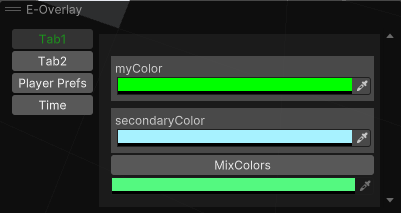
 [EOverlayElement(name:"Tab1")]
    public static Color MixColors(Color myColor,Color secondaryColor)
    {
        return (myColor + secondaryColor)/2;
    }
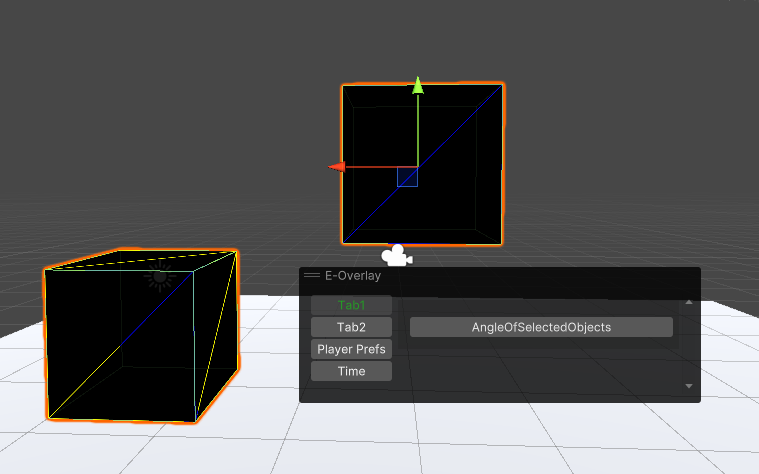
  public static bool myBool { get => Selection.gameObjects.Length == 2; }

    [EOverlayElement(name: "Tab1", enableCondition: "myBool")]
    public static float AngleOfSelectedObjects()
    {
        var from = Selection.gameObjects[0].transform.position;
        var to = Selection.gameObjects[1].transform.position;
        return Vector3.Angle(from, to);
    }
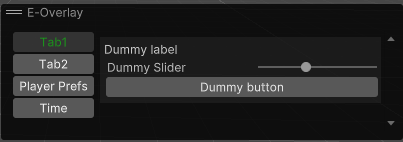
  [EOverlayElement(name: "Tab1")]
    public static VisualElement AngleOfSelectedObjects()
    {
        var root = new VisualElement();
        root.Add(new Label("Dummy label"));
        root.Add(new Slider("Dummy Slider", 0, 10));
        root.Add(new Button()
        {
            text = "Dummy button"
        });
        return root;
    }
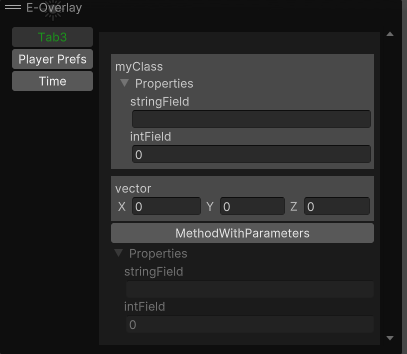
NEW! SUPPORTS CLASSES & STRUCTS AS PARAMETER & RETURN TYPE
    [EOverlayElement("Tab3")]
    public static MyClass MethodWithParameters(MyClass myClass,Vector3 vector)
    {
        return myClass;
    }
Comments
No comments yet. Be the first!
Sign in to join the conversation
Sign In