Safe Area Layout
Safe Area Layout is a Unity GUI layout group that automatically adjusts UI elements to respect device safe areas, eliminating notch and rounded corner issues on mobile devices. It integrates seamlessly with Unity's layout system, supports editor preview modes, and allows selective exclusion of child elements, making it ideal for cross-platform UI development.
com.gilzoide.safe-area-layout 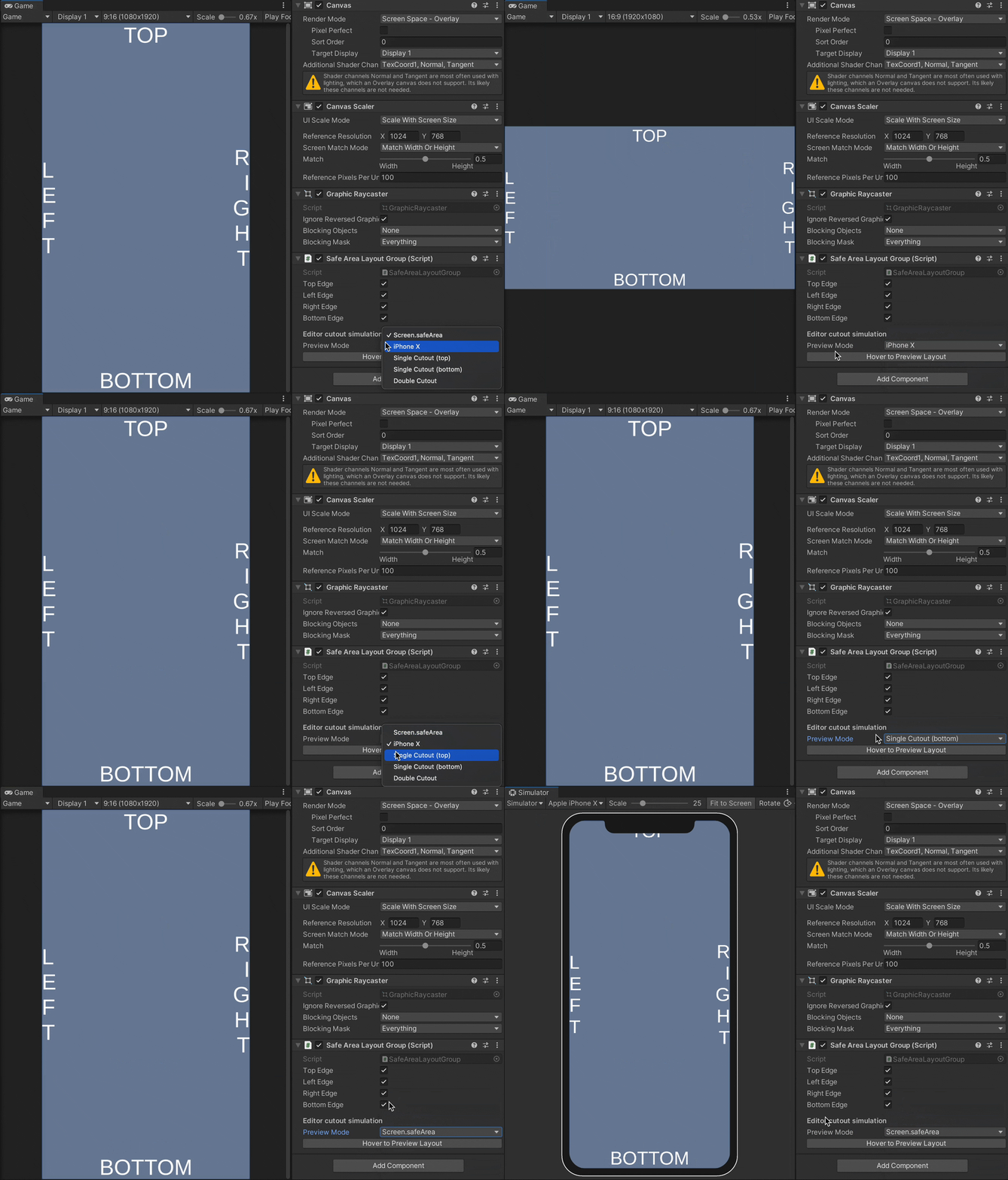
Install via UPM
Add to Unity Package Manager using this URL
https://www.pkglnk.dev/safe-area-layout.git README Markdown
Copy this to your project's README.md

## Installation
Add **Safe Area Layout** to your Unity project via Package Manager:
1. Open **Window > Package Manager**
2. Click **+** > **Add package from git URL**
3. Enter:
```
https://www.pkglnk.dev/safe-area-layout.git
```
[](https://www.pkglnk.dev/pkg/safe-area-layout)README
Safe Area Layout

Unity GUI layout group
that makes children respect the Safe Area.
It drives direct children's anchors while in Play Mode and supports LayoutElement.ignoreLayout.
Features
- Fully integrated with Unity GUI's layout system: only rebuilds the layout when needed, no
Updatemethod or coroutines attached - Does not resize it's own
RectTransform, so it can be used in objects with aCanvascomponent directly - Does not demand a full screen
RectTransform: the script detects where your rect overlaps with the Safe Area and updates accordingly - Ignore children using a
IgnoreSafeAreacomponent orLayoutElementwithIgnore Layoutmarked as true. Useful for background images, for example. - Preview Safe Area adjustments in Editor using any of the Preview Modes in
SafeAreaLayoutGroup's inspector while hovering theHover to Preview Layoutbutton or while in Play Mode. All Preview Modes support both portrait and landscape resolutions.Screen.safeAreaPreview Mode is only applied when using Unity's Device Simulator (in Unity 2020 and older, available as an UPM package) - Only affects canvases in either
Screen Space - OverlayorScreen Space - Cameramodes, soWorld Spacecanvases are ignored - Customize the safe area rectangle by creating a subclass of
SafeAreaLayoutGroupand overriding theGetSafeArea()method. This is useful to provide additional spacing to the safe area, for example space occupied by banner ads.
Installing
Either:
Install using openupm:
openupm add com.gilzoide.safe-area-layoutInstall via Unity Package Manager using the following git URL:
https://github.com/gilzoide/unity-safe-area-layout.git#1.1.2Clone this repository directly to your
Packagesfolder or anywhere inside your project'sAssets.
Sample
A sample scene is available at Samples~/SimpleSample.
How to use
- Add the SafeAreaLayoutGroup script anywhere in your UI hierarchy, even objects with
Canvascomponents are supported. Direct children will have their anchors driven while the script is enabled. - (optional) Select the Safe Area edges that your layout group will respect.
- (optional) Make specific children be ignored by the layout group by adding the
IgnoreSafeAreacomponent to them. Alternatively, useLayoutElementcomponents with theIgnore Layoutflag marked as true. - (optional) Use one of the Preview Modes while in editor to preview the adjustments.
Preview is applied on Play Mode and while hovering the
Hover to Preview Layoutbutton in theSafeAreaLayoutGroup's inspector. - Play the game (play the game, everybody play the gaaaame)
- Enjoy 🍾
Comments
No comments yet. Be the first!
Sign in to join the conversation
Sign In