PonyuDev Sherpa-ONNX
Unity integration for sherpa-onnx with editor installer for native libraries and models.
com.ponyudev.sherpa-onnx 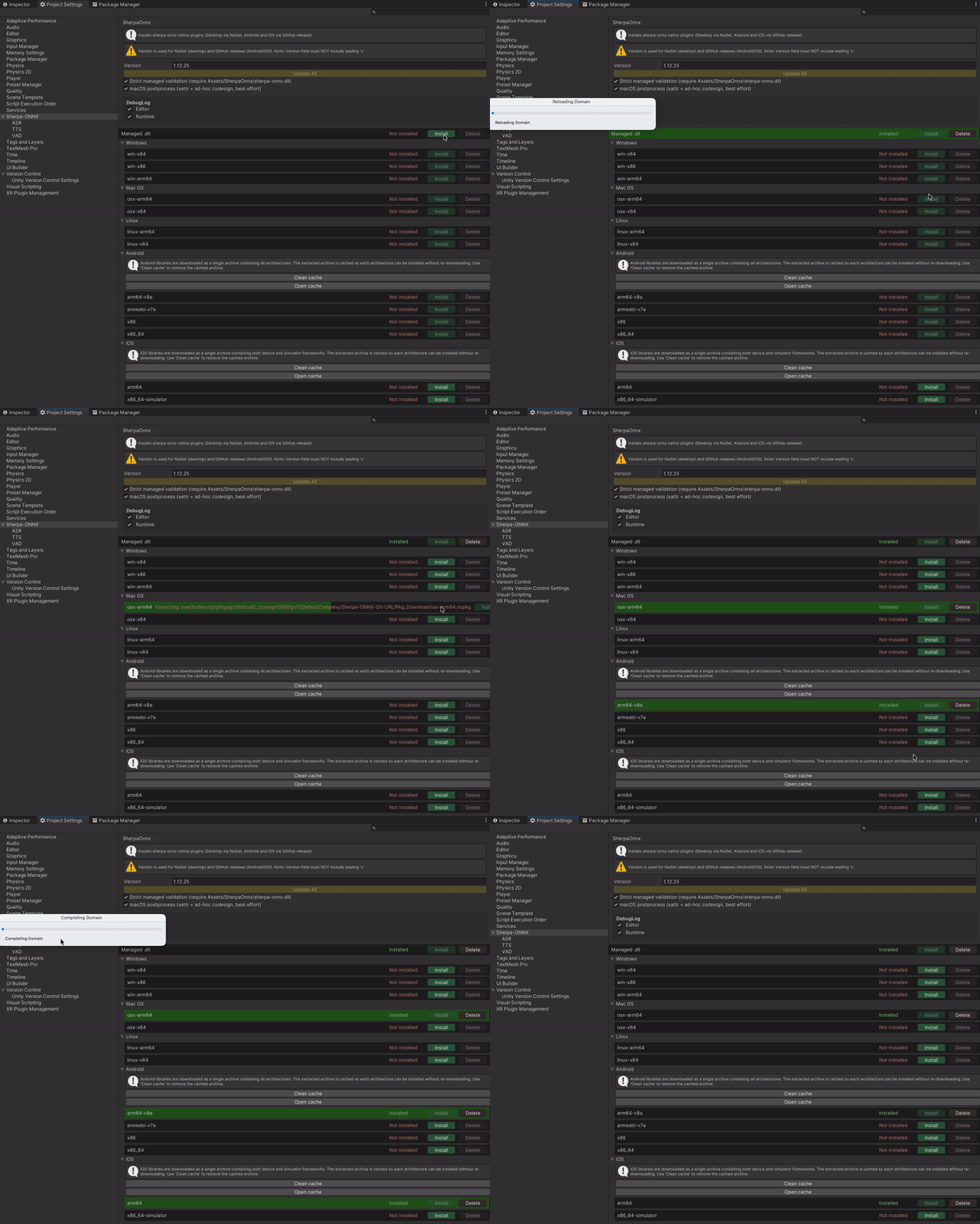
Install via UPM
Add to Unity Package Manager using this URL
https://www.pkglnk.dev/sherpa-onnx.git README Markdown
Copy this to your project's README.md

## Installation
Add **PonyuDev Sherpa-ONNX** to your Unity project via Package Manager:
1. Open **Window > Package Manager**
2. Click **+** > **Add package from git URL**
3. Enter:
```
https://www.pkglnk.dev/sherpa-onnx.git
```
[](https://www.pkglnk.dev/pkg/sherpa-onnx)Dependencies (2)
README
Unity-Sherpa-ONNX
Unity integration plugin for sherpa-onnx — an open-source speech toolkit powered by ONNX Runtime.
🗺️ Feature Roadmap
| Feature | Description | Status |
|---|---|---|
| Text-to-Speech (TTS) | Offline speech synthesis — VITS, Matcha, Kokoro, Kitten, ZipVoice, Pocket (voice cloning) | ✅ Done |
| Speech Recognition (ASR) | Offline and streaming speech-to-text — Zipformer, Paraformer, Whisper, SenseVoice, Moonshine | ✅ Done |
| Voice Activity Detection (VAD) | Speech/silence segmentation for efficient ASR — Silero VAD, TEN-VAD | ✅ Done |
| Keyword Spotting (KWS) | Lightweight always-on keyword detection from microphone | 📋 Planned |
| Speaker ID & Diarization | Speaker identification by voice, who-spoke-when segmentation | 📋 Planned |
| Audio Tools | Audio tagging, speech enhancement, punctuation restoration, language identification | 📋 Planned |
🖥️ Supported Platforms
| Platform | Architectures |
|---|---|
| 🪟 Windows | x64, x86, arm64 |
| 🍎 macOS | x64, arm64 |
| 🐧 Linux | x64, arm64 |
| 🤖 Android | arm64-v8a, armeabi-v7a, x86, x86_64 |
| 📱 iOS | arm64, x86_64-simulator |
💡 Why This Plugin
Integrating sherpa-onnx into a Unity project normally requires manual native library setup, platform-specific workarounds, and custom C# bindings. This plugin handles all of that out of the box.
⚡ Easy Setup
- 🔌 One-click library install — open Project Settings, pick a version, click Install. Native libraries for Windows, macOS, Linux, Android, and iOS are downloaded and configured automatically.
- 📥 One-click model import — paste a model URL, the importer downloads, extracts, auto-detects the model type, and creates a ready-to-use profile. No manual config editing.
- 🔄 Update All — change the version number and update every installed platform at once.
🔧 Platform Solutions
The plugin solves real-world platform issues that are not addressed by sherpa-onnx itself:
| Problem | Platform | What the plugin does |
|---|---|---|
| 🔇 Unity Microphone returns silence | Android | Detects silence automatically, falls back to native AudioRecord via JNI with audio source cascade (VOICE_RECOGNITION → VOICE_COMMUNICATION → MIC). Disables NoiseSuppressor, AGC, and AEC that can mute the signal. Fires SilenceDetected event with full diagnostics. |
| 📦 StreamingAssets locked inside APK | Android | Extracts model files to persistentDataPath on first launch with version tracking and progress reporting. Skips re-extraction on subsequent launches. |
| 🌍 Non-US locale breaks native code | Android | Wraps native calls with a locale guard that temporarily sets LC_NUMERIC to "C", preventing comma-as-decimal crashes in sherpa-onnx's float parsing. |
| 🍏 No dynamic library loading | iOS | Builds a patched sherpa-onnx.dll with DllImport("__Internal") and downloads it automatically during install. |
| ✂️ Xcframework architecture bloat | iOS | Filters xcframeworks to only the target architecture (device or simulator) during install. |
| 🎙️ Microphone not actually recording | Unity (all) | Plays a silent AudioSource on the mic clip to force the device to start recording — a known Unity workaround. |
| ⏳ Microphone readiness delay | Unity (all) | Polls Microphone.GetPosition() with a configurable timeout before starting capture. |
| 🎵 Sample rate mismatch | All | Built-in resampler converts any input rate to the model's expected rate (typically 16 kHz). |
| 🔐 Microphone permission | Android / iOS | Async permission request with UniTask — returns false gracefully if denied. |
⚙️ All microphone settings (silence threshold, fallback timing, diagnostics) are configurable via a JSON file in StreamingAssets — no code changes needed.
📦 Installation
Option 1 - Installer
- ⬇️ Download Installer
- 📂 Import installer into Unity project
- Double-click the file — Unity will open it
- OR: Unity Editor → Assets → Import Package → Custom Package, then choose the file
- The installer adds OpenUPM scoped registry and resolves the package automatically
Option 2 - OpenUPM (Scoped Registry)
- 📂 Open
Packages/manifest.jsonin your project - ✏️ Add the scoped registry and dependency:
{ "scopedRegistries": [ { "name": "OpenUPM", "url": "https://package.openupm.com", "scopes": [ "com.ponyudev.sherpa-onnx", "com.cysharp.unitask" ] } ], "dependencies": { "com.ponyudev.sherpa-onnx": "0.1.0" } } - ✅ Unity will resolve and download the package automatically
Option 3 - OpenUPM CLI
- 📦 Install openupm-cli
- ▶️ Run the command in your project folder:
openupm add com.ponyudev.sherpa-onnx - ✅ Dependencies are resolved automatically
Option 4 - Git URL
- ⚠️ Install UniTask first — open Window → Package Manager, click + → Add package from git URL... and paste:
https://github.com/Cysharp/UniTask.git?path=src/UniTask/Assets/Plugins/UniTask - 🔗 Then add Sherpa-ONNX the same way:
https://github.com/Ponyu-dev/Unity-Sherpa-ONNX.git
🔌 Installing Native Libraries
- Open Edit → Project Settings → Sherpa ONNX
- Set the desired sherpa-onnx version (e.g.
1.12.25) - Click Install for each platform you need
- Use Update All when you change the version to update all installed libraries at once
📥 Libraries are downloaded from:
- Desktop (Windows, macOS, Linux): NuGet
- Android / iOS native: sherpa-onnx GitHub releases
- iOS managed DLL: this repository's GitHub releases (see below)
🗣️ Text-to-Speech (TTS)
Offline speech synthesis with pooling and caching. Supports 6 model architectures.
Setting Up TTS Models
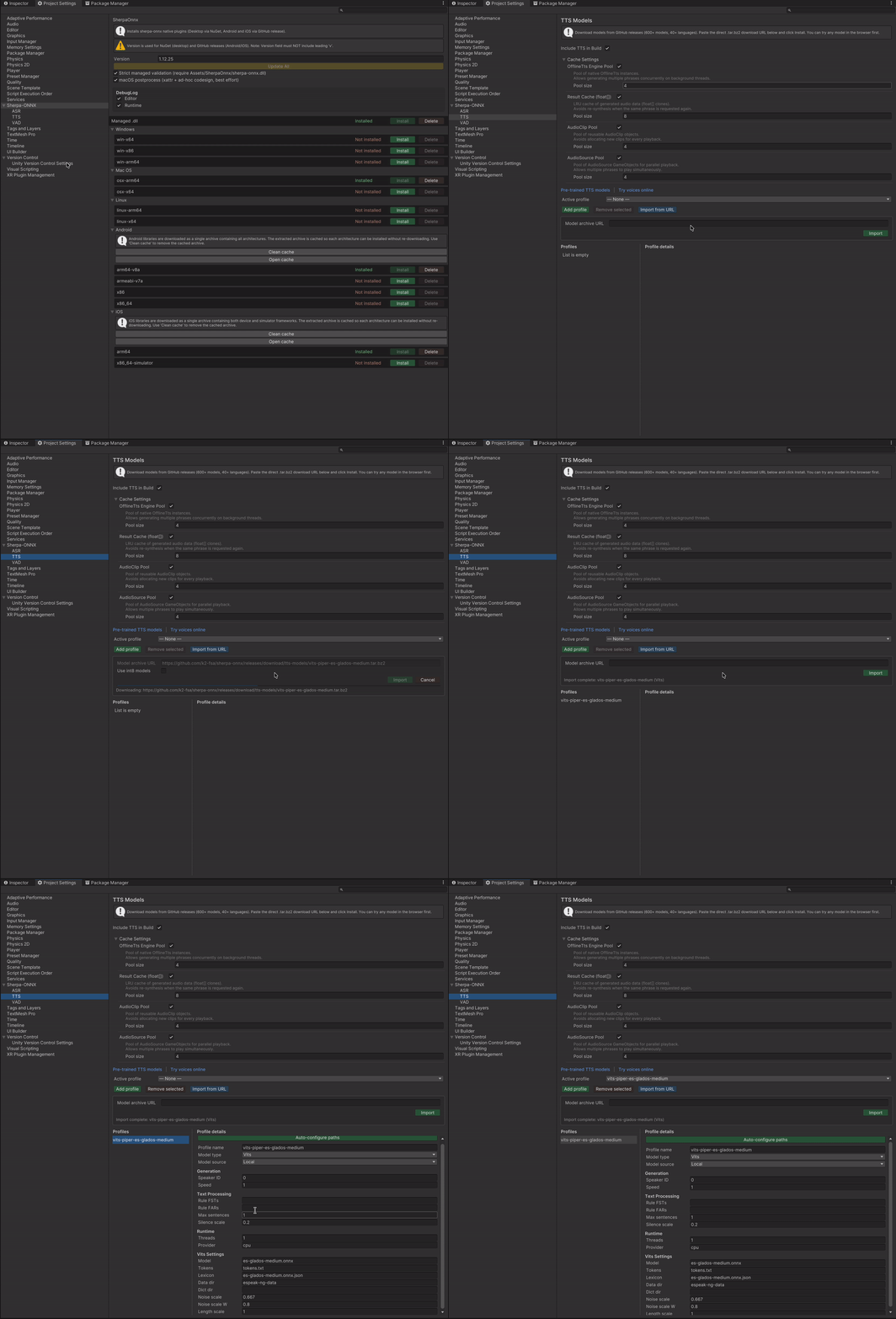
- Open Project Settings > Sherpa-ONNX > TTS
- Click Import from URL and paste a model archive link
- The importer downloads, extracts, and auto-configures the profile
- Select the Active profile to use at runtime
Key features:
- 🧠 6 model architectures — Vits (Piper), Matcha, Kokoro, Kitten, ZipVoice, Pocket
- 🔍 Auto-detection — model type and paths are configured automatically from the archive
- ⚡ Int8 quantization — one-click switch between normal and int8 models
- 🚀 Flexible deployment — Local (StreamingAssets), Remote (runtime download), or LocalZip (compressed at build time)
- 🎛️ Matcha vocoder selector — choose and download vocoders independently
- ♻️ Cache pooling — configurable pools for audio buffers, AudioClips, and AudioSources
📖 Documentation
- Models Setup Guide — Editor UI, importing, profiles, deployment options
- Runtime Usage Guide — MonoBehaviour, VContainer, Zenject examples, API reference
👂 Speech Recognition (ASR)
Offline file recognition and real-time streaming with microphone. Supports 15 offline and 5 online model architectures.
Setting Up ASR Models
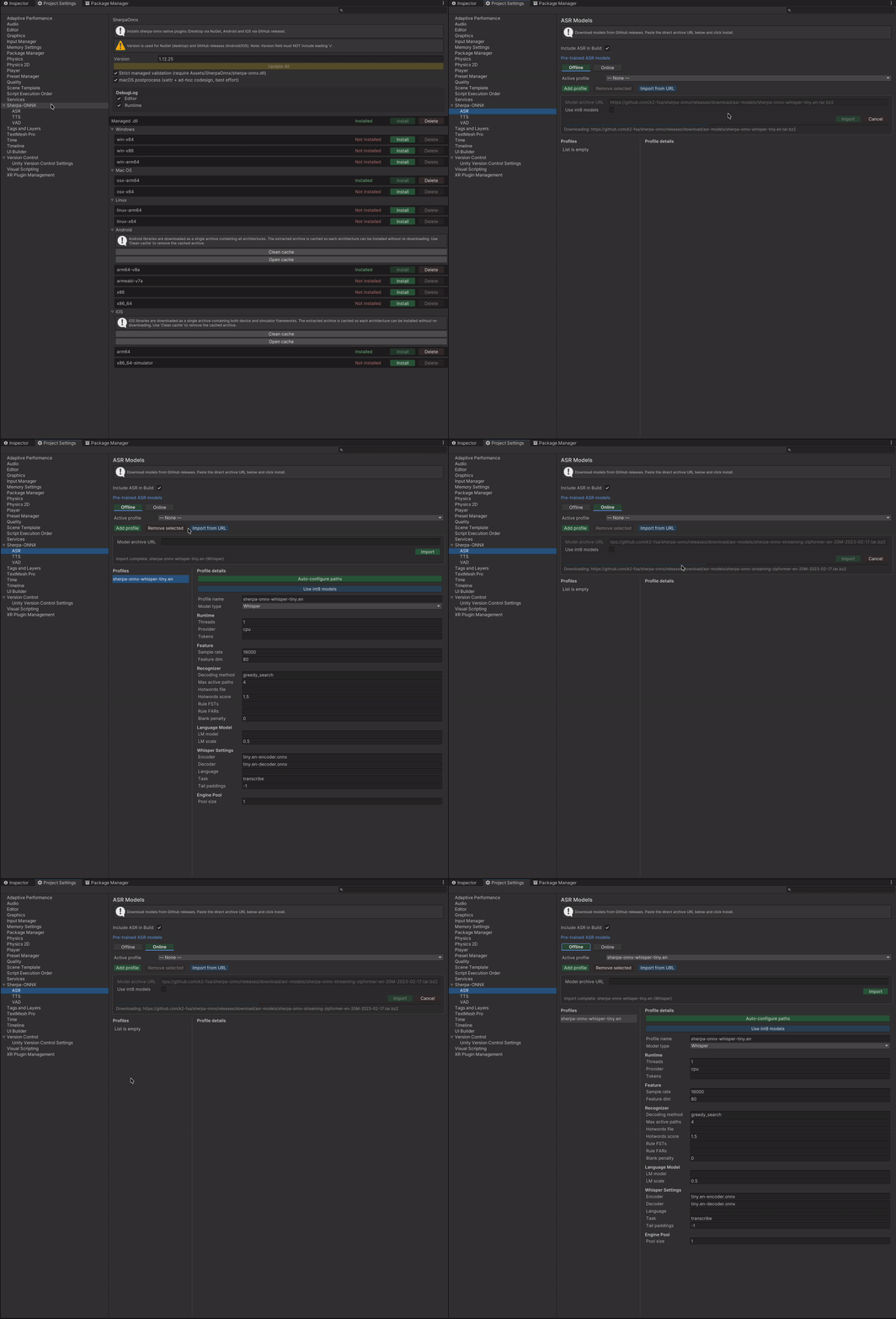
- Open Project Settings > Sherpa-ONNX > ASR
- Select the Offline or Online tab
- Click Import from URL and paste a model archive link
- The importer downloads, extracts, and auto-configures the profile
- Select the Active profile to use at runtime
Key features:
- 🧠 15 offline + 5 online architectures — Zipformer, Paraformer, Whisper, SenseVoice, Moonshine, and more
- 🔍 Auto-detection — model type and paths are configured automatically from the archive
- ⚡ Int8 quantization — one-click switch between normal and int8 models
- 🎙️ Streaming recognition — real-time microphone capture with partial and final results
- 🏊 Engine pool — multiple concurrent recognizer instances for offline ASR
- ⏹️ Endpoint detection — configurable silence rules for automatic utterance segmentation
📖 Documentation
- Models Setup Guide — Editor UI, importing, profiles, offline/online tabs
- Runtime Usage Guide — MonoBehaviour, VContainer, Zenject examples, API reference
🔊 Voice Activity Detection (VAD)
Speech/silence segmentation for efficient ASR pipelines. Supports Silero VAD and TEN-VAD models.
Setting Up VAD Models
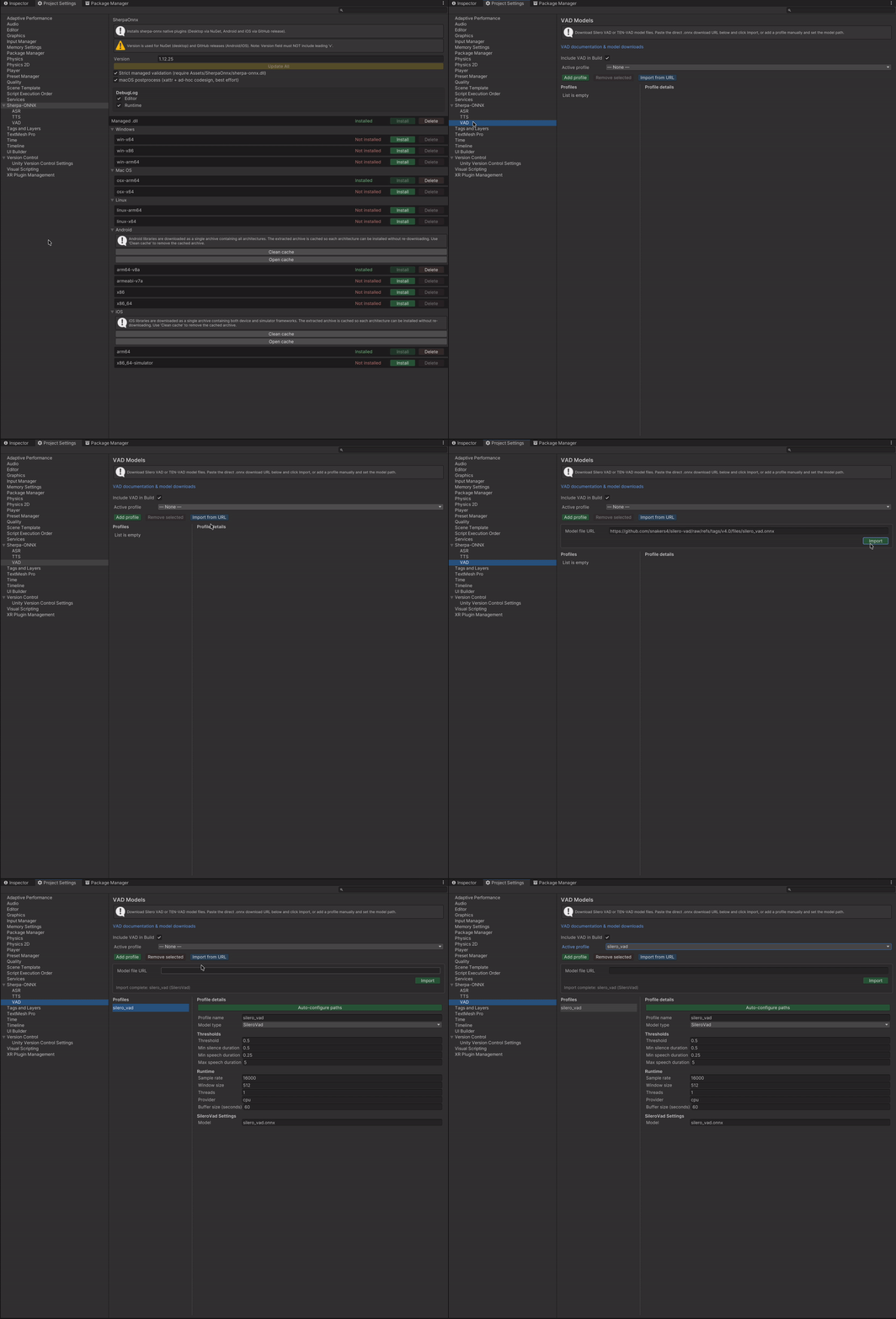
- Open Project Settings > Sherpa-ONNX > VAD
- Click Import from URL and paste a model archive link
- The importer downloads, extracts, and auto-configures the profile
- Select the Active profile to use at runtime
Key features:
- 🧠 2 model architectures — Silero VAD, TEN-VAD
- 🔍 Auto-detection — model type and paths are configured automatically from the archive
- 🎛️ Configurable parameters — threshold, min silence/speech duration, window size
- 🔗 VAD + ASR pipeline — segment audio by voice activity, then recognize each segment
📖 Documentation
- Models Setup Guide — Editor UI, importing, profiles, configuration
- Runtime Usage Guide — MonoBehaviour, VContainer, Zenject examples, API reference
🍏 Why the iOS Managed DLL Is Hosted Here
On desktop and Android, Unity loads native code via dynamic libraries (.dll, .so, .dylib).
The managed C# binding (sherpa-onnx.dll) uses DllImport("sherpa-onnx-c-api") to find them at runtime.
iOS does not support dynamic loading. All native code must be statically linked into the app binary.
This means the managed DLL must use DllImport("__Internal") instead of "sherpa-onnx-c-api".
The upstream sherpa-onnx NuGet package ships with the standard "sherpa-onnx-c-api" binding, which does not work on iOS.
To solve this, the Tools~/ scripts in this repository:
- Take the official C# sources from
sherpa-onnx/scripts/dotnet/ - Patch
Dll.csto replace"sherpa-onnx-c-api"with"__Internal" - Build a custom
sherpa-onnx.dlltargetingnetstandard2.0 - Publish it as a GitHub release with tag
sherpa-v{version}
The plugin's iOS install pipeline downloads this patched DLL automatically.
🏷️ Scripting Define Symbol
After installing any library, the plugin automatically adds SHERPA_ONNX to Scripting Define Symbols for all build targets. This allows you to guard runtime code that depends on sherpa-onnx:
#if SHERPA_ONNX
    var recognizer = new OnlineRecognizer(config);
#endif
The define is removed automatically when all libraries are uninstalled.
📋 Requirements
- Unity 2022.3 or later
com.unity.sharp-zip-lib1.4.1+ (added automatically as a dependency)
No comments yet. Be the first!