Console
Runtime developer console for Unity using reflection-based command binding. Exposes methods, fields, and properties from existing code through an in-game UI without requiring additional dependencies. Features customizable toolbar, support for primitive types and common Unity structs, and lightweight IMGUI implementation. Configure commands via inspector, script, asset, or attributes for flexible integration into your development workflow.
com.smidgenomics.unity-console 
Install via UPM
Add to Unity Package Manager using this URL
https://www.pkglnk.dev/smidgens-unity-console.git README Markdown
Copy this to your project's README.md

## Installation
Add **Console** to your Unity project via Package Manager:
1. Open **Window > Package Manager**
2. Click **+** > **Add package from git URL**
3. Enter:
```
https://www.pkglnk.dev/smidgens-unity-console.git
```
[](https://www.pkglnk.dev/pkg/smidgens-unity-console)README

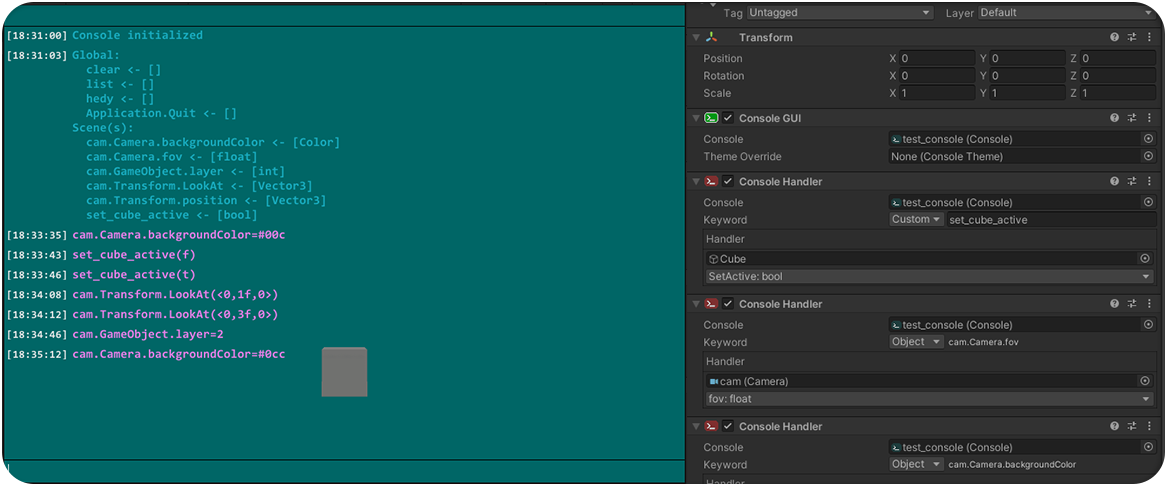
ℹ️ Features
- Reflection-based in-game console.
- No extras required - usable with existing code and wireable through inspector.
- Bind commands to methods, fields, or properties.
- Customizable toolbar.
- Includes input and parsing of standard primitive types + common Unity structs (
Vector2/3/4,Color...). - Minimalistic and functional UI (Unity IMGUI).
- 🤞 Reasonably lightweight.
⌛ In Progress
- Support binding methods with optional parameters.
- Support implicit type casting for arguments when available (float -> double etc.)
- Support custom input parsers to handle custom types as command arguments.
📦 Install
- Open Package Manager
- Paste GitHub URL:
https://github.com/Smidgens/unity-console.git#<version_tag>
🚀 Use
Basic Setup
- Create a Console asset:
Create->Console->Console. - Add a
Console GUIscript to your scene and drop a reference to the asset into it.
Binding Commands
🟣 Option 1: Script
- Add a Console Command script to your scene.
- Add a reference to a console asset.
🔵 Option 2: Asset
- Create a Console Command asset in your project:
Create->Console->Console Command. - Drop a reference to the command into a console asset.
🟠 Option 3: Attributes
Note: Requires reference to Smidgenomics.Unity.Console assembly.
🔳 ConsoleCommand
Exposes static method, field, or property to console.
🔳 ConsoleAssembly
Additional options for commands declared in assembly. Also used to filter assemblies based on attribute search settings in console asset.
🔳 ConsoleClass
Additional options for commands declared in type. Includes option for exposing all members automatically.
🔳 HideInConsole
Ignores class member from console when exposing all class members through ConsoleClass.
No comments yet. Be the first!