TheArtOfScalableGameArchitecture

My thoughts on creative game architecture design
Unity Project
Built with Unity 6000.0.38f1 · download the source from GitHub
README

The Art of Scalable Game Architecture
Best Practices for Creating an Upgradable, Scalable, and Optimized Game Architecture



About • Bootstrap Scene • Services • StateMachine • GameStateMachine • SceneLoaderService • Addressable • EventSystem • System Interaction • THE END
About
Good Day!
Game Architecture - is a creative self-expression of a programmer, a manifestation of their imagination, vision, inspiration, just like any other creativity, making such decisions is based on experience, knowledge base, character, and sensory perceptions of the developer. Below is my vision, I do not claim to be the ultimate truth, I'm sure no one will find it, I want to share my developments and hear feedback!
[!WARNING] The repository implements these practices with very poor, unpolished code, these are all sketches, but they work.
This repository is a canvas for learning and experiments.
[!IMPORTANT] If you have advice, suggestions, objections, additions, please write to me, tell me and correct me, I will be very interested to listen and better understand this issue.
[!IMPORTANT] RusVersion - The Art of Scalable Game Architecture - Russian Language
Bootstrap Scene
Bootstrap Scene - the foundation, the roots of the future architecture, which, when watered, turn into a digital garden of ready-made design solutions.
The presence of a Bootstrap Scene, implemented using the Entry Point pattern, is a key element of the project's architecture. The Bootstrap Scene loads first when the application starts and remains active throughout the entire game operation, functioning as an additive base scene, on top of which other game levels are loaded.
Its main task is the initialization, configuration, and management of the lifecycle of all basic services necessary for the project's operation. For example, within the Bootstrap Scene, the following subsystems are created and launched:
- Core-services: SceneLoaderService, SaveLoadService, Logger, EventManager, GameStateMachine.
- Gameplay-services: InputService, AudioService, UIService, and others responsible for gameplay logic.
- Optional-services: analytics, advertising, metrics, internal debugging, etc.
[!NOTE] The above are examples of subsystems and services.
This approach solves one of the key problems of large Unity architectures - the lack of a guaranteed order of object initialization, especially during transitions between scenes. The Bootstrap Scene ensures a strictly controlled lifecycle of services and a deterministic order of their launch, making the interaction between components transparent and predictable.
In addition, using the Bootstrap Scene allows for a complete separation of responsibilities between system layers - gameplay, infrastructural, and auxiliary. This simplifies testing, code reuse, and project maintenance throughout its entire lifecycle.
[!TIP] If you implement SceneLoaderService as in the example below in the SceneLoaderService section, the Bootstrap Scene will always launch first, but if you work differently, it's worth implementing a system that will launch the Bootstrap additively as the very first scene and only after its loading start everything else.
Code for Initial Loading
The code below allows loading the Bootstrap Scene before any other scenes and levels in the game. This creates the necessary safety net that all required services will load in the correct order.
public static class GameBootstrap
{
    public static string RequestedScene;

    [RuntimeInitializeOnLoadMethod(RuntimeInitializeLoadType.BeforeSceneLoad)]
    private static void OnGameStart()
    {
        string activeScene = SceneManager.GetActiveScene().name;

        if (activeScene != "BootstrapScene")
        {
            RequestedScene = activeScene;
            SceneManager.LoadScene("BootstrapScene");
        }
        else
        {
            RequestedScene = null;
        }
    }
}
In fact - an ugly crutch, but it saves from the situation when launching from a scene, its Awake manages to load before GameBootstrap;
[InitializeOnLoad]
public class EditorInit
{
    static EditorInit() => EditorSceneManager.playModeStartScene = AssetDatabase.LoadAssetAtPath<SceneAsset>(EditorBuildSettings.scenes[0].path);
}
Services
Services are the foundation of the project's infrastructure — they perform key tasks, ensuring the operation of the entire game at the core and gameplay levels. In all Unity projects, they are present, regardless of genre or scale. However, it's important not only which services are used, but also how they are structured, initialized, and interact with each other, and the rest of the code. Initialization was mentioned above; it happens in the Bootstrap Scene. There may also be a service that initializes before the level where it is used and unloads after its completion.
Approaches to Implementing Services
There are several common approaches to implementing and managing services:
- Singleton - the simplest way to organize services. Each service is implemented as a singleton, initialized in the Bootstrap scene, and can exist as a MonoBehaviour object or as a C# class.
- ServiceLocator - a more flexible way, having some simplicity of Singleton and the structure, organization of DI. All services are registered in the ServiceLocator, located in the Bootstrap scene (as a MonoBehaviour or a separate static object). The Service Locator can be encapsulated to limit the scope of access and improve readability, for example, there will be separate locators for gameplay, core, debug.
- DI Container - DI is a development of the ServiceLocator idea, based on the principle of inversion of control (Inversion of Control).
If when using Service Locator, the object itself requests the necessary dependencies, then in the case of DI — dependencies are "injected" from outside (into the constructor, fields, or methods).
This makes the system more flexible, testable, and easily expandable.
You can implement your own DI, but there are also convenient ready-made solutions for Unity:
- Zenject
- Reflex
- VContainer
Examples of Services
Examples of services:
- SceneLoaderService — responsible for loading and unloading scenes, managing asynchronous transitions, and pre-initializing content. Often works in conjunction with the Addressables or AssetBundles system;
- AudioService — centralized management of sounds and music: playback, caching, volume changes, crossfades between tracks, 3D sound, and effects.
- InputService — abstracts input from specific sources (keyboard, gamepad, mobile gestures); Allows easy adaptation of controls for different platforms;
- DebugService / DeveloperConsole — tools for debugging, logging, and entering console commands during development.
StateMachine
State Machine — an incredibly useful pattern that helps build a clean, transparent, and manageable architecture for object behavior.
It encapsulates the logic of each state in a separate class, clearly separates responsibilities, isolates transitions, and builds a predictable order of code execution.
Types of StateMachine
There are two main types:
- Ordinary State Machine — a simple sequence of states and transitions;
- Hierarchical — supports nested states and allows building more complex behavior structures;
[!TIP] Before creating a StateMachine, it's worth analyzing in advance whether a hierarchy will be needed, so as not to face an overgrown number of transitions in the future.
Approaches to Organizing Transitions
There are also two options for implementing transitions between states:
- Local transitions within states
Each state itself determines under what conditions it completes its work and to which state to transition. That is, the transition logic is encapsulated right in the state class.
public class AttackState : IState
{
    private readonly Player _player;
    private readonly StateMachine _machine;

    public void Update()
    {
        if (_player.Health <= 0)
            _machine.Enter<DeathState>();

        if (_player.HasNoTarget)
            _machine.Enter<IdleState>();
    }
}
This approach may be suitable for simple systems with not too many states.
- Centralized transitions (predicates, rules, Transition Map)
All transitions are described in one place — usually in a separate configuration class. States become “clean”: they only perform their internal logic, and the decision when and where to transition is made by an external controller based on a set of conditions (predicates).
machine.AddTransition(AttackState, IdleState, () => player.HasNoTarget);
machine.AddTransition(AnyState, DeathState, () => player.Health <= 0);
This approach is perfect for large, hierarchical, scalable systems, as it will be easier to control the growing number of transitions.
Libraries
For Unity, there are many libraries with already implemented state machines, but out of all, I liked UnityHFSM. It has clear, structured, documented code, support for hierarchy and centralized transitions, and many different transitions.
GameStateMachine
GameStateMachine — is a state machine that is responsible for the current state of the game as a whole.
As mentioned earlier, State Machine allows encapsulating logic into specific states and building a clear order of execution. In the context of the game, this is especially important: we need to have full control over what state the game is in, and divide areas of responsibility between stages — loading, menu, gameplay, etc.
Example of State Hierarchy
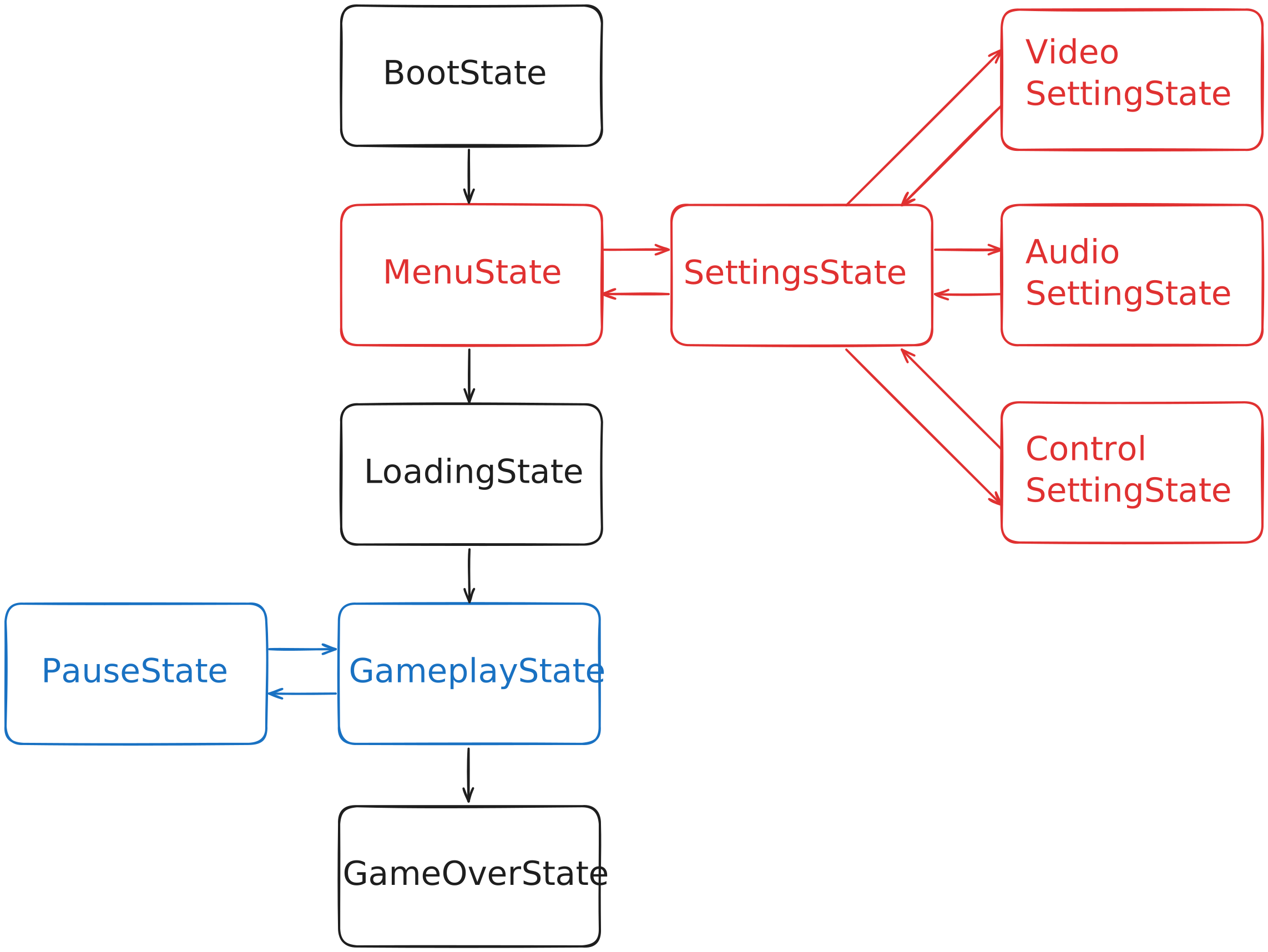
The set of states that will be contained in GameStateMachine depends on the specific game, below is a simple example of a hierarchical GameStateMachine, a similar system is implemented in the code above.
- BootState - Game initialization (loading services, systems, data);
- MenuState - Main menu (UI, settings);
- SettingsState - Settings (substate of MenuState);
- VideoSettingState - Graphics parameters;
- AudioSettingState - Sound and volume;
- ControlSettingState - Controls and bindings;
- SettingsState - Settings (substate of MenuState);
- LoadingState - Loading scene, assets, or data before gameplay.
- GameplayState - Main game process (character control, level logic);
- PauseState - Pause, temporary gameplay stop with active UI;
- GameOverState - Game completion (victory or defeat screen).
GameStateMachine Diagram
Below is a diagram of GameStateMachine
SceneLoaderService
SceneLoaderService — is a service responsible for loading and unloading scenes in the game.
It allows assembling levels from multiple additive scenes, managing their lifecycle, and ensuring control
over what and when is in memory.
Additive scenes are a powerful tool and provide the following advantages:
- Full control over what is loaded and what is unloaded;
- Lower memory consumption and easy integration with Addressables;
- Provide detailing for team work and help avoid merge conflicts;
- Ability to dynamically assemble levels and test their individual parts.
SceneLoaderService Algorithm
A good SceneLoaderService — is a MonoBehaviour-service located in BootstrapScene, you can add scene objects to it, for example, using Eflatun.SceneReference, from a set of scenes, levels are obtained, each scene will load asynchronously, if sequential loading of some scenes is required, the service will have such functionality, it's also convenient to connect Addressable and optimize the loading and unloading of all levels. Implementation of the ability to select an active scene. It is mandatory to implement a system that will allow launching the required level at the moment in the editor, this will ensure comfortable level debugging. Support for caching and reuse of common scenes (for example, UI or Lighting).
[!TIP] An excellent example of a ready-made solution - Advanced Scene Manager. This is an asset that provides a flexible, convenient, and visually appealing scene manager.
Example of a Level Consisting of Additive Scenes
In the diagram below, you can see a simplified example of a created level from scenes.
We have 4 scenes with three objects that are part of these scenes:
- BoostrapScene: AllServices, GameFSM, ServiceLocator / DI Container;
- GameplayScene: GlobalEnv, Lighting, Player;
- Level1Scene: Level1Core, Level1_Env, Level1_Enemies;
- Level2Scene: Level2Core, Level2_Env, Level2_Enemies;
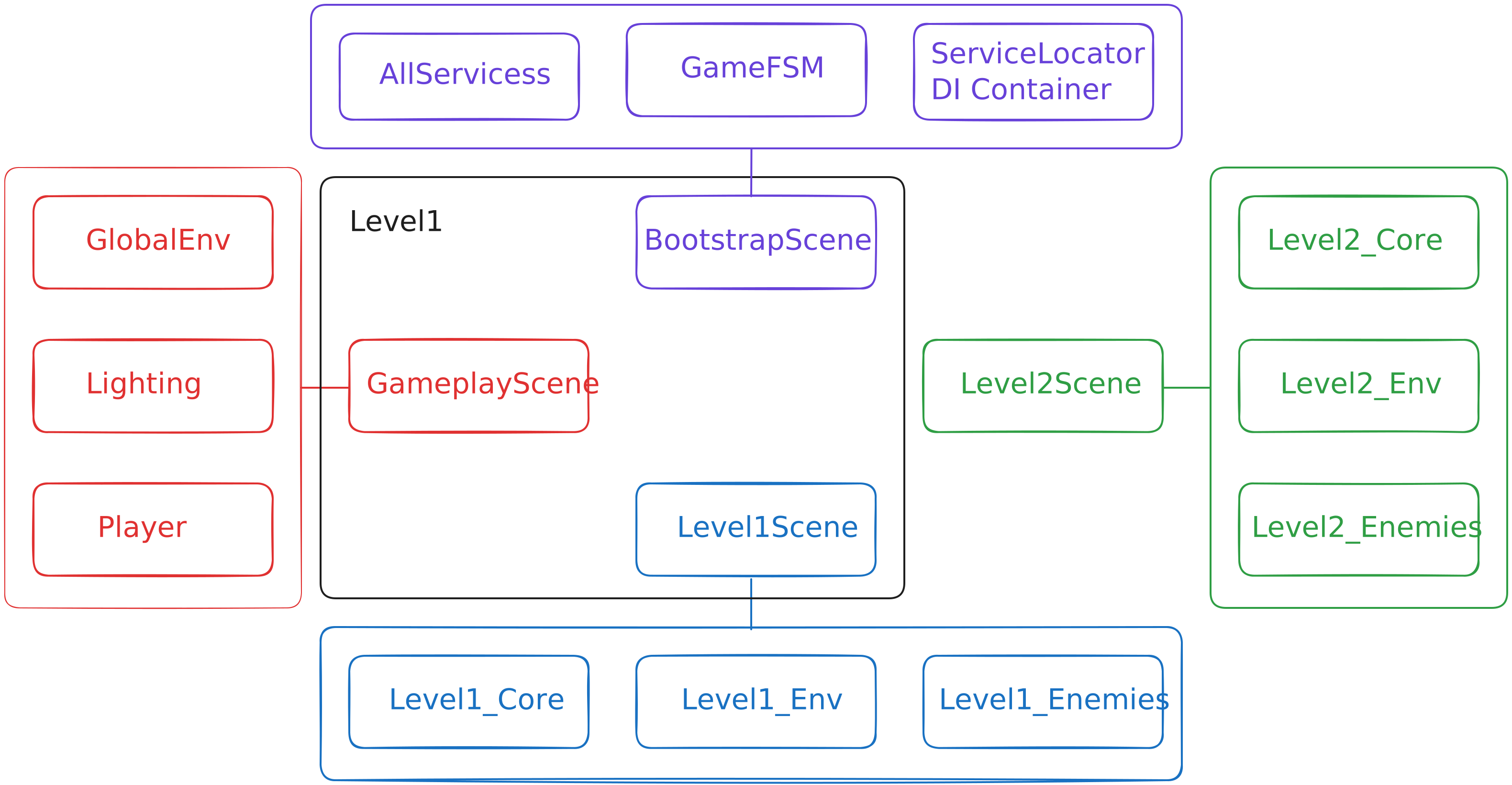
You can see how a set of scenes: BoostrapScene, GameplayScene, Level1Scene, turn into one level - Level1 all this works with additivity and loads asynchronously, when transitioning to the second level, where instead of Level1Scene there will be Level2Scene, only Level1Scene is unloaded, and all other scenes remain.
[!IMPORTANT] The name of the scene Level1Scene and the general Level1 are different things, the general Level1 - is a set of scenes, Level1Scene - is a scene that contains a set of objects: Level1_Core, Level1_Env, Level1_Enemies.
Features and Useful Links
Unity does not allow activating a scene in the same frame in which it was loaded — you need to wait one frame. Solutions and utilities for this can be found here:
[!TIP] Information about operation, advantages, disadvantages, to hear advice can be found on the Unity forum, specifically in this topic Kurt-Dekker provides a huge number of links to his works on this topic (19th reply).
Addressable
Addressables — is a resource management system in Unity that allows loading and unloading assets by their address, regardless of whether they are local or on a remote server (CDN).
The main idea of Addressables — is to give full control over memory and content loading at runtime. Each resource (scene, prefab, texture, sound) gets a unique address by which it can be called from anywhere in the project.
Addressables + SceneLoaderService
And here you can see one of the advantages of a well-designed architecture, the Addressables package and SceneLoaderService are made for each other, and when implementing SceneLoaderService, it's better to think about how nice it will be to combine it with Addressables. This architecture will provide the very flexibility and optimizations that we need so much. In the bundle of two systems, to all the advantages of SceneLoaderService, the advantages of Addressables are added, and the output is a number of the following benefits:
- Levels and scenes can be stored as additive addressable scenes, loaded on demand
- Common assets (for example, Player, Lighting, UI) can be cached and reused without reloading
- When transitioning between levels, SceneLoaderService can unload old Addressables, freeing up memory
As a result, you get a system where memory is always under control, and the project scales without chaos and leaks.
Flexibility of Architecture for Project Type
It's important to understand that there is no single approach to implementing the Addressables + SceneLoaderService bundle - it always
depends on the project and its structure.
For example, two types of games can be distinguished:
- Linear games - games in which levels go sequentially, one after another, in such a project, simple sequential scene loading will be used. Here, the system can completely unload the previous level before loading the next, keeping the minimum volume of active assets in memory.
- Games with open worlds - in such a game, scenes and assets are loaded dynamically, in parts, depending on the player's position. In this case, the system should keep part of the scenes active, to avoid visible sub-loads. Determining the part that should be sub-loaded is precisely the artist's task.
Thus, each game needs its own implementation of Addressables + SceneLoaderService depending on the tasks and needs.
EventSystem
System Interaction
The key components of the architecture were discussed above: Bootstrap Scene, services, state machines, SceneLoaderService, Addressables, and EventSystem. Now I want to explain how these systems will interact with each other. In my opinion, everything should work as a single mechanism, architectural decisions should complement and glue each other together, rather than burden the architecture. I will describe their work as a single flow, starting from initialization and moving to runtime operation.
- Launching Bootstrap Scene as the entry point. Everything starts with launching Bootstrap Scene as the entry point into the application.
- Creating and initializing GameStateMachine. In Bootstrap Scene, GameStateMachine is created and initialized. This is the future "brain" of the game, which manages the global state of each stage in the game. GameStateMachine is configured with a hierarchy of states (BootstrapState, MenuState with substates, LoadingState, GameplayState, etc.).
- Launching BootstrapState in GameStateMachine and initializing services. GameStateMachine transitions to the initial state — BootstrapState. This state is responsible for the basic initialization of the basic, sequential, clear initialization of the game. In this state, DI Container, ServiceLocator are created, and in them global services are registered and initialized in a strict order (depending on the situation): core-services (SceneLoaderService, SaveLoadService, EventService), then gameplay-services (InputService, AudioService, UIService). DI automatically injects dependencies (for example, SceneLoaderService gets access to Addressables for asynchronous loading). This separates responsibilities and simplifies testing.
- Transition from BootState to subsequent states. After initializing services, checking the transition conditions from state to state (all services are correctly initialized), GameStateMachine exits BootstrapState and transitions to the next state (for example, MenuState).
- Loading scenes via SceneLoaderService. In states like LoadingState, GameStateMachine calls SceneLoaderService (already initialized) for asynchronous loading of additive scenes. For example, for a level: GameplayScene (with Player, Lighting) and Level1Scene (with environment, enemies) are loaded. Addressables is integrated: SceneLoader requests assets by addresses, caching common ones (UI, sounds). If sequential loading is needed, the service waits for the completion of the previous scene.
- Communication via EventSystem. Throughout the entire game operation, EventSystem serves as the glue that allows setting up exchanges between services and objects on scenes. For example, services subscribe to the SceneLoaded event, and upon its triggering, GameStateMachine knows when to transition to the next state.
- Handling transitions between levels. When changing states (for example, from GameplayState of level 1 to level 2), GameStateMachine signals SceneLoaderService to unload unnecessary scenes (only Level1Scene, leaving Bootstrap and Gameplay). Addressables frees up memory by unloading assets. EventSystem notifies services (AudioService plays transition sounds, SaveLoadService saves progress).
- Cycle completion. In the final state GameOverState, GameStateMachine calls services for cleanup: SaveLoadService saves data, SceneLoader unloads everything except Bootstrap. EventSystem sends "GameEnded", completing local machines.
This algorithm makes the architecture sequential, transparent, optimized, and predictable; you can always understand what and when is working, it's convenient to add services, mechanics, and debug them. In short, Bootstrap launches, GameStateMachine orchestrates, services support, SceneLoader + Addressables optimize, EventSystem connects.
THE END
Thank you for reading, I hope this information will be useful to you!
As a programmer grows as a specialist and a person, their approach to such creative things as architecture will change, so I will supplement, correct, and improve this material.
If you have advice, interesting material, recommendations, please write, I will be pleased to hear feedback and become better!

Comments
No comments yet. Be the first!
Sign in to join the conversation
Sign In