
Install via Unity Package Manager
Add to Unity Package Manager
Paste this URL into Unity's Window › Package Manager › + › Add package from git URL,
or click Install.
git
https://www.pkglnk.dev/unityutil.git Install 0
README
Rendered from GitHubUnity Utilities
This package is where all the utility functions as well as all the custom inspector drawer code lives.
Installation
- Install OpenUPM-CLI
- Run command in your project folder
openupm add com.github.voxell.unityutil
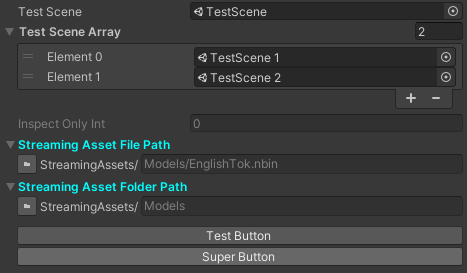
Custom Property Attribute
using UnityEngine;
using Voxell.Inspector;

public class CustomInspectorTest : MonoBehaviour
{
  [Scene]
  public string testScene;
  [Scene]
  public string[] testSceneArray;
  [InspectOnly]
  public int inspectOnlyInt;

  [StreamingAssetFilePath]
  public string streamingAssetFilePath;
  [StreamingAssetFolderPath]
  public string streamingAssetFolderPath;

  [Button]
  void TestButton() => Debug.Log("TestButton function invoked!");
  [Button("Super Button")]
  void AnotherTestButton() => Debug.Log("Button with Super Button name pressed!");
}
Utilities
MathUtil
using UnityEngine;
using Voxell.Mathx;

// generate array [0, 1, 2, 3, 4]
int[] shuffledArray = MathUtil.GenerateSeqArray(5);
// shuffles array
MathUtil.ShuffleArray<int>(ref shuffledArray, 3);
Debug.Log(shuffledArray);
Under the hood
using Unity.Mathematics;

// GenerateSeqArray method
int length = 5;
int[] shuffledArray = new int[length];
for (int i=0; i < length; i++) shuffledArray[i] = i;

// ShuffleArray method
for (int i = 0; i < shuffledArray.Length; i++)
{
  int randomIdx = UnityEngine.Random.Range(0, shuffledArray.Length);
  int tempItem = shuffledArray[randomIdx];
  shuffledArray[randomIdx] = shuffledArray[i];
  shuffledArray[i] = tempItem;
}

Debug.Log(shuffledArray);
Support the project!


Join the community!


License
This repository as a whole is licensed under the Apache License 2.0. Individual files may have a different, but compatible license.
See license file for details.
References
Versions 0
No versions tracked yet.
Dependencies 0
No dependencies.
Changelog 0 releases
No changelog entries yet. Run the admin Changelog & Version Scanner to pull from the repository's CHANGELOG.md.
README Markdown
Copy this to your project's README.md
Style
Preview 
## Installation
Add **VX Util** to your Unity project via Package Manager:
1. Open **Window > Package Manager**
2. Click **+** > **Add package from git URL**
3. Enter:
```
https://www.pkglnk.dev/unityutil.git
```
[](https://www.pkglnk.dev/pkg/unityutil)Embed badge README snippet
Markdown
[](https://www.pkglnk.dev/pkg/unityutil)HTML
<a href="https://www.pkglnk.dev/pkg/unityutil"><img src="https://www.pkglnk.dev/badge/unityutil.svg" alt="pkglnk installs"></a>URL
https://www.pkglnk.dev/badge/unityutil.svgComments
No comments yet. Be the first!
Sign in to join the conversation
Sign In