XR Gizmos
XRGizmos extends Unity's built-in Gizmos class with debug visualization tools designed for AR/VR development. The package provides methods to draw primitives like lines, spheres, and cubes, plus specialized shapes including arrows, hemispheres, axes, and 3D text. Batch drawing methods enable efficient visualization of multiple elements in a single call. Enable via the XR_GIZMOS scripting define to easily toggle debug rendering between development and release builds.
com.darktable.xrgizmos 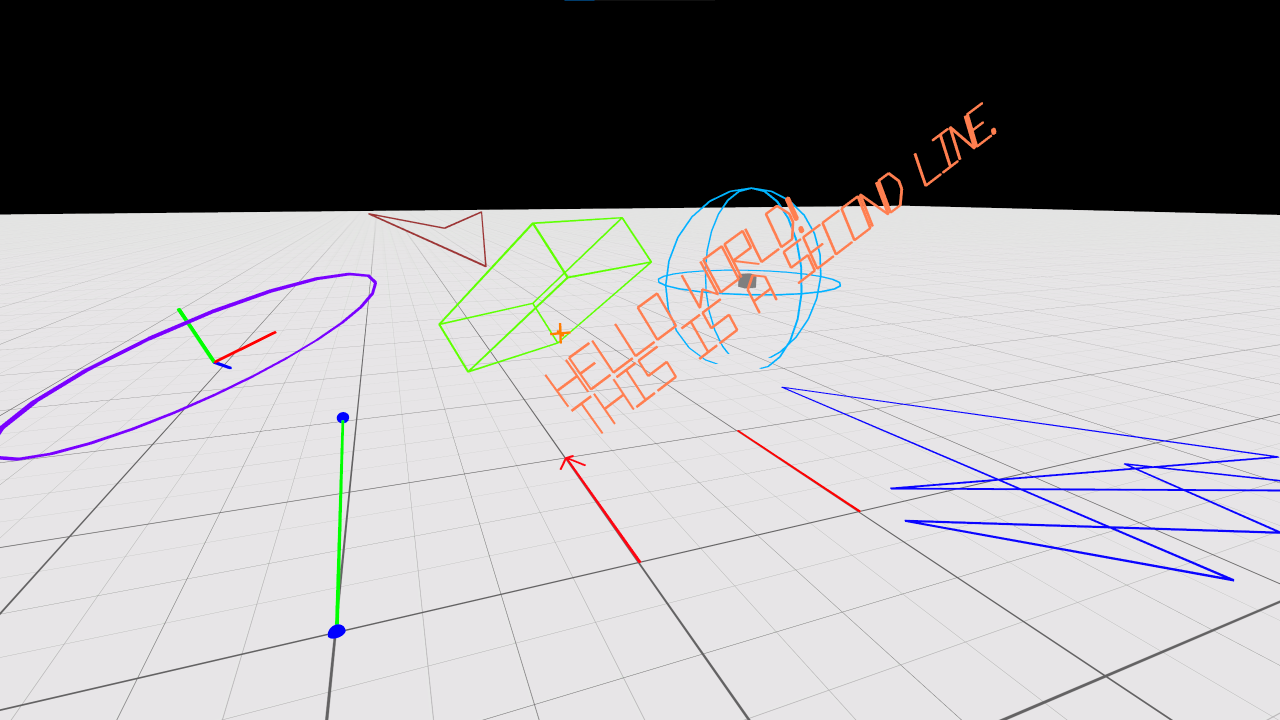
Install via UPM
Add to Unity Package Manager using this URL
https://www.pkglnk.dev/xrgizmos.git README Markdown
Copy this to your project's README.md

## Installation
Add **XR Gizmos** to your Unity project via Package Manager:
1. Open **Window > Package Manager**
2. Click **+** > **Add package from git URL**
3. Enter:
```
https://www.pkglnk.dev/xrgizmos.git
```
[](https://www.pkglnk.dev/pkg/xrgizmos)README
XRGizmos
This is an expansion on a technique that Unity demonstrated in their SuperScience library:
https://github.com/Unity-Technologies/SuperScience/tree/main/Runtime/GizmoModule
XRGizmos offers a set of methods to draw primitives similar to Unity's Gizmos class:
- DrawLine
- DrawRay
- DrawSphere
- DrawWireSphere
- DrawCube
- DrawWireCube
It also offers several new methods for other useful shapes:
- DrawPoint
- A 3d plus shape to mark a point in 3d space
- DrawCircle
- 2d outline of a circle
- DrawArrow
- 2d direction indicator
- DrawPointer
- A ray with an arrow at the end
- DrawWireHemisphere
- Half a sphere
- DrawAxis
- Draw the up, right, and forward axes of a transform
- DrawString
- Draw a multi-line string in 3D space
Advanced
- DrawLineList
- Pass in a list of Vector3s and it will connect them with lines.
- DrawPointSet
- Pass in a list of Vector3s and it will mark them all with a point. ~300 points in a single draw call
- DrawWireCubes
- Pass in a list of Vector3, a rotation and size and it will draw them all. Useful for grids.
Troubleshooting
To enable XRGizmos you need to add an "XR_GIZMOS" define in your Player Settings. This is so you can easily disable the debug drawing in release builds.
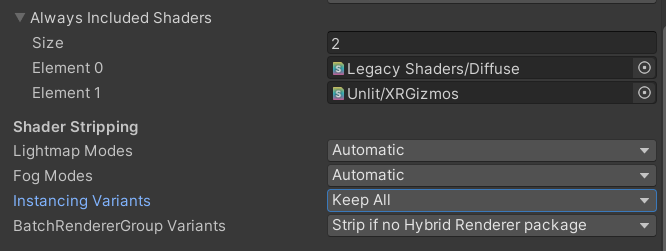
If XRGizmos are drawing in the editor, but they are not showing up in builds the instancing variants of the gizmos shader may be getting stripped from the build.
To workaround this you can add the gizmos shader to the "Always Included Shaders" array in Graphics Settings and change "Instancing Variants" from "Strip Unused" to "Keep All."
The font used to draw text is a modified version of coolbutuseless' "arcadefont": https://github.com/coolbutuseless/arcadefont
If you need more features or better performance than this tool, I recommend the ALINE tool available in the Unity Asset Store.
No comments yet. Be the first!