Asset Graph
AssetGraph is a visual toolset lets you configure asset workflow visually in Unity. It is intended to create rule-based configuration using graphs to create and manage efficient workflow around assets.
com.unity.assetgraph 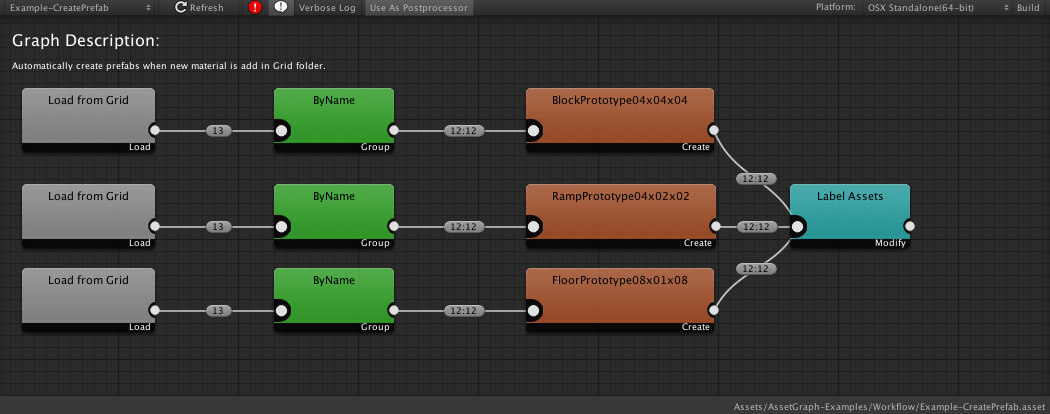
Install via UPM
Add to Unity Package Manager using this URL
https://www.pkglnk.dev/assetgraph.git README Markdown
Copy this to your project's README.md
Style
Preview 
## Installation
Add **Asset Graph** to your Unity project via Package Manager:
1. Open **Window > Package Manager**
2. Click **+** > **Add package from git URL**
3. Enter:
```
https://www.pkglnk.dev/assetgraph.git
```
[](https://www.pkglnk.dev/pkg/assetgraph)README
AssetGraph
AssetGraph is a tool that aims to reduce the workload of all the effort needed to build workflows around asset importing, building Asset Bundles and building Player Apps. By using the tool, you can build workflows to create, modify, and change asset settings graphically, and even automate it. It will free designers and artists from repetitive tasks during game development.
Getting Started
- User Manual: English(1.7) | Japanese(1.7)
- Quick Q&A
- ChangeLog for the latest version info.
- If you find any bugs/issues or feature requests, please create a new Issue from Issue Section.
No comments yet. Be the first!