Easy Editor Settings
This package provides an easy way to create editor Settings for Tools.
ch.elhodel.easy-editor-settings 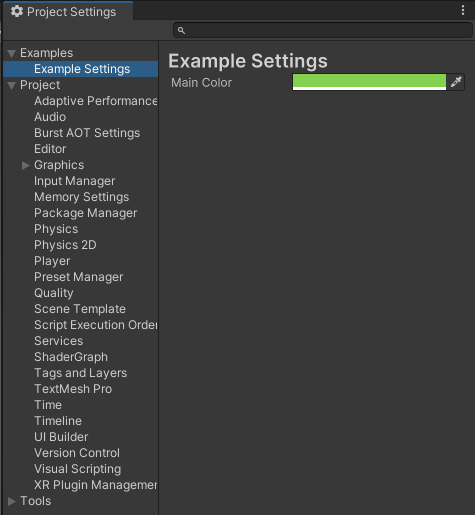
Install via UPM
Add to Unity Package Manager using this URL
https://www.pkglnk.dev/easy-editor-settings.git README Markdown
Copy this to your project's README.md

## Installation
Add **Easy Editor Settings** to your Unity project via Package Manager:
1. Open **Window > Package Manager**
2. Click **+** > **Add package from git URL**
3. Enter:
```
https://www.pkglnk.dev/easy-editor-settings.git
```
[](https://www.pkglnk.dev/pkg/easy-editor-settings)Used By (1)
README
Easy Editor Settings
Create easy settings for your Editor Tools without any Boilerplate thanks to Source Generators.
[!IMPORTANT]
These Settings are exlusivly for Editor Tools and will not be availabe on Runtime!
How it works
Add the [EasyEditorSettings] Attribute to a ScriptableSingleton<T> class and the Settings will appear in the Preferences or ProjectSettings Window.
using UnityEngine;
using UnityEditor;
using elhodel.EasyEditorSettings;

[EasyEditorSettings(SettingsScope.Project, "ProjectSettings/Tools/ExampleSettings.asset", "Examples/Example Settings")]
public partial class ExampleSettings : ScriptableSingleton<ExampleSettings>
{
    [SerializeField]
    private Color _mainColor;

}
Usage:
using UnityEditor;
using UnityEngine.UIElements;

public class ExampleEditorWindow : EditorWindow
{
    [MenuItem("Tools/Example Window")]
    public static void GenerateWindow() => EditorWindow.GetWindow<ExampleEditorWindow>();
    private void CreateGUI()
    {
        rootVisualElement.style.backgroundColor = ExampleSettings.instance.MainColor;
    }

}
For all private fields with the Attribute [SerializeField] Properties to access and setting the value are auto generated. The Property is needed to properly save eventual changes to disc.
Attribute Arguments
scope:
Where the Settings should be stored:
- In the Project Folder for Project specific Settings
- In the Preferences Folder for Project overarching Settings
savePath:
Where the Settings should be saved on the Machine.
When scope is set to Project the Path is relative to the ProjectFolder.
When scope is set to User the Path is relative to the Preferences Folder: https://docs.unity3d.com/ScriptReference/FilePathAttribute.Location.PreferencesFolder.html
menuPath:
Path in the EditorWindow of the ProjectSettings or Prefernces depending on location
Installation
Get the Package from OpenUPM: https://openupm.com/packages/ch.elhodel.easy-editor-settings/
Or add it in the Package Manager with "Add package from git URL..." with this URL: https://github.com/elhodel/EasyEditorSettings.git
Planned Improvements
- Improve saving timing, currently the whole Setting is always saved on any change which is suboptimal when working with complex/big Settings.
- Expose Event when Settings changed.
- Add simpler Attribute that allows omitting some arguments
No comments yet. Be the first!