
Kiro editor integration for supporting Kiro as code editor for unity. Adds support for generating csproj files for intellisense purposes, auto discovery of installations, etc.
Add to Unity Package Manager
Paste this URL into Unity's Window › Package Manager › + › Add package from git URL,
or click Install.
https://www.pkglnk.dev/kiro.git README
Rendered from GitHubUnity Kiro Editor Integration
Plugin tích hợp Kiro Editor với Unity, hỗ trợ IntelliSense, debugging và tự động tạo project files.
Tính năng
- 🔍 Tự động phát hiện Kiro installation trên Windows, macOS và Linux
- 📝 Tạo file
.csprojvà.slncho IntelliSense - 🐛 Hỗ trợ debugging Unity projects
- ⚙️ Tự động cấu hình workspace (
.vscode/settings.json,launch.json,extensions.json) - 🔄 Đồng bộ project files khi có thay đổi
- 🧪 Tích hợp Unity Test Framework
Cài đặt nhanh
✅ Kiro có thể cùng tồn tại với Windsurf - Không cần gỡ package cũ!
- Mở Unity → Window → Package Manager
- Click "+" → "Add package from git URL..."
- Nhập:
https://github.com/tndh/com.unity.ide.kiro.git - Click "Add"
- Chọn editor trong Edit → Preferences → External Tools
Xem INSTALLATION.md để biết thêm chi tiết. Gặp vấn đề? Xem TROUBLESHOOTING.md.
Cấu hình
Sau khi cài đặt:
- Edit → Preferences → External Tools
- Chọn Kiro trong dropdown External Script Editor
- Click "Regenerate project files"
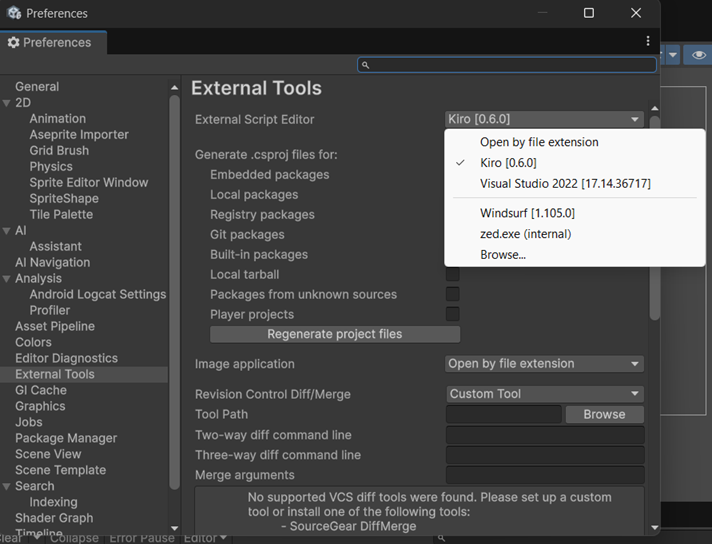
Yêu cầu
- Unity 2019.4 trở lên
- Kiro Editor
Kiểm tra phát hiện Kiro (Windows)
Nếu Unity không tự động phát hiện Kiro, chạy script test:
powershell -ExecutionPolicy Bypass -File test-kiro-detection.ps1
Script sẽ quét tất cả ổ đĩa và hiển thị vị trí Kiro được tìm thấy.
Đóng góp
Contributions are welcome! Please feel free to submit a Pull Request.
License
MIT License - xem LICENSE.md để biết thêm chi tiết.
Versions 0
No versions tracked yet.
Dependencies 0
No dependencies.
Changelog 0 releases
No changelog entries yet. Run the admin Changelog & Version Scanner to pull from the repository's CHANGELOG.md.
README Markdown
Copy this to your project's README.md

## Installation
Add **Kiro Editor** to your Unity project via Package Manager:
1. Open **Window > Package Manager**
2. Click **+** > **Add package from git URL**
3. Enter:
```
https://www.pkglnk.dev/kiro.git
```
[](https://www.pkglnk.dev/pkg/kiro)Embed badge README snippet
[](https://www.pkglnk.dev/pkg/kiro)<a href="https://www.pkglnk.dev/pkg/kiro"><img src="https://www.pkglnk.dev/badge/kiro.svg" alt="pkglnk installs"></a>https://www.pkglnk.dev/badge/kiro.svgComments
No comments yet. Be the first!
Sign in to join the conversation
Sign In