
Install via UPM
Add to Unity Package Manager using this URL
https://www.pkglnk.dev/xirename.git#upm README Markdown
Copy this to your project's README.md

## Installation
Add **XiRename** to your Unity project via Package Manager:
1. Open **Window > Package Manager**
2. Click **+** > **Add package from git URL**
3. Enter:
```
https://www.pkglnk.dev/xirename.git#upm
```
[](https://www.pkglnk.dev/pkg/xirename)README
XiRename The renaming tool for Unity 3D




Simple asstes renaming tool by hww
Introduction
The tool allows you to select and rename a group of files according to a pattern that can consist of: file name, prefix, suffix, and version or variant number.
Allows you to renumber a series of files by sorting the list of names.
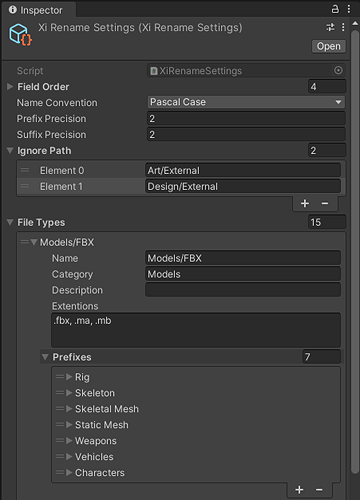
The tool works according to the Studio naming convention, which you can set up through the configuration panel.
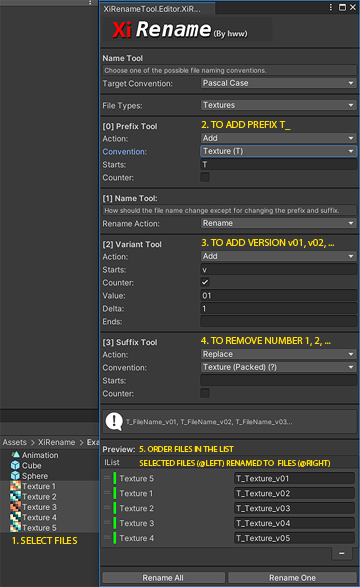
The rules can be configured in the panel (below) or from the C# source code.
Install
The package is available on the openupm registry. You can install it via openupm-cli.
openupm add com.hww.xirename
You can also install via git url by adding this entry in your manifest.json
"com.hww.xirename": "https://github.com/hww/XiRename.git#upm"
TODO
The current state of the project Alpha. The tool has not been tested at the moment and needs to be tested and improved: the API, interface and default NamingConvention settings.
- Basic functionality
- Configurabe and safe (no enum) the objects tagging
- Update documentation
- Per project verification tool
Define the Naming Convention with API
The file name consists of tokens (name, prefix, suffix, version or variant). The order of the tokens must be determined.
fieldOrder.Clear();
fieldOrder.Add(ETokenType.Prefix);
fieldOrder.Add(ETokenType.Name);
fieldOrder.Add(ETokenType.Variant);
fieldOrder.Add(ETokenType.Suffix);
Clear all existing file types.
fileTypes.Clear();
Create a new type Textures2D with category Textures.
kind = Define("Textures2D", "Textures", ".tga, .bmp, .jpg, .png, .gif, .psd");
Let's add some prefixes and suffixes
kind.DefinePreffix("Render Target", "RT");
kind.DefinePreffix("Cube Render Target", "RTC");
kind.DefinePreffix("Texture Light Profile", "TLP");
kind.DefineSuffix("Texture (Diffuse/Albedo/Base Color", "D");
kind.DefineSuffix("Texture (Normal)", "N");
No comments yet. Be the first!